shadcn delete confirmation dialog
shadcn's AlertDialog is free and it's the right delete confirmation for most apps. Here's one dialog for a whole data table, kept open while the delete runs, plus a hold-to-delete with undo for single-item pages and when the dialog fits better.
By buying you agree to the Terms.
- Download right after paying
- Use it in client projects
- Won't run on the listed stack? We fix it or refund you
Ready forCursorv0Lovableshadcn CLI
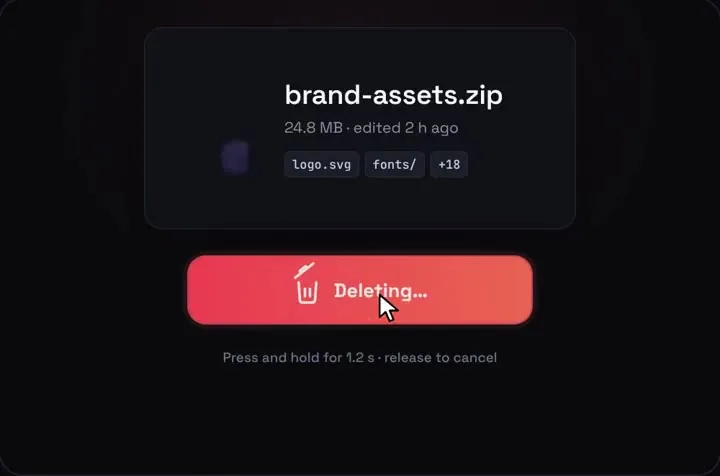
Hold to confirm on a single item's page, with Hold to Delete
"use client";
import { useEffect, useRef, useState } from "react";
import { useRouter } from "next/navigation";
import HoldToDelete from "@/components/HoldToDelete";
import { Button } from "@/components/ui/button";
import { ConfirmDeleteDialog } from "@/components/confirm-delete-dialog";
import { deleteFile } from "../actions";
type FileRow = { id: string; name: string; size: string; type: string };
// Hold to Delete draws on a 1000 x 660 stage; scale it to the panel's width
function useStageScale() {
const ref = useRef<HTMLDivElement>(null);
const [scale, setScale] = useState(0);
useEffect(() => {
const el = ref.current;
if (!el) return;
const ro = new ResizeObserver(([entry]) => setScale(entry.contentRect.width / 1000));
ro.observe(el);
return () => ro.disconnect();
}, []);
return [ref, scale] as const;
}
export function DeleteFilePanel({ file }: { file: FileRow }) {
const router = useRouter();
const [stageRef, scale] = useStageScale();
const [dialogOpen, setDialogOpen] = useState(false);
// after the hold the button is disabled and focus falls to <body>;
// the Undo toast shows 1050 ms in, so keyboard users are moved there
const focusIn = (selector: string, delay = 0) =>
window.setTimeout(() => stageRef.current?.querySelector<HTMLElement>(selector)?.focus(), delay);
const remove = async () => {
await deleteFile(file.id);
router.push("/files");
};
return (
<section className="space-y-3">
{/* sm and up: hold to delete, with 5 s to undo before anything is sent */}
<div ref={stageRef} className="relative hidden aspect-[1000/660] w-full overflow-hidden rounded-xl sm:block">
{scale > 0 && (
<HoldToDelete
fileName={file.name}
fileMeta={file.size}
fileType={file.type}
tags={[]}
restoreLabel={null}
onDelete={() => focusIn(".qhd-toast button", 1100)}
onUndo={() => focusIn(".qhd-hold")}
onCommit={remove}
style={{ position: "absolute", left: 0, top: 0, transform: `scale(${scale})`, transformOrigin: "0 0" }}
/>
)}
</div>
{/* the dialog path: phones, voice control, switch access, anyone who can't hold */}
<Button variant="destructive" className="sm:hidden" onClick={() => setDialogOpen(true)}>
Delete file
</Button>
<Button variant="link" className="hidden px-0 sm:inline-flex" onClick={() => setDialogOpen(true)}>
Can't hold? Delete with a dialog
</Button>
<ConfirmDeleteDialog open={dialogOpen} onOpenChange={setDialogOpen} name={file.name} onConfirm={remove} />
</section>
);
}Good to know
- Free first. shadcn's AlertDialog is the right delete confirmation for most apps, and it's what the table above uses. It traps focus, opens on Cancel, closes on Esc and is announced as an alert dialog. Keep it for bulk deletes, for anything that should make people type a name to confirm, and for any screen that has to work well with voice control or switch access.
- Hold to Delete fits a single thing on its own screen: a file page, a project's settings, a saved report. The piece draws the file card it is about to delete (name, size, type), so it shows what's going, the way an alert dialog's description does. Nothing is sent until the 5 s undo window closes, so Undo never has to restore anything on the server.
- It doesn't fit a table row. The piece is a whole 1000 x 660 scene with its own card, button and toast, not a small inline button. The snippet scales it to the panel's width and hides it below Tailwind's sm breakpoint (640 px), where it would get too small to read. Phones get the AlertDialog instead.
- Holding is the weak spot for accessibility. Space or Enter works: hold the key and the fill runs, let go and it drains back. But a voice control click or a switch press is a short press, and a short press does nothing here. That's why the snippet keeps a dialog path on every screen size ("Can't hold? Delete with a dialog").
- After a completed hold the piece disables its button, and keyboard focus fell to the page body in our tests. The snippet moves focus to the Undo button when the toast shows, and back to the hold button after Undo. The toast itself is role="status", so a screen reader reads out that the file was deleted. Holding gives no spoken progress, though, so a screen reader user only hears the button's label, "Hold to delete" plus the file name.
- If the tab closes during the undo window, onCommit never runs and nothing is deleted. That's the safe way to fail, but say so if it matters to your users.
- What we ran on Oct 25 2026: every file on this page type-checks against next 16.4.3, react 19.3.1, @types/react 19.3.0, radix-ui 1.8.1, framer-motion 14.6.0 and lucide-react 1.61.0, with TypeScript 5.9.3 and 7.0.2, using shadcn's alert-dialog, button, dropdown-menu and table files from its new-york-v4 registry and the shipped HoldToDelete. We built them into a scratch Next.js app with Tailwind 4.3.3 and ran it headless in Chromium, WebKit and Firefox at 1440 and 390 px: keyboard through the menu and the dialog, Esc, a delete, focus after each, the hold by keyboard, Undo, the commit, and the phone fallback. The server action deleted from an in-memory list, not a database. We didn't test a screen reader, voice control, a real phone or a TanStack Table version of the table.
What shadcn's AlertDialog gives you today
- We read ui.shadcn.com on Oct 25 2026. The AlertDialog page describes it as "A modal dialog that interrupts the user with important content and expects a response." You add it with npx shadcn@latest add alert-dialog (the shadcn CLI was at 4.22.1 on npm, published Oct 18 2026, with 8,003,630 downloads in the week of Oct 16 to 22). The docs page now has Radix UI, Base UI and React Aria tabs; the code here uses the Radix one (it imports from radix-ui).
- The current registry file has a size prop on AlertDialogContent ("default" or "sm"), an AlertDialogMedia slot for an icon, and variant and size on AlertDialogAction and AlertDialogCancel, so a red Delete button is variant="destructive" with no extra classes.
- Radix's docs list what the keyboard gets: focus is trapped, Esc closes, and Tab and Shift + Tab move inside the dialog. In Radix's AlertDialog source, focus goes to Cancel when it opens, so a stray Enter cancels instead of deleting. Our test confirmed that.
One AlertDialog for the whole data table
- The common question, asked on Stack Overflow as "Optimal Approach for delete confirmation Dialog in Data Table using Shadcn/UI", is where the dialog goes when every row has a Delete. If the AlertDialog sits inside the row's DropdownMenuContent, it goes away when the menu closes, because Radix unmounts a closed menu's content.
- Render one dialog next to the table instead. The row's menu item only stores which row was picked and opens it. shadcn's data table guide uses a DropdownMenu for row actions, so the snippet does too. In our runs, opening the dialog from the menu item's onSelect left the page clickable afterwards, in all three browsers.
- Two details worth copying. First, AlertDialogAction closes the dialog on click, so the snippet calls e.preventDefault() and closes it itself once the server action returns; Cancel and Esc are blocked while it runs. Second, with no AlertDialogTrigger, Radix has nowhere to return focus. Without onCloseAutoFocus, focus landed on the page body after Esc in our test. The snippet sends it back to that row's menu button, or to the table once the row is gone.
- On TanStack Table, the actions column's cell can call the same two setters. We didn't type-check that version.
"use client";
import { useTransition, type ComponentProps } from "react";
import {
AlertDialog,
AlertDialogAction,
AlertDialogCancel,
AlertDialogContent,
AlertDialogDescription,
AlertDialogFooter,
AlertDialogHeader,
AlertDialogTitle,
} from "@/components/ui/alert-dialog";
type Props = {
open: boolean;
onOpenChange: (open: boolean) => void;
name: string;
onConfirm: () => Promise<void>;
onCloseAutoFocus?: ComponentProps<typeof AlertDialogContent>["onCloseAutoFocus"];
};
export function ConfirmDeleteDialog({ open, onOpenChange, name, onConfirm, onCloseAutoFocus }: Props) {
const [pending, startTransition] = useTransition();
return (
// while the delete runs, Esc and Cancel can't close it
<AlertDialog open={open} onOpenChange={(next) => !pending && onOpenChange(next)}>
<AlertDialogContent onCloseAutoFocus={onCloseAutoFocus}>
<AlertDialogHeader>
<AlertDialogTitle>Delete {name}?</AlertDialogTitle>
<AlertDialogDescription>
It goes for everyone on the project. This can't be undone.
</AlertDialogDescription>
</AlertDialogHeader>
<AlertDialogFooter>
<AlertDialogCancel disabled={pending}>Cancel</AlertDialogCancel>
<AlertDialogAction
variant="destructive"
disabled={pending}
onClick={(e) => {
e.preventDefault(); // Action closes on click; stay open until the server answers
startTransition(async () => {
await onConfirm();
onOpenChange(false);
});
}}
>
{pending ? "Deleting…" : "Delete"}
</AlertDialogAction>
</AlertDialogFooter>
</AlertDialogContent>
</AlertDialog>
);
}"use client";
import { useRef, useState } from "react";
import { MoreHorizontal } from "lucide-react";
import { Button } from "@/components/ui/button";
import {
DropdownMenu,
DropdownMenuContent,
DropdownMenuItem,
DropdownMenuTrigger,
} from "@/components/ui/dropdown-menu";
import { Table, TableBody, TableCell, TableHead, TableHeader, TableRow } from "@/components/ui/table";
import { ConfirmDeleteDialog } from "@/components/confirm-delete-dialog";
import { deleteFile } from "./actions";
type FileRow = { id: string; name: string; size: string };
export function FilesTable({ files }: { files: FileRow[] }) {
// one dialog for the whole table: the row being deleted lives in state
const [target, setTarget] = useState<FileRow | null>(null);
const [open, setOpen] = useState(false);
const wrapRef = useRef<HTMLDivElement>(null);
return (
<div ref={wrapRef} tabIndex={-1} className="outline-none">
<Table>
<TableHeader>
<TableRow>
<TableHead>Name</TableHead>
<TableHead>Size</TableHead>
<TableHead className="w-12"><span className="sr-only">Actions</span></TableHead>
</TableRow>
</TableHeader>
<TableBody>
{files.map((file) => (
<TableRow key={file.id}>
<TableCell className="font-medium">{file.name}</TableCell>
<TableCell>{file.size}</TableCell>
<TableCell>
<DropdownMenu>
<DropdownMenuTrigger asChild>
<Button id={`actions-${file.id}`} variant="ghost" size="icon" aria-label={`Actions for ${file.name}`}>
<MoreHorizontal />
</Button>
</DropdownMenuTrigger>
<DropdownMenuContent align="end">
<DropdownMenuItem
variant="destructive"
onSelect={() => {
setTarget(file);
setOpen(true);
}}
>
Delete…
</DropdownMenuItem>
</DropdownMenuContent>
</DropdownMenu>
</TableCell>
</TableRow>
))}
</TableBody>
</Table>
<ConfirmDeleteDialog
open={open}
onOpenChange={setOpen}
name={target?.name ?? ""}
onConfirm={async () => {
if (target) await deleteFile(target.id);
}}
onCloseAutoFocus={(e) => {
// there's no AlertDialogTrigger, so Radix has nothing to hand focus back to
e.preventDefault();
const back = target && document.getElementById(`actions-${target.id}`);
(back ?? wrapRef.current)?.focus(); // the row is gone after a delete
}}
/>
</div>
);
}"use server";
import { revalidatePath } from "next/cache";
export async function deleteFile(id: string) {
// your real delete: Prisma, Drizzle, Supabase or an API call
await fetch(`${process.env.API_URL}/files/${id}`, { method: "DELETE" });
revalidatePath("/files");
}When the plain AlertDialog fits better
- Most of the time. Use the dialog for deletes people do often (a hold is slower than a click), for bulk deletes, for anything you want typed confirmation on, and for apps where people use voice control, switch access or a screen reader a lot. Its two buttons are plain clicks that every input method can make.
- Use a hold with undo where a stray click is the real risk and a modal feels heavy, on a single item's own page. Keep the dialog beside it as the second path, as the snippet does.
Tailwind v4 and the piece's Tailwind 3.4
- New shadcn projects use Tailwind v4. The Hold to Delete download is a Vite demo set up with Tailwind 3.4 (a tailwind.config.js and @tailwind lines in index.css). The component doesn't rely on that: HoldToDelete.tsx uses no Tailwind classes, and all of its styles live in hold-to-delete.css under qhd- class names.
- So you copy the two component files and leave tailwind.config.js behind. We compiled the snippet with Tailwind 4.3.3 beside shadcn's v4 class names and the card, hold button and toast rendered as in the demo in all three browsers we ran.
- The demo's App.tsx positions the piece with Tailwind's !absolute class. The snippet uses an inline style for that instead, so it doesn't depend on any Tailwind version. Load the two fonts the README lists, Space Grotesk and JetBrains Mono, or the card falls back to system fonts.
Install
- Copy from the zipPut
react/src/componentsintosrc/, thennpm i framer-motion. - Or ask your AIPaste PROMPT.md into Cursor, Lovable or v0.
Props
- onCommit
- the undo window ran out: delete for real here
- onDelete / onUndo
- the hold completed / Undo was pressed
- holdMs / undoMs
- 1200 ms hold, 5000 ms undo by default
- fileName / fileMeta / fileType
- what the card shows
- restoreLabel
- null hides the demo's restore button
- hint
- the line under the button
How qodesign compares
- qodesign vs UiverseUiverse is best for: single small elements: buttons, loaders, toggles, checkboxes, inputs.
- qodesign vs AnimataAnimata is best for: free animated building blocks you copy and adapt.
- qodesign vs Motion PrimitivesMotion Primitives is best for: small motion building blocks you compose yourself: text effects, number tickers, dialogs, toolbars.
All comparisons, with prices read on each library's own site.
From the blog: Hold to Delete Button in React and Tailwind CSS
From the blog: Make shadcn/ui Look Less Generic: 7 Small Tweaks
Questions
How do I add a delete confirmation dialog to a shadcn data table?
Render one AlertDialog next to the table, keep the row to delete in state, and have each row's Delete menu item set that row and open the dialog. The code is in the One AlertDialog for the whole data table section above.
How do I keep a shadcn AlertDialog open while the delete runs?
Call e.preventDefault() in AlertDialogAction's onClick, run the delete in a transition, and close the dialog yourself when it returns. Ignore onOpenChange while it's pending so Esc and Cancel can't close it halfway.
Why does focus jump to the top of the page after the dialog closes?
A controlled AlertDialog with no AlertDialogTrigger has nothing to return focus to. Pass onCloseAutoFocus, call e.preventDefault() and focus the button that opened it yourself.
Is a hold-to-delete button accessible?
Partly. Holding Space or Enter works with a keyboard, but voice control and switch users make short presses, which don't trigger a hold. Keep a dialog path next to it, as the snippet does.
Does Hold to Delete work with Tailwind v4?
Yes. The component's styles are in its own CSS file and it uses no Tailwind classes. The download's demo project is set up with Tailwind 3.4, but you only copy the component files.
Can Cursor or v0 add it for me?
Yes. Each download has a PROMPT.md. Paste it into Cursor, Lovable, v0 or Claude Code and it fits the piece into your app.
Can I use it in client work?
Yes, in personal and client projects. You can't resell the code itself as a kit.