Press and hold button in Framer Motion
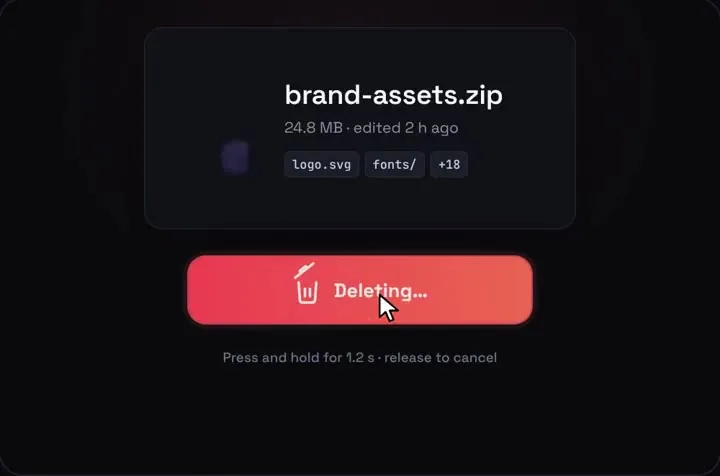
Hold the button and a fill bar runs while the bin lid lifts. At 100% the file crumples into the bin, and if you let go early it drains back. React, Tailwind, Framer Motion.
By buying you agree to the Terms and ask for instant access, so you lose the 14-day withdrawal right. When we still refundWe'll also email you when a new piece lands (about once a week). Unsubscribe in one click, anytime.
Use it in Next.js
"use client";
import HoldToDelete from "@/components/HoldToDelete";

export default function DeleteReport() {
  return (
    <HoldToDelete
      fileName="Q3 report.pdf"
      holdMs={1500}
      onCommit={() => deleteReport()} // the undo window closed
      onUndo={() => console.log("kept")}
    />
  );
}
Good to know
- The hold to delete page below has the rest of the props, and the delete with undo recipe wires onCommit to a server action.
- The hold runs in Framer Motion's useAnimationFrame. Progress lives in a ref, not in React state. It fills over holdMs while you hold and drains back in 0.4 s when you let go, and each frame sets the fill bar's scaleX and the lid's angle directly.
- Past 60% the lid starts to rattle, only while you're still holding.
- The crumple into the bin is a CSS keyframe. Then Framer Motion's useAnimate fades the file card out, and Undo pops it back with a small overshoot over 0.55 s.
- The Undo toast is a motion.div that slides up from below.
- It works with a mouse, touch and the keyboard (hold Space or Enter). Letting go early or sliding off the button cancels.
- With Reduce Motion on, the Framer Motion fades jump to their end and the CSS crumple is cut to almost nothing. The fill bar and lid still follow your hold.
Install
- Copy from the zipPut
react/src/componentsintosrc/, thennpm i framer-motion. - Or ask your AIPaste PROMPT.md into Cursor, Lovable or v0.
Props
- holdMs
- how long to hold, 1200 by default
- onCommit
- undo window ran out, delete for real
- onUndo
- undo pressed
- undoMs
- how long Undo stays, 5000 by default
How qodesign compares
- qodesign vs UiverseUiverse is best for: single small elements: buttons, loaders, toggles, checkboxes, inputs.
- qodesign vs AnimataAnimata is best for: free animated building blocks you copy and adapt.
- qodesign vs Motion PrimitivesMotion Primitives is best for: small motion building blocks you compose yourself: text effects, number tickers, dialogs, toolbars.
All comparisons, with prices read on each library's own site.
From the blog: Hold to Delete Button in React and Tailwind CSS
From the blog: Framer Motion vs CSS Animation for Micro-Interactions
Questions
Which framer-motion version does it need?
The package.json asks for framer-motion ^11.11.0. We haven't tested it with the motion package's motion/react import yet.
Can I change how long the hold takes?
Yes, with holdMs. The hint under the button picks up the new time.
Can I use the hold for something other than delete?
The labels are props (holdLabel, holdingLabel, deletingLabel), but the piece is drawn as a file and a bin, so it reads as delete. For another action you'd lift the useAnimationFrame loop out of HoldToDelete.tsx.
Can Cursor or v0 add it for me?
Yes. Each download has a PROMPT.md. Paste it into Cursor, Lovable, v0 or Claude Code and it fits the piece into your app.
Can I use it in client work?
Yes, in personal and client projects. You can't resell the code itself as a kit.