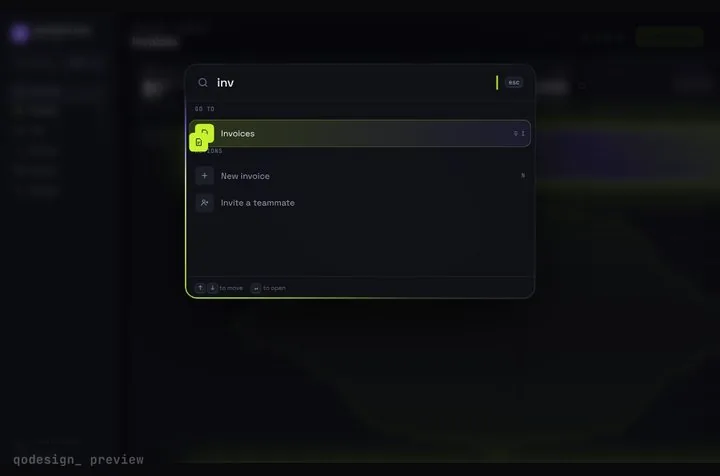
The ⌘K jump around your table, with Command-K Dashboard
app/dashboard/dashboard.tsx
"use client";
import { useRouter } from "next/navigation";
import { CommandDashboard } from "@/components/CommandDashboard";
import type { Command } from "@/components/engine";

// The dashboard's own four pages, plus one command that leaves it for your TanStack table.
const commands: Command[] = [
  { id: "overview", label: "Overview", group: "Go to", page: "overview", hint: "G O" },
  { id: "invoices", label: "Invoices", group: "Go to", page: "invoices", hint: "G I" },
  { id: "team", label: "Team", group: "Go to", page: "team", hint: "G T" },
  { id: "revenue", label: "Revenue", group: "Go to", page: "revenue", spark: true },
  { id: "invoice-table", label: "All invoices (sort, filter, select)", group: "Actions", hint: "T" },
  { id: "invoice-pages", label: "All invoices, paged on the server", group: "Actions" },
];

export default function Dashboard() {
  const router = useRouter();
  return (
    <CommandDashboard
      commands={commands}
      hotkey="mod+k"
      onCommand={(id) => {
        // Commands without a page land here. Send them to the real table.
        if (id === "invoice-table") router.push("/invoices");
        if (id === "invoice-pages") router.push("/invoices/server?page=1");
      }}
    />
  );
}
components/data-table/features.ts
import {
  columnFilteringFeature,
  columnVisibilityFeature,
  createFilteredRowModel,
  createPaginatedRowModel,
  createSortedRowModel,
  filterFn_includesString,
  rowPaginationFeature,
  rowSelectionFeature,
  rowSortingFeature,
  sortFn_alphanumeric,
  sortFn_basic,
  tableFeatures,
} from "@tanstack/react-table";

// TanStack Table v9: list what this table can do. Anything not listed stays out of the bundle,
// and the core row model is always on, so there is no getCoreRowModel any more.
export const features = tableFeatures({
  columnFilteringFeature,
  columnVisibilityFeature,
  rowPaginationFeature,
  rowSelectionFeature,
  rowSortingFeature,
  filteredRowModel: createFilteredRowModel(),
  sortedRowModel: createSortedRowModel(),
  paginatedRowModel: createPaginatedRowModel(),
  filterFns: { includesString: filterFn_includesString },
  sortFns: { alphanumeric: sortFn_alphanumeric, basic: sortFn_basic },
});

// Pass this as the first type argument to ColumnDef, Row, Table and createColumnHelper.
export type DataTableFeatures = typeof features;
app/invoices/columns.tsx
"use client";
import { createColumnHelper } from "@tanstack/react-table";
import { Button } from "@/components/ui/button";
import { Checkbox } from "@/components/ui/checkbox";
import {
  DropdownMenu,
  DropdownMenuContent,
  DropdownMenuItem,
  DropdownMenuLabel,
  DropdownMenuSeparator,
  DropdownMenuTrigger,
} from "@/components/ui/dropdown-menu";
import type { DataTableFeatures } from "@/components/data-table/features";
import type { Invoice } from "@/lib/invoices";

const col = createColumnHelper<DataTableFeatures, Invoice>();
const money = new Intl.NumberFormat("en-US", { style: "currency", currency: "USD" });

export const columns = col.columns([
  col.display({
    id: "select",
    header: ({ table }) => (
      <Checkbox
        checked={table.getIsAllPageRowsSelected() || (table.getIsSomePageRowsSelected() && "indeterminate")}
        onCheckedChange={(value) => table.toggleAllPageRowsSelected(!!value)}
        aria-label="Select all rows on this page"
      />
    ),
    cell: ({ row }) => (
      <Checkbox
        checked={row.getIsSelected()}
        onCheckedChange={(value) => row.toggleSelected(!!value)}
        aria-label={`Select ${row.original.id}`}
      />
    ),
    enableSorting: false,
    enableHiding: false,
  }),
  col.accessor("id", { header: "Invoice" }),
  col.accessor("customer", {
    header: ({ column }) => (
      <Button variant="ghost" onClick={() => column.toggleSorting(column.getIsSorted() === "asc")}>
        Customer {column.getIsSorted() === "asc" ? "↑" : column.getIsSorted() === "desc" ? "↓" : ""}
      </Button>
    ),
    sortFn: "alphanumeric",
    filterFn: "includesString",
  }),
  col.accessor("status", {
    header: "Status",
    cell: ({ row }) => <span className="capitalize">{row.original.status}</span>,
  }),
  col.accessor("amount", {
    header: ({ column }) => (
      <Button variant="ghost" className="ml-auto" onClick={() => column.toggleSorting(column.getIsSorted() === "asc")}>
        Amount
      </Button>
    ),
    cell: ({ row }) => <div className="text-right tabular-nums">{money.format(row.original.amount / 100)}</div>,
    sortFn: "basic",
  }),
  col.display({
    id: "actions",
    enableHiding: false,
    cell: ({ row }) => (
      <DropdownMenu>
        <DropdownMenuTrigger asChild>
          <Button variant="ghost" size="icon" aria-label={`Actions for ${row.original.id}`}>
            ...
          </Button>
        </DropdownMenuTrigger>
        <DropdownMenuContent align="end">
          <DropdownMenuLabel>Actions</DropdownMenuLabel>
          <DropdownMenuItem onSelect={() => navigator.clipboard.writeText(row.original.id)}>Copy invoice ID</DropdownMenuItem>
          <DropdownMenuSeparator />
          <DropdownMenuItem asChild>
            <a href={`/invoices/${row.original.id}`}>Open invoice</a>
          </DropdownMenuItem>
        </DropdownMenuContent>
      </DropdownMenu>
    ),
  }),
]);
components/data-table/data-table.tsx
"use client";
import * as React from "react";
import {
  useTable,
  type ColumnDef,
  type ColumnFiltersState,
  type ColumnVisibilityState,
  type RowData,
  type RowSelectionState,
  type SortingState,
} from "@tanstack/react-table";
import { Button } from "@/components/ui/button";
import { Input } from "@/components/ui/input";
import {
  DropdownMenu,
  DropdownMenuCheckboxItem,
  DropdownMenuContent,
  DropdownMenuTrigger,
} from "@/components/ui/dropdown-menu";
import { Table, TableBody, TableCell, TableHead, TableHeader, TableRow } from "@/components/ui/table";
import { features, type DataTableFeatures } from "./features";

// Rows need a string id: selection is keyed by it, so it stays on the right rows after sorting and paging.
// (A getRowId function can't be a prop here: a Server Component can't pass functions to a Client Component.)
type Props<TData extends RowData & { id: string }> = {
  columns: ColumnDef<DataTableFeatures, TData>[];
  data: TData[];
  filterColumn: string; // the column the search box filters
};

export function DataTable<TData extends RowData & { id: string }>({ columns, data, filterColumn }: Props<TData>) {
  const [sorting, setSorting] = React.useState<SortingState>([]);
  const [columnFilters, setColumnFilters] = React.useState<ColumnFiltersState>([]);
  const [columnVisibility, setColumnVisibility] = React.useState<ColumnVisibilityState>({});
  const [rowSelection, setRowSelection] = React.useState<RowSelectionState>({});

  const table = useTable({
    features,
    data,
    columns,
    getRowId: (row) => row.id,
    onSortingChange: setSorting,
    onColumnFiltersChange: setColumnFilters,
    onColumnVisibilityChange: setColumnVisibility,
    onRowSelectionChange: setRowSelection,
    state: { sorting, columnFilters, columnVisibility, rowSelection },
    initialState: { pagination: { pageIndex: 0, pageSize: 10 } },
  });

  const filter = table.getColumn(filterColumn);

  return (
    <div className="w-full">
      <div className="flex items-center gap-2 py-4">
        <Input
          placeholder="Filter..."
          aria-label="Filter rows"
          value={(filter?.getFilterValue() as string) ?? ""}
          onChange={(e) => filter?.setFilterValue(e.target.value)}
          className="max-w-sm"
        />
        <DropdownMenu>
          <DropdownMenuTrigger asChild>
            <Button variant="outline" className="ml-auto">Columns</Button>
          </DropdownMenuTrigger>
          <DropdownMenuContent align="end">
            {table
              .getAllColumns()
              .filter((column) => column.getCanHide())
              .map((column) => (
                <DropdownMenuCheckboxItem
                  key={column.id}
                  className="capitalize"
                  checked={column.getIsVisible()}
                  onCheckedChange={(value) => column.toggleVisibility(!!value)}
                >
                  {column.id}
                </DropdownMenuCheckboxItem>
              ))}
          </DropdownMenuContent>
        </DropdownMenu>
      </div>
      <div className="overflow-hidden rounded-md border border-white/10">
        <Table>
          <TableHeader>
            {table.getHeaderGroups().map((headerGroup) => (
              <TableRow key={headerGroup.id}>
                {headerGroup.headers.map((header) => (
                  <TableHead key={header.id}>{header.isPlaceholder ? null : <table.FlexRender header={header} />}</TableHead>
                ))}
              </TableRow>
            ))}
          </TableHeader>
          <TableBody>
            {table.getRowModel().rows.length ? (
              table.getRowModel().rows.map((row) => (
                <TableRow key={row.id} data-state={row.getIsSelected() ? "selected" : undefined}>
                  {row.getVisibleCells().map((cell) => (
                    <TableCell key={cell.id}>
                      <table.FlexRender cell={cell} />
                    </TableCell>
                  ))}
                </TableRow>
              ))
            ) : (
              <TableRow>
                <TableCell colSpan={table.getVisibleLeafColumns().length} className="h-24 text-center">
                  No results.
                </TableCell>
              </TableRow>
            )}
          </TableBody>
        </Table>
      </div>
      <div className="flex items-center gap-2 py-4">
        <p className="flex-1 text-sm opacity-70">
          {table.getFilteredSelectedRowModel().rows.length} of {table.getFilteredRowModel().rows.length} row(s) selected.
        </p>
        <Button variant="outline" size="sm" onClick={() => table.previousPage()} disabled={!table.getCanPreviousPage()}>
          Previous
        </Button>
        <Button variant="outline" size="sm" onClick={() => table.nextPage()} disabled={!table.getCanNextPage()}>
          Next
        </Button>
      </div>
    </div>
  );
}
app/invoices/page.tsx
import { DataTable } from "@/components/data-table/data-table";
import { getAllInvoices } from "@/lib/invoices";
import { columns } from "./columns";

// A Server Component: it fetches, the client table sorts, filters, selects and pages in the browser.
export default async function InvoicesPage() {
  const invoices = await getAllInvoices();
  return (
    <main className="mx-auto max-w-5xl p-6">
      <h1 className="text-xl font-semibold">Invoices</h1>
      <DataTable columns={columns} data={invoices} filterColumn="customer" />
    </main>
  );
}
lib/invoices.ts
export type Invoice = {
  id: string;
  customer: string;
  email: string;
  amount: number; // cents
  status: "pending" | "paid" | "overdue";
  due: string; // YYYY-MM-DD
};

const customers = ["Halcyon Health", "Brightline", "Orbital Foods", "Kestrel Labs", "Northbeam", "Pinecrest"];
const statuses: Invoice["status"][] = ["pending", "paid", "paid", "overdue"];

// Stand-in for your database: 57 rows, so the pager has something to do.
const ALL: Invoice[] = Array.from({ length: 57 }, (_, i) => {
  const customer = customers[i % customers.length];
  return {
    id: `INV-${2041 + i}`,
    customer,
    email: `billing@${customer.toLowerCase().replace(/\s+/g, "")}.example`,
    amount: 50_000 + ((i * 7919) % 900_000),
    status: statuses[i % statuses.length],
    due: `2026-${String((i % 12) + 1).padStart(2, "0")}-${String((i % 27) + 1).padStart(2, "0")}`,
  };
});

export async function getAllInvoices(): Promise<Invoice[]> {
  return ALL;
}

// One page from the "database". In a real app this is LIMIT/OFFSET (or a cursor) plus a COUNT.
export async function getInvoicePage(opts: { page: number; pageSize: number; q?: string }) {
  const q = opts.q?.toLowerCase() ?? "";
  const matching = q ? ALL.filter((r) => r.customer.toLowerCase().includes(q) || r.id.toLowerCase().includes(q)) : ALL;
  const start = opts.page * opts.pageSize;
  return { rows: matching.slice(start, start + opts.pageSize), rowCount: matching.length };
}
app/invoices/server/page.tsx (server-side pagination)
import { getInvoicePage } from "@/lib/invoices";
import { ServerTable } from "./server-table";

const PAGE_SIZE = 20;

// Next.js 15 and 16: searchParams is a Promise in a page.
export default async function ServerInvoicesPage({
  searchParams,
}: {
  searchParams: Promise<{ page?: string; q?: string }>;
}) {
  const { page = "1", q = "" } = await searchParams;
  const pageIndex = Math.max(0, (Number.parseInt(page, 10) || 1) - 1);
  const { rows, rowCount } = await getInvoicePage({ page: pageIndex, pageSize: PAGE_SIZE, q });

  return (
    <main className="mx-auto max-w-5xl p-6">
      <h1 className="text-xl font-semibold">Invoices</h1>
      <ServerTable data={rows} rowCount={rowCount} pageIndex={pageIndex} pageSize={PAGE_SIZE} />
    </main>
  );
}
app/invoices/server/server-table.tsx
"use client";
import { usePathname, useRouter, useSearchParams } from "next/navigation";
import { createColumnHelper, rowPaginationFeature, tableFeatures, useTable, type PaginationState, type Updater } from "@tanstack/react-table";
import { Button } from "@/components/ui/button";
import { Table, TableBody, TableCell, TableHead, TableHeader, TableRow } from "@/components/ui/table";
import type { Invoice } from "@/lib/invoices";

// Only pagination here, and no paginated row model: the server already sent just this page.
// No columnVisibilityFeature either, so rows have getAllCells() but not getVisibleCells().
const features = tableFeatures({ rowPaginationFeature });
const col = createColumnHelper<typeof features, Invoice>();
const columns = col.columns([
  col.accessor("id", { header: "Invoice" }),
  col.accessor("customer", { header: "Customer" }),
  col.accessor("status", { header: "Status" }),
]);

type Props = { data: Invoice[]; rowCount: number; pageIndex: number; pageSize: number };

export function ServerTable({ data, rowCount, pageIndex, pageSize }: Props) {
  const router = useRouter();
  const pathname = usePathname();
  const searchParams = useSearchParams();
  const pagination: PaginationState = { pageIndex, pageSize };

  // The URL is the state: a page change becomes ?page=N and the Server Component fetches that page.
  const onPaginationChange = (updater: Updater<PaginationState>) => {
    const next = typeof updater === "function" ? updater(pagination) : updater;
    const params = new URLSearchParams(searchParams.toString());
    params.set("page", String(next.pageIndex + 1));
    router.push(`${pathname}?${params.toString()}`);
  };

  const table = useTable({
    features,
    data,
    columns,
    getRowId: (row) => row.id,
    manualPagination: true,
    rowCount,
    state: { pagination },
    onPaginationChange,
  });

  return (
    <div>
      <div className="overflow-hidden rounded-md border border-white/10">
        <Table>
          <TableHeader>
            {table.getHeaderGroups().map((hg) => (
              <TableRow key={hg.id}>
                {hg.headers.map((h) => (
                  <TableHead key={h.id}>
                    <table.FlexRender header={h} />
                  </TableHead>
                ))}
              </TableRow>
            ))}
          </TableHeader>
          <TableBody>
            {table.getRowModel().rows.map((row) => (
              <TableRow key={row.id}>
                {row.getAllCells().map((cell) => (
                  <TableCell key={cell.id}>
                    <table.FlexRender cell={cell} />
                  </TableCell>
                ))}
              </TableRow>
            ))}
          </TableBody>
        </Table>
      </div>
      <div className="flex items-center gap-2 py-4">
        <p className="flex-1 text-sm opacity-70">
          Page {pageIndex + 1} of {Math.max(1, table.getPageCount())}
        </p>
        <Button variant="outline" size="sm" onClick={() => table.previousPage()} disabled={!table.getCanPreviousPage()}>
          Previous
        </Button>
        <Button variant="outline" size="sm" onClick={() => table.nextPage()} disabled={!table.getCanNextPage()}>
          Next
        </Button>
      </div>
    </div>
  );
}
app/dashboard/page.tsx
import Dashboard from "./dashboard";

export default function DashboardPage() {
  return <Dashboard />;
}