A Next.js login modal with intercepting routes
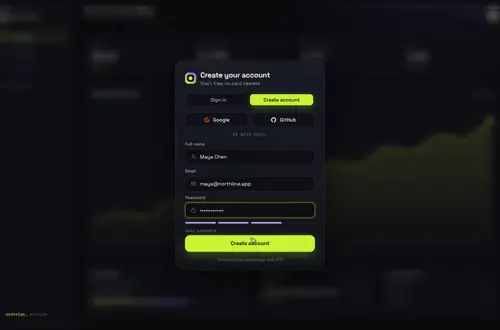
Click Sign in and the login opens over the page you're on, with /login in the address bar. Refresh or share that URL and the same form loads as a full page. This guide wires it with @modal and (.)login, closes it with router.back(), and uses Gateway Dive as the sign-in card.
By buying you agree to the Terms.
- Download right after paying
- Use it in client projects
- Won't run on the listed stack? We fix it or refund you
Ready forCursorv0Lovableshadcn CLI
Use it in Next.js
import Link from "next/link";

export default function RootLayout({
  children,
  modal,
}: {
  children: React.ReactNode;
  modal: React.ReactNode;
}) {
  return (
    <html lang="en">
      <body>
        <header>
          <Link href="/login">Sign in</Link>
        </header>
        {children}
        {modal}
      </body>
    </html>
  );
}export default function Default() {
return null;
}import { LoginCard } from "@/components/login-card";
import { LoginModal } from "@/components/login-modal";
export default function InterceptedLogin() {
return (
<LoginModal>
<LoginCard />
</LoginModal>
);
}"use client";
import { useEffect, useRef } from "react";
import { useRouter } from "next/navigation";
export function LoginModal({ children }: { children: React.ReactNode }) {
const router = useRouter();
const ref = useRef<HTMLDialogElement>(null);
useEffect(() => {
const dialog = ref.current;
if (dialog && !dialog.open) dialog.showModal();
const root = document.documentElement;
const before = root.style.overflow;
root.style.overflow = "hidden"; // the page underneath stays where it was
return () => {
root.style.overflow = before;
};
}, []);
return (
<dialog
ref={ref}
aria-label="Sign in"
onClose={() => router.back()} // Esc and the close button both land here
style={{
width: "100vw", height: "100dvh", maxWidth: "none", maxHeight: "none",
margin: 0, padding: 0, border: 0, background: "transparent",
}}
>
{children}
<button
type="button"
aria-label="Close"
onClick={() => ref.current?.close()}
style={{ position: "absolute", top: 16, right: 16, zIndex: 10 }}
>
Close
</button>
</dialog>
);
}"use client";
import { useRouter } from "next/navigation";
import GatewayDive from "@/components/gateway-dive/GatewayDive";
export function LoginCard() {
const router = useRouter();
return (
<GatewayDive
autoplayDemo={false}
brand="Acme"
style={{ height: "100%" }}
providers={[
{ id: "google", label: "Google" },
{ id: "github", label: "GitHub" },
]}
// OAuth leaves the page; it comes back to your callback route, not to the modal
onProvider={(id) => window.location.assign(`/auth/${id}`)}
onSubmit={async ({ mode, name, email, password }) => {
// your auth call: Supabase, Clerk, Auth.js or your own route
const res = await fetch(`/api/auth/${mode}`, {
method: "POST",
headers: { "Content-Type": "application/json" },
body: JSON.stringify({ name, email, password }),
});
if (res.ok) return { ok: true };
const { error } = (await res.json().catch(() => ({}))) as { error?: string };
return { ok: false, error: error ?? "That didn't work. Try again." };
}}
// the dive takes about 1.4 s; replace, so Back doesn't reopen the form
onSuccess={() => setTimeout(() => router.replace("/dashboard"), 1400)}
/>
);
}import type { Metadata } from "next";
import { LoginCard } from "@/components/login-card";
export const metadata: Metadata = { title: "Sign in" };
export default function LoginPage() {
return (
<main style={{ height: "100dvh" }}>
<LoginCard />
</main>
);
}export default function CatchAll() {
return null;
}Good to know
- The Next.js docs name this exact case on the Intercepting Routes page: "Other examples could include opening a login modal in a top navbar while also having a dedicated /login page". The Parallel Routes page builds it step by step with a slot called @auth. The slot name is yours; this guide uses @modal, like the official nextgram example.
- Soft navigation is a click on a Link or a router.push. Next.js then renders app/@modal/(.)login/page.tsx in the slot and keeps the page underneath mounted. Hard navigation is a refresh, a pasted URL or a new tab. The docs: "After a full-page load (browser refresh), Next.js cannot determine the active state for the slots that don't match the current URL. Instead, it will render a default.js file for the unmatched slots". Interception doesn't run, so app/login/page.tsx renders as a normal full page.
- On Next.js 16 you need app/@modal/default.tsx. The version 16 upgrade guide says: "All parallel route slots now require explicit default.js files. Builds will fail without them."
- Closing: the docs say "You can close the modal by calling router.back() or by using the Link component." The snippet uses a native dialog with showModal(), like nextgram. Esc and the Close button both fire the dialog's close event, which calls router.back(). The browser Back button closes it too, and Forward opens it again.
- After a successful sign-in the card calls router.replace("/dashboard"). The catch-all app/@modal/[...catchAll]/page.tsx returns null, so the slot empties and the modal goes away. Without it the modal stays on screen; the docs explain why: "client-side navigations to a route that no longer match the slot will remain visible". If you send people to "/" instead, add app/@modal/page.tsx returning null as well, as the docs show.
- Gateway Dive covers the whole screen. It draws its own app screen behind the card (the bundled dashboard, or whatever you pass as backdrop), so the page you came from stays mounted and keeps its scroll position, but you don't see it through the card. Want the real page dimmed behind a small card? A plain dialog fits better (see below).
- Google and GitHub buttons leave the page for the provider and come back to your callback route, so the modal is gone after an OAuth sign-in. That's expected.
- We built this on Next.js 16.4.3 with React 19.3.1, and on Next.js 15.5.28 with React 19.1.1, with TypeScript 5.9.3 and the shipped component source. On the production build we clicked through it in Chromium: a Link click opened the modal at /login with the old page still in the DOM, Esc, Close and Back closed it, Forward reopened it, a refresh on /login gave the full page, and a sign-in landed on /dashboard with no modal left.
When a plain dialog or the official example is enough
- If all you need is a sign-in form over the page, you don't need a paid piece. The Modal component from the Next.js docs, the nextgram example (github.com/nextjs/nextgram) or a shadcn/ui Dialog inside app/@modal/(.)login/page.tsx all work with the same routing, and they keep the page you came from visible behind a dimmed backdrop. That is the right call for most apps.
- Gateway Dive is for when the sign-in screen is a moment you want to design: sign in and create account on one card, a shake on a wrong password, and a dive into the app when it works. The routing on this page is the same either way. Swap LoginCard for your own form and every file still applies.
The files, and what each one does
- app/layout.tsx takes the modal slot as a prop and renders it next to children.
- app/@modal/default.tsx returns null, so the slot is empty after a full page load of any URL other than /login.
- app/@modal/(.)login/page.tsx is the intercepted route. (.) matches a segment on the same level, and the docs point out the convention "does not consider @slot folders", so @modal/(.)login at the app root catches /login.
- components/login-modal.tsx opens a native dialog and turns closing into router.back(). It locks page scroll while it's open.
- components/login-card.tsx is the sign-in card, shared by the modal and the full page.
- app/login/page.tsx is the full page that a refresh, a shared link or a new tab gets.
- app/@modal/[...catchAll]/page.tsx returns null, so the modal closes when the app navigates somewhere else.
Soft and hard navigation, step by step
- Click a Link to /login: the URL becomes /login, the modal opens, and the page underneath stays as it was.
- Press Esc, the Close button or the browser Back button: the URL goes back and the modal closes.
- Press Forward: the modal opens again.
- Refresh on /login, or open the link in a new tab: the full /login page renders, with no modal.
- Sign in from the modal: the card dives, router.replace goes to /dashboard, and the catch-all clears the slot. Back then goes to the page before, not to the form.
Install
- Copy from the zipPut
react/src/componentsintosrc/, thennone (no animation library). - Or ask your AIPaste PROMPT.md into Cursor, Lovable or v0.
Props
- providers
- { id, label }[]; google and github draw logos
- onProvider
- (id) → your OAuth redirect
- onSubmit
- mode, name, email, password; returns { ok, error? }
- onSuccess
- runs when the check appears; route here
- backdrop
- your own screen behind the card
- autoplayDemo
- false in a real app
How qodesign compares
- qodesign vs Magic UIMagic UI is best for: landing pages built with shadcn/ui.
- qodesign vs Aceternity UIAceternity UI is best for: teams building many marketing pages who want one big library.
All comparisons, with prices read on each library's own site.
Questions
Why does /login open as a full page when I refresh?
That's how intercepting routes work. A refresh is a hard navigation, so Next.js can't recover the slot's state and renders default.tsx for the slot and app/login/page.tsx for the URL. Only a client-side navigation shows the modal.
How do I close an intercepting routes modal?
Call router.back(), as the Next.js docs do. If you close it with a Link or a router.push instead, give the slot a route that returns null for the destination, like the catch-all in this guide, or the modal stays on screen.
Do I need default.tsx in the @modal slot?
Yes. Next.js 16 fails the build without it. On older versions a full page load renders a 404 for an unmatched slot that has no default.js.
Can I use a shadcn Dialog instead?
Yes, and it's free. The routing files are the same; put the Dialog in app/@modal/(.)login/page.tsx. Gateway Dive is only worth it if you want the designed sign-in card and the dive animation.
Does it work with Supabase, Clerk or Auth.js?
Yes. The card never calls an auth service itself. Put signInWithPassword, signIn("credentials") or your own route inside onSubmit and return { ok: true } or { ok: false, error }.
What happens to the page underneath while the modal is open?
It stays mounted with its state and scroll position. The modal locks page scroll while it's open and puts it back when it closes, and Esc, Close or Back return you to the same spot.
Can Cursor or v0 add it for me?
Yes. Each download has a PROMPT.md. Paste it into Cursor, Lovable, v0 or Claude Code and it fits the piece into your app.
Can I use it in client work?
Yes, in personal and client projects. You can't resell the code itself as a kit.