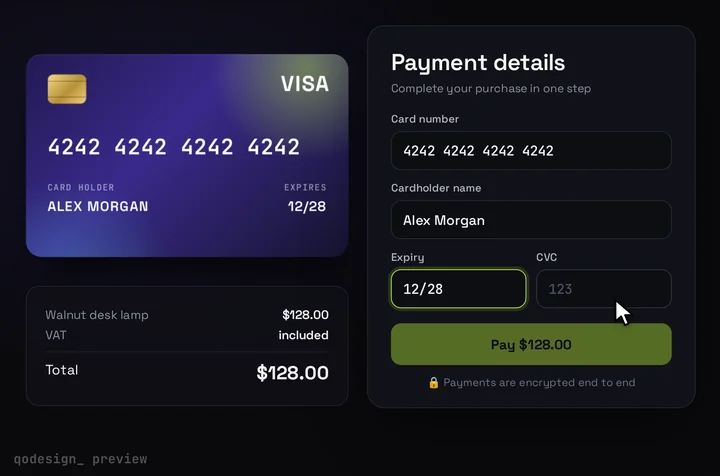
Google Pay above the 3D card form, in the App Router
app/checkout/checkout.tsx
"use client";
import { useState } from "react";
import CardCheckout, { type CardCheckoutProps } from "@/components/CardCheckout";
import GooglePayRow from "./google-pay";
import { PLAN } from "@/lib/plan";

// Pass renderCardFields + onConfirm from your gateway's card fields (Adyen, Square, Braintree...).
// Without them the card shows its built-in inputs, which are for demos only.
type CardProps = Pick<CardCheckoutProps, "renderCardFields" | "onConfirm">;

export default function Checkout(card: CardProps) {
  const [walletShown, setWalletShown] = useState(false);

  return (
    <div className="mx-auto w-full max-w-[440px]">
      <GooglePayRow onShownChange={setWalletShown} />
      {walletShown && (
        <div className="my-4 flex items-center gap-3 text-xs uppercase tracking-wide text-white/50">
          <span className="h-px flex-1 bg-white/15" />
          or pay with card
          <span className="h-px flex-1 bg-white/15" />
        </div>
      )}
      <CardCheckout
        amount={PLAN.amount / 100}
        currency={PLAN.currency}
        productName={PLAN.name}
        resetAfter={null}
        {...card}
      />
    </div>
  );
}
app/checkout/google-pay.tsx
"use client";
import { useState, useTransition } from "react";
import GooglePayButton from "@google-pay/button-react";
import { googlePayEnv, paymentRequest } from "@/lib/google-pay";
import { payWithGooglePay } from "./actions";

type Props = { onShownChange?: (shown: boolean) => void };

export default function GooglePayRow({ onShownChange }: Props) {
  const [message, setMessage] = useState("");
  const [pending, startTransition] = useTransition();

  return (
    <div aria-busy={pending}>
      <GooglePayButton
        environment={googlePayEnv}
        paymentRequest={paymentRequest}
        buttonType="buy"
        buttonColor="white" // white is for dark backgrounds, black or default for light ones
        buttonSizeMode="fill" // fill takes the size you give it below
        style={{ width: "100%", height: 48 }}
        onReadyToPayChange={({ isButtonVisible }) => onShownChange?.(isButtonVisible)}
        onLoadPaymentData={(paymentData) => {
          // Pass the token on as is. Your server hands it to the gateway.
          const token = paymentData.paymentMethodData.tokenizationData.token;
          startTransition(async () => {
            setMessage("Paying...");
            const result = await payWithGooglePay(token);
            setMessage(result.ok ? "Paid. Thank you!" : result.error);
          });
        }}
        onCancel={() => setMessage("")} // the buyer closed the sheet
        onError={(error) => {
          console.error(error);
          setMessage("Google Pay didn't open. Try the card form below.");
        }}
      />
      <p role="status" className="mt-2 min-h-5 text-center text-sm text-white/70">
        {message}
      </p>
    </div>
  );
}
app/checkout/actions.ts
"use server";
import { randomUUID } from "node:crypto";
import { PLAN } from "@/lib/plan";
import { chargeGooglePay } from "@/lib/gateway";

export type PayResult = { ok: true; reference: string } | { ok: false; error: string };

export async function payWithGooglePay(token: string): Promise<PayResult> {
  if (typeof token !== "string" || token.length === 0 || token.length > 20_000) {
    return { ok: false, error: "That payment didn't come through. Please try again." };
  }
  // The amount comes from the server, never from the browser.
  const reference = `order_${randomUUID()}`;
  const result = await chargeGooglePay({ token, amount: PLAN.amount, currency: PLAN.currency, reference });
  if (!result.ok) return { ok: false, error: "The payment was declined. Try another card." };
  // Save the order here (or from the gateway's webhook) before you thank the buyer.
  return { ok: true, reference };
}
lib/google-pay.ts
import { PLAN } from "./plan";

// TEST returns dummy cards that can't be charged. PRODUCTION needs your site approved in the Google Pay & Wallet Console.
export const googlePayEnv: google.payments.api.Environment =
  process.env.NEXT_PUBLIC_GOOGLE_PAY_ENV === "PRODUCTION" ? "PRODUCTION" : "TEST";

// What your gateway told you to put here. Adyen: gateway "adyen", gatewayMerchantId = your merchant account name.
const tokenizationSpecification: google.payments.api.PaymentMethodTokenizationSpecification = {
  type: "PAYMENT_GATEWAY",
  parameters: {
    gateway: process.env.NEXT_PUBLIC_GOOGLE_PAY_GATEWAY ?? "example",
    gatewayMerchantId: process.env.NEXT_PUBLIC_GOOGLE_PAY_GATEWAY_MERCHANT_ID ?? "exampleGatewayMerchantId",
  },
};

export const paymentRequest: google.payments.api.PaymentDataRequest = {
  apiVersion: 2,
  apiVersionMinor: 0,
  allowedPaymentMethods: [
    {
      type: "CARD",
      parameters: {
        // Ask your gateway which of these it supports before you ship.
        allowedAuthMethods: ["PAN_ONLY", "CRYPTOGRAM_3DS"],
        allowedCardNetworks: ["MASTERCARD", "VISA"],
      },
      tokenizationSpecification,
    },
  ],
  merchantInfo: {
    merchantName: "Example Store",
    // Your ID from the Google Pay & Wallet Console. The fallback is the docs' TEST value.
    merchantId: process.env.NEXT_PUBLIC_GOOGLE_PAY_MERCHANT_ID ?? "12345678901234567890",
  },
  transactionInfo: {
    totalPriceStatus: "FINAL",
    totalPriceLabel: "Total",
    totalPrice: (PLAN.amount / 100).toFixed(2), // a string, in major units
    currencyCode: PLAN.currency,
    countryCode: PLAN.country,
  },
};
lib/plan.ts
// One place for what you sell. The page shows it, the Server Action charges it.
export const PLAN = { id: "pro", name: "Pro plan", amount: 1000, currency: "USD", country: "US" } as const; // amount in cents
app/checkout/page.tsx
import Checkout from "./checkout";

export default function CheckoutPage() {
  return (
    <main className="grid min-h-dvh place-items-center overflow-hidden bg-[#0b0a14] p-4">
      <Checkout />
    </main>
  );
}