CopilotKit headless UI with an animated chat screen
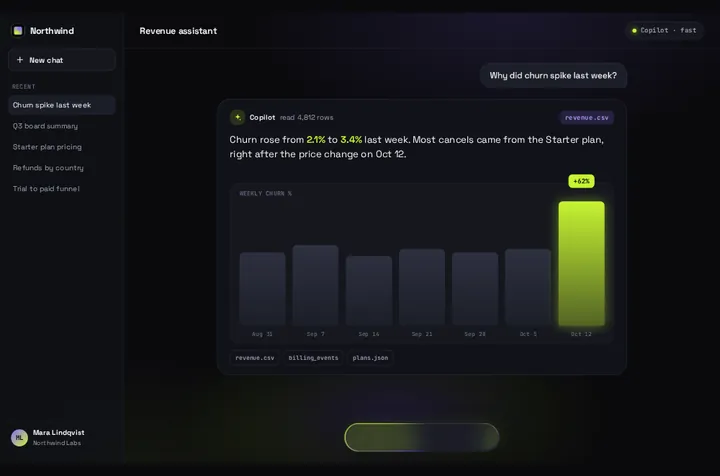
CopilotKit's headless hooks hand you the agent's messages and a way to run it, and leave the screen to you. Prompt Bloom is a screen for that: the prompt lifts into a bubble, a Thinking pill holds while the agent runs, and the answer streams into one card.
By buying you agree to the Terms.
- Download right after paying
- Use it in client projects
- Won't run on the listed stack? We fix it or refund you
Ready forCursorv0Lovableshadcn CLI
Use it in Next.js
"use client";
import { useAgent, useCopilotKit } from "@copilotkit/react-core/v2";
import { randomUUID } from "@copilotkit/shared";
import PromptBloom from "@/components/PromptBloom";
import northwind from "@/data/northwind";

const data = { ...northwind, app: { ...northwind.app, name: "Acme", title: "Ops copilot", history: [] } };

export default function CopilotBloom() {
  const { agent } = useAgent(); // the "default" agent your runtime registers
  const { copilotkit } = useCopilotKit();

  // The answer card shows one turn: every assistant text since the last user message.
  // Tool calls and tool results in between are skipped, not drawn.
  const lastUser = agent.messages.findLastIndex((m) => m.role === "user");
  const reply = agent.messages
    .slice(lastUser + 1)
    .map((m) => (m.role === "assistant" && typeof m.content === "string" ? m.content : ""))
    .filter(Boolean)
    .join("

");

  async function send(prompt: string) {
    agent.addMessage({ id: randomUUID(), role: "user", content: prompt });
    await copilotkit.runAgent({ agent }); // the same call CopilotChat makes
  }

  return (
    <PromptBloom
      data={data}
      autoplayDemo={false}
      text={reply}
      streaming={agent.isRunning}
      onSubmit={(prompt) => void send(prompt)}
    />
  );
}"use client";
import { CopilotKitProvider } from "@copilotkit/react-core/v2";
export function Providers({ children }: { children: React.ReactNode }) {
return <CopilotKitProvider runtimeUrl="/api/copilotkit">{children}</CopilotKitProvider>;
}Good to know
- CopilotKit's Headless UI page, read on October 25, 2026, opens with "Fully customize your Copilot's UI from the ground up using headless UI". Its example takes useAgent and useCopilotKit from @copilotkit/react-core/v2, adds the user's message with agent.addMessage and then calls copilotkit.runAgent, which it calls "the same method CopilotKit's built-in <CopilotChat /> uses internally." The snippet above does the same, and Prompt Bloom draws the result.
- When the free option fits better: most of the time. CopilotChat, CopilotSidebar and CopilotPopup are free, ship in the same package and connect to your agent with no wiring. They keep a scrolling thread, render tool calls and generative UI, and take Tailwind classes through slots. CopilotKit's own docs say to go headless "when the slot system isn't enough". If a popup or a sidebar in your colours is what you're after, you don't need Prompt Bloom.
- Package facts, checked October 25, 2026: @copilotkit/react-core 1.80.0 came out on October 24, and npm counted 286,211 downloads in the week to October 22. It accepts React 18 or 19. The repo is MIT licensed and not archived. In 1.80 the prebuilt components and the headless hooks both come from @copilotkit/react-core/v2, so @copilotkit/react-ui isn't needed for this setup.
- What Prompt Bloom doesn't do: it shows one answer card, not a thread. Each prompt replaces the card. Earlier turns stay in agent.messages and the agent still sees them, but they aren't drawn. Tool calls, generative UI, human-in-the-loop prompts and interrupts aren't rendered either; the snippet skips tool messages and shows the assistant's text only. There's no stop button and no file upload, and the paperclip is drawn but does nothing.
- The client files need a CopilotKit runtime at /api/copilotkit. Use the route from CopilotKit's quickstart as it is, or the runtime from your agent framework's guide if you already run LangGraph, CrewAI, Mastra or similar. CopilotKit warns that its BuiltInAgent replaces your own agent rather than connecting to it. The route isn't repeated here.
- Model output is written as text, never parsed as HTML. **bold**, line breaks, - bullets and # headings are shown; nothing else is interpreted.
- Type-checked on October 25, 2026 against @copilotkit/react-core 1.80.0, @copilotkit/shared 1.80.0, next 15.5.28 and react 19.1.10 with TypeScript 5.9.3, using the shipped Prompt Bloom source. We didn't run this page's code against a live agent or a runtime route. The text and streaming props are the same ones tested end to end on the Vercel AI SDK guide.
CopilotChat or headless: what each part maps to
- agent.messages: the card shows every assistant text since the last user message, joined. Earlier turns stay in the array but aren't drawn.
- agent.isRunning: goes into streaming. While it's true the composer becomes a Thinking pill, and the words fill the card as they arrive.
- agent.addMessage and copilotkit.runAgent: called from onSubmit(prompt), the same two calls as CopilotKit's headless example.
- copilotkit.stopAgent({ agent }): no built-in button. Put your own next to the card if runs can take long.
- CopilotChat labels such as welcomeMessageText: data.hello, data.helloSub and data.demo.placeholder.
- Suggestions: data.chips show under a finished answer, and a tap sends the chip's text. They're fixed strings from data, not useSuggestions.
- useRenderTool, useHumanInTheLoop, useInterrupt and generative UI: no match. Keep CopilotChat if your agent depends on them.
Install
- Copy from the zipPut
react/src/components + react/src/dataintosrc/, thennpm i @copilotkit/react-core @copilotkit/runtime. - Or ask your AIPaste PROMPT.md into Cursor, Lovable or v0.
Props
- onSubmit
- (prompt) → agent.addMessage + copilotkit.runAgent
- text
- the assistant's reply so far
- streaming
- agent.isRunning
- data
- every string on screen
- autoplayDemo
- false for a real chat
- chart
- bar chart under the reply; off by default when streaming
How qodesign compares
- qodesign vs 21st.dev21st.dev is best for: browsing a huge marketplace and copying many components a month.
- qodesign vs Magic UIMagic UI is best for: landing pages built with shadcn/ui.
All comparisons, with prices read on each library's own site.
Questions
What is CopilotKit headless UI?
It's CopilotKit's name for building your own chat screen on its hooks. useAgent gives you the agent's messages and whether it's running, and useCopilotKit gives you runAgent and stopAgent. CopilotKit still handles the connection to your agent, the message list and the streaming.
Should I just use CopilotChat or CopilotPopup?
For a normal chat, yes. They're free, they keep a scrolling thread, and they render tool calls and generative UI. Prompt Bloom fits when you want one animated answer card in place of a thread.
Does it show tool calls or generative UI?
No. The snippet skips tool messages and shows only the assistant's text. Keep CopilotChat, or render your tools yourself next to the card.
Does it work with LangGraph, CrewAI or Mastra agents?
If CopilotKit's runtime serves the agent, yes. useAgent talks to whatever agent the runtime registers, and the card only ever sees text. We type-checked the client side, not a live agent.
Does Prompt Bloom work in Next.js?
Yes, as a client component. Keep "use client" at the top of the file that renders it, as in the snippet above. App Router and Pages Router both work.
Can Cursor or v0 add it for me?
Yes. Each download has a PROMPT.md. Paste it into Cursor, Lovable, v0 or Claude Code and it fits the piece into your app.
Can I use it in client work?
Yes, in personal and client projects. You can't resell the code itself as a kit.