Clerk delete account in Next.js, with your own button
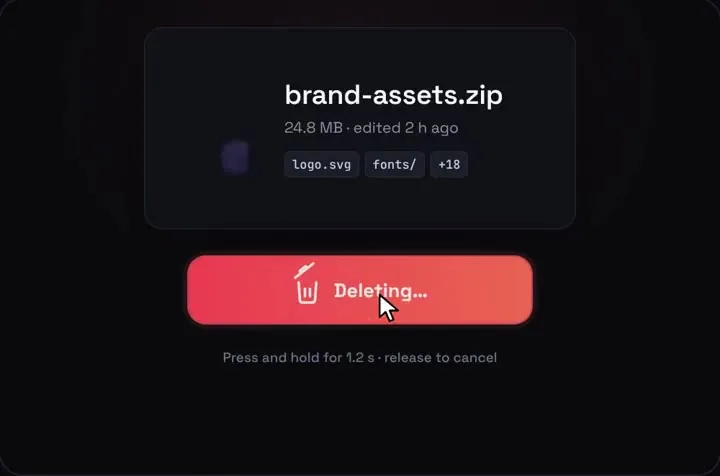
Clerk already ships a delete account flow, and it's free: the Security tab of <UserProfile /> shows a Delete account section once your Clerk Dashboard lets users delete themselves. If your app uses Clerk's account pages, use that. If you built your own settings page, user.delete() does the work behind useReverification, and Hold to Delete can be the button: a 1.2 second hold, then five seconds to undo before Clerk is called.
By buying you agree to the Terms.
- Download right after paying
- Use it in client projects
- Won't run on the listed stack? We fix it or refund you
Ready forCursorv0Lovableshadcn CLI
Clerk delete account: UserProfile first, then your own button
import { UserProfile } from "@clerk/nextjs";

// The free route: Clerk's own account page. Its Security tab has a
// "Delete account" section when the Dashboard lets users delete themselves.
export default function AccountPage() {
  return <UserProfile path="/account" />;
}"use client";
import { useEffect, useState } from "react";
// Hold to Delete draws on a fixed 1000 x 660 stage. This scales it to the
// width of its box and hands back a helper that moves keyboard focus inside.
export function useHoldStage() {
const [el, setEl] = useState<HTMLDivElement | null>(null);
const [scale, setScale] = useState(0);
useEffect(() => {
if (!el) return;
const ro = new ResizeObserver(([entry]) => setScale(entry.contentRect.width / 1000));
ro.observe(el);
return () => ro.disconnect();
}, [el]);
const focusIn = (selector: string, delay = 0) =>
window.setTimeout(() => el?.querySelector<HTMLElement>(selector)?.focus(), delay);
return { ref: setEl, scale, focusIn };
}"use client";
import { useState } from "react";
import { useClerk, useReverification, useUser } from "@clerk/nextjs";
import { isReverificationCancelledError } from "@clerk/nextjs/errors";
import HoldToDelete from "@/components/HoldToDelete";
import { useHoldStage } from "@/components/hold-stage";
export function DeleteAccount() {
const { user } = useUser();
const { setActive } = useClerk();
const { ref, scale, focusIn } = useHoldStage();
const [attempt, setAttempt] = useState(0); // a new key resets the piece
const [message, setMessage] = useState("");
// Clerk counts "Delete account" as a sensitive action: if the last sign-in
// is older than the reverification window, this opens Clerk's check first
const deleteUser = useReverification(() => user!.delete());
if (!user) return null;
if (!user.deleteSelfEnabled) {
return <p>Account deletion is turned off for this app. Contact support to delete your account.</p>;
}
const commit = async () => {
try {
await deleteUser();
// same two steps as Clerk's own delete form: drop the session, then leave
await setActive({ session: null, redirectUrl: "/goodbye" });
} catch (e) {
setMessage(
isReverificationCancelledError(e)
? "Nothing was deleted: the identity check was closed."
: "Your account was not deleted. Try again or contact support.",
);
setAttempt((n) => n + 1);
}
};
return (
<section className="space-y-3">
<div ref={ref} className="relative aspect-[1000/660] w-full overflow-hidden rounded-xl">
{scale > 0 && (
<HoldToDelete
key={attempt}
fileName={user.primaryEmailAddress?.emailAddress ?? "Your account"}
fileMeta="Your account and everything in it"
fileType="YOU"
tags={[]}
emptyText="Account deleted"
toastText="Deleting your account"
restoreLabel={null}
onDelete={() => focusIn(".qhd-toast button", 1100)}
onUndo={() => focusIn(".qhd-hold")}
onCommit={commit}
style={{ position: "absolute", left: 0, top: 0, transform: `scale(${scale})`, transformOrigin: "0 0" }}
/>
)}
</div>
<p role="alert" className="text-sm text-red-600">{message}</p>
</section>
);
}import { auth } from "@clerk/nextjs/server";
import { redirect } from "next/navigation";
import { DeleteAccount } from "./delete-account";
export default async function SettingsPage() {
const { isAuthenticated } = await auth();
if (!isAuthenticated) redirect("/sign-in");
return (
<main className="mx-auto max-w-2xl space-y-6 p-6">
<h1 className="text-xl font-semibold">Delete account</h1>
<p>Hold the button. You get five seconds to undo before anything is sent to Clerk.</p>
<DeleteAccount />
</main>
);
}Good to know
- Hold to Delete calls onCommit only when the five-second undo window runs out, so user.delete() never runs for someone who pressed Undo. If the tab closes during that window, nothing is deleted.
- If the last sign-in is older than Clerk's reverification window, Clerk's check opens when onCommit runs, about six seconds after the hold. Closing it throws, and the snippet says nothing was deleted and puts the button back with a new key.
- The piece is drawn as a file card that crumples into a bin. For an account, the snippet shows the primary email as the file name and "YOU" on the icon. If that metaphor feels wrong for your product, UserProfile's typed confirmation is the plainer choice.
- Holding is slower than clicking, and some people can't hold a key or a touch for a second. Keep a second path if that matters to your users: UserProfile's own Delete account section works as one. The piece gives no spoken progress while held.
- On a 390 px phone the piece scales to about 370 px wide, so the hold button is roughly 178 by 36 px.
- @clerk/nextjs 7.9.20 lists Next 15 (from 15.2.8) and Next 16 as peers on npm today.
- What we ran on Oct 25 2026: every file on this page type-checks with TypeScript 5.9.3 against @clerk/nextjs 7.9.20 (with @clerk/shared 4.41.1 and @clerk/backend 3.26.2), next 15.5.28, @types/react 19.3.0, framer-motion 14.6.0 and the shipped HoldToDelete, and a call to a method that doesn't exist on the user fails the same check. We then rendered delete-account.tsx headless in Chromium at 1440 and 390 px with React 19.3.1 and Clerk's hooks stubbed: the first delete threw a reverification-cancelled error and the second succeeded. The cancel showed "Nothing was deleted" and brought the button back, the second hold reached setActive with the redirect, and Undo sent nothing. We didn't use a real Clerk instance, so Clerk's own reverification modal and a real user.delete() weren't run. We also didn't run next build on these files or test Safari, Firefox, a real phone or a screen reader.
Where Clerk's own delete account lives
- In Clerk's open-source UI code (clerk/javascript, packages/ui, read Oct 25 2026), the Security tab of <UserProfile /> ends with a SecurityDelete section that renders only when user.deleteSelfEnabled is true. Clerk's User reference describes that field as "Indicates whether the user can delete their own account."
- The switch is in the Clerk Dashboard. The sign-up and sign-in options guide lists "Allow users to delete their accounts" under the User model section. We didn't confirm whether it starts on or off for a new app, so check it if the section doesn't show up.
- Clerk's own form asks the user to type "Delete account", calls useReverification(() => user?.delete()), and then setActive({ session: null, redirectUrl }). The custom snippet above copies those last two steps, so your page behaves like Clerk's after the button.
Clerk delete user and reverification
- Clerk's reverification guide lists "Delete account" among the sensitive actions, with the strategy "Strongest available" and a default window of 10 minutes. The window can be set between 1 and 10 minutes on the Dashboard's Sessions page.
- On the client, useReverification() opens Clerk's check when the window has passed and retries the call once the user passes it. If the user closes it, isReverificationCancelledError(e) is true, which is what the snippet tests. To show your own check screen instead of Clerk's modal, pass onNeedsReverification; /react/clerk-reverification-custom-ui-nextjs walks through one.
- One caveat from the same guide: "Users without any of the above factors cannot reverify." Its list is password, email code, phone code, passkey and Enterprise SSO for first factors. An app that signs people in with email links only should test this before shipping.
Clerk delete user API for admin pages
- Deleting someone else's account is a server job. Clerk's backend reference has deleteUser(userId), called as (await clerkClient()).users.deleteUser(userId), and it wraps the Backend API's DELETE /users/{user_id}. The users guide also covers the Dashboard: "Select the user, open the Actions dropdown, and select Delete user."
- The same guide says "Bulk deletion of users cannot currently be done through the Clerk Dashboard or programmatically." The action below checks an org admin role first; swap in whatever your app uses for admins.
- Clerk only knows about its own user. Rows in your database are yours to remove; Clerk's webhooks send a user.deleted event you can listen for. We didn't type-check a webhook handler for this page.
"use server";
import { auth, clerkClient } from "@clerk/nextjs/server";

// Admin panels: delete someone else's account from the server.
export async function removeUser(userId: string) {
  const { has } = await auth();
  if (!has({ role: "org:admin" })) throw new Error("Not allowed");
  const client = await clerkClient();
  await client.users.deleteUser(userId);
}
Tailwind v4 and shadcn apps
- In our Oct 25 2026 check of every piece on Tailwind v4, Hold to Delete works as-is with no config change. Its CSS file only targets classes that start with qhd-. We re-read it today: there's no :root, html or body rule, and the few element rules sit under the piece's own classes, so shadcn Buttons and Clerk's components keep their styles.
Install
- Copy from the zipPut
react/src/componentsintosrc/, thennpm i framer-motion (with @clerk/nextjs already set up). - Or ask your AIPaste PROMPT.md into Cursor, Lovable or v0.
Props
- onCommit
- the undo window ran out: call user.delete() here
- onUndo
- Undo was pressed and Clerk wasn't called
- fileName / fileMeta / fileType
- what the card shows: the email, one line, a short label
- emptyText / toastText
- the text after the hold
- holdMs / undoMs
- 1200 ms hold and 5000 ms undo by default
How qodesign compares
- qodesign vs UiverseUiverse is best for: single small elements: buttons, loaders, toggles, checkboxes, inputs.
- qodesign vs AnimataAnimata is best for: free animated building blocks you copy and adapt.
- qodesign vs Motion PrimitivesMotion Primitives is best for: small motion building blocks you compose yourself: text effects, number tickers, dialogs, toolbars.
All comparisons, with prices read on each library's own site.
Questions
Why doesn't UserProfile show Delete account?
The section only renders when user.deleteSelfEnabled is true. Turn on "Allow users to delete their accounts" in the User model settings of your Clerk Dashboard.
Does user.delete() ask the user to sign in again?
It can. Delete account is one of Clerk's sensitive actions, with a 10 minute window by default. Wrap the call in useReverification() so Clerk can ask for a fresh check.
user.delete() or deleteUser()?
user.delete() on the client deletes the signed-in user. deleteUser(userId) on the server deletes any user and needs your secret key, so keep it for admin pages.
Will it change my shadcn styles?
No. Hold to Delete's CSS only targets its own qhd- classes, with no :root, html or body rules.
Can Cursor or v0 add it for me?
Yes. Each download has a PROMPT.md. Paste it into Cursor, Lovable, v0 or Claude Code and it fits the piece into your app.
Can I use it in client work?
Yes, in personal and client projects. You can't resell the code itself as a kit.