A custom Clerk reverification screen for Next.js
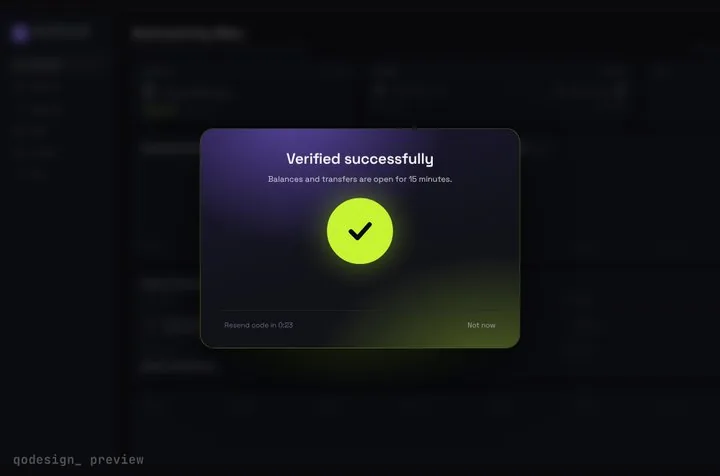
Clerk's useReverification shows its own modal when a sensitive action needs a fresh check. Pass onNeedsReverification and you can show your own screen instead: here, a code card over the blurred page that unlocks once Clerk accepts the code.
By buying you agree to the Terms.
- Download right after paying
- Use it in client projects
- Won't run on the listed stack? We fix it or refund you
Ready forCursorv0Lovableshadcn CLI
Use it in Next.js
"use client";
import { useState } from "react";
import { useReverification } from "@clerk/nextjs";
import { isReverificationCancelledError } from "@clerk/nextjs/errors";
import type { SessionVerificationLevel } from "@clerk/nextjs/types";
import { ReverifyGate } from "./ReverifyGate";

type Pending = { complete: () => void; cancel: () => void; level: SessionVerificationLevel | undefined };

export default function PayoutsPage() {
  const [pending, setPending] = useState<Pending | null>(null);
  const [note, setNote] = useState("");

  // Clerk calls onNeedsReverification instead of opening its own modal
  const sendPayout = useReverification(
    async () => {
      const res = await fetch("/api/payout", { method: "POST" });
      return res.json();
    },
    { onNeedsReverification: ({ complete, cancel, level }) => setPending({ complete, cancel, level }) },
  );

  async function onPay() {
    try {
      await sendPayout(); // retried by Clerk after complete()
      setNote("Payout sent.");
    } catch (e) {
      if (isReverificationCancelledError(e)) setNote("Payout not sent.");
      else throw e;
    }
  }

  const page = (
    <main className="grid min-h-dvh place-items-center bg-[#0b0c10] text-white">
      <button onClick={() => void onPay()} className="rounded-lg bg-[#C6F432] px-4 py-2 font-medium text-black">
        Send payout
      </button>
      {note ? <p role="status" className="text-sm text-white/60">{note}</p> : null}
    </main>
  );

  if (!pending) return page;
  return (
    <ReverifyGate
      level={pending.level}
      onComplete={() => { pending.complete(); setPending(null); }}
      onCancel={() => { pending.cancel(); setPending(null); }}
    >
      {page}
    </ReverifyGate>
  );
}"use client";
import { useEffect, useRef, useState, type ReactNode } from "react";
import { useSession } from "@clerk/nextjs";
import type { EmailCodeFactor, SessionVerificationLevel } from "@clerk/nextjs/types";
import { StepUpGate } from "@/components/StepUpGate";
export function ReverifyGate({ level = "first_factor", onComplete, onCancel, children }: {
level: SessionVerificationLevel | undefined;
onComplete: () => void;
onCancel: () => void;
children: ReactNode;
}) {
const { session } = useSession();
const [factor, setFactor] = useState<EmailCodeFactor>();
const started = useRef(false);
const sendCode = (f: EmailCodeFactor) =>
session?.prepareFirstFactorVerification({ strategy: "email_code", emailAddressId: f.emailAddressId });
useEffect(() => {
if (!session || started.current) return;
started.current = true;
void session.startVerification({ level }).then(async (v) => {
const f = v.supportedFirstFactors?.find((x): x is EmailCodeFactor => x.strategy === "email_code");
if (v.status === "needs_first_factor" && f) {
setFactor(f);
await sendCode(f);
}
});
}, [session, level]);
return (
<StepUpGate
title="Confirm it's you"
description={factor ? `Enter the 6-digit code we sent to ${factor.safeIdentifier}.` : "Sending you a code..."}
successTitle="Confirmed"
successDescription="Sending your payout."
onVerify={async (code) => {
const v = await session?.attemptFirstFactorVerification({ strategy: "email_code", code }).catch(() => null);
return v?.status === "complete"; // a wrong code shakes the cells
}}
onResend={factor ? () => void sendCode(factor) : undefined}
onCancel={onCancel}
onVerified={onComplete}
>
{children}
</StepUpGate>
);
}import { auth, reverificationErrorResponse } from "@clerk/nextjs/server";
export async function POST() {
const { has, userId } = await auth();
if (!userId) return new Response("Unauthorized", { status: 401 });
// not verified in the last 10 minutes: 403, and useReverification asks for a code
if (!has({ reverification: "strict" })) return reverificationErrorResponse("strict");
// move the money here
return Response.json({ ok: true });
}Good to know
- Clerk's useReverification docs, read on October 25, 2026: "If you'd like to build a custom UI, you can use the onNeedsReverification option." The handler gets complete, cancel and level. complete() retries the original request and cancel() rejects it.
- The route returns reverificationErrorResponse("strict") when the user hasn't verified in the last 10 minutes, the same check as in Clerk's reverification guide. The guide says you can set that window anywhere from 1 to 10 minutes.
- When the free option fits better: if Clerk's own modal looks fine in your app, keep it. It's what useReverification shows when you leave onNeedsReverification out, it costs nothing extra, and it handles every factor Clerk supports.
- This screen covers one case, the same one Clerk's own custom UI example covers: an email code as the first factor. Clerk also lets people reverify with a password, phone code, passkey or Enterprise SSO, or as a second factor with a phone code, authenticator app, backup code or passkey. The gate fits the code ones only. For an authenticator app, call session.attemptSecondFactorVerification({ strategy: "totp", code }) in onVerify and leave onResend out.
- If startVerification comes back as needs_second_factor (accounts with two-factor on, or a stricter level), the snippet keeps saying it's sending a code. Handle that status before you ship it to those accounts.
- Turn on Email verification code in the Clerk Dashboard, as Clerk's example says. Clerk sends the email itself.
- The page mounts again inside the gate while it's locked, so keep any state you care about above it. The gate frosts whatever you pass as children. Copy StepUpGate.tsx, step-up-gate.css and timeline.ts from react/src/components.
- Type-checked on October 25, 2026 against @clerk/nextjs 7.9.20, next 15.5.28, react 19.1 and framer-motion 14.6.0 with TypeScript 5.9.3, using the shipped component. We didn't run it against a live Clerk app.
How Clerk's custom UI example maps to the gate
- onNeedsReverification: save complete, cancel and level in state, then render the gate.
- session.startVerification({ level }) and prepareFirstFactorVerification: run once when the gate mounts. The Resend link calls prepare again.
- attemptFirstFactorVerification: goes in onVerify. Return true only when the status is complete. A wrong code comes back as an error, onVerify returns false and the cells shake.
- complete(): onVerified, which runs after the unlock animation, so Clerk retries the payout request.
- cancel(): the gate's Not now link. Your call then throws an error that isReverificationCancelledError recognises.
- level: passed straight to startVerification. The snippet only handles first_factor.
Install
- Copy from the zipPut
react/src/componentsintosrc/, thennpm i framer-motion @clerk/nextjs. - Or ask your AIPaste PROMPT.md into Cursor, Lovable or v0.
Props
- onVerify
- (code) → true when Clerk says complete
- onResend
- send a fresh code (leave out for an authenticator app)
- onCancel
- Not now: call Clerk's cancel()
- onVerified
- runs after the unlock: call Clerk's complete()
- title / description
- card text
- length
- number of cells (6 for Clerk)
How qodesign compares
- qodesign vs Magic UIMagic UI is best for: landing pages built with shadcn/ui.
- qodesign vs Aceternity UIAceternity UI is best for: teams building many marketing pages who want one big library.
All comparisons, with prices read on each library's own site.
Questions
Why not Clerk's built-in reverification modal?
Use it if it fits your design. It's free and covers every factor. This is for when you want the check to look like part of your app, with the page waiting behind the glass.
Does it work for passkeys or passwords?
No. The gate is a code screen, so it fits email codes, phone codes and authenticator apps. Use Clerk's modal or your own form for the others.
How long does a reverification last?
Ten minutes by default, per Clerk's docs. You can set it between 1 and 10 minutes in the has() check on the server.
Is this a sign-in page?
No, it runs after sign-in, before a sensitive action. For a Clerk sign-in with an email code, see the Clerk email code guide.
Does the gate work in Next.js?
Yes, as a client component. Keep "use client" at the top of the file that renders it, as in the snippet above. App Router and Pages Router both work.
Can Cursor or v0 add it for me?
Yes. Each download has a PROMPT.md. Paste it into Cursor, Lovable, v0 or Claude Code and it fits the piece into your app.
Can I use it in client work?
Yes, in personal and client projects. You can't resell the code itself as a kit.