Better Auth email OTP in Next.js
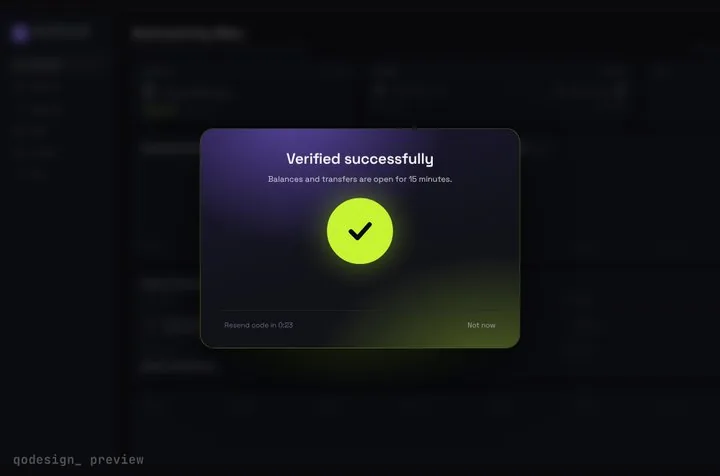
Better Auth's emailOTP plugin emails a 6-digit code and signs the user in with it. Here its two client calls, emailOtp.sendVerificationOtp and signIn.emailOtp, drive an animated code card, and the phone-number plugin gets the same card at the end.
By buying you agree to the Terms.
- Download right after paying
- Use it in client projects
- Won't run on the listed stack? We fix it or refund you
Ready forCursorv0Lovableshadcn CLI
Use it in Next.js
"use client";
import { useState } from "react";
import { useRouter } from "next/navigation";
import { StepUpGate } from "@/components/StepUpGate";
import { authClient } from "@/lib/auth-client";

const ASK = "Enter the 6-digit code we sent to ";

export default function EmailOtpLogin() {
  const router = useRouter();
  const [email, setEmail] = useState("");
  const [sentTo, setSentTo] = useState<string | null>(null);
  const [hint, setHint] = useState("");
  const [error, setError] = useState("");

  async function sendCode(address: string) {
    setError("");
    const { error } = await authClient.emailOtp.sendVerificationOtp({ email: address, type: "sign-in" });
    if (error) return setError(error.message ?? "We couldn't send a code. Try again.");
    setSentTo(address);
    setHint(ASK + address + ".");
  }

  if (!sentTo) {
    return (
      <main className="grid min-h-dvh place-items-center bg-[#0b0c10] text-white">
        <form
          onSubmit={(e) => {
            e.preventDefault();
            void sendCode(email);
          }}
          className="grid w-80 gap-3"
        >
          <label htmlFor="email" className="text-sm text-white/70">Email</label>
          <input id="email" type="email" autoComplete="email" required value={email} onChange={(e) => setEmail(e.target.value)}
            className="rounded-lg bg-white/10 px-3 py-2 outline-none focus:ring-2 focus:ring-[#C6F432]" />
          <button className="rounded-lg bg-[#C6F432] px-3 py-2 font-medium text-black">Email me a code</button>
          {error ? <p role="alert" className="text-sm text-red-400">{error}</p> : null}
        </form>
      </main>
    );
  }

  return (
    <StepUpGate
      title="Check your email"
      description={hint}
      successTitle="You're in"
      successDescription="Opening your dashboard."
      onVerify={async (code) => {
        const { error } = await authClient.signIn.emailOtp({ email: sentTo, otp: code });
        if (!error) return true;
        // 3 wrong tries (allowedAttempts) burn the code: ask for a new one
        if (error.code === "TOO_MANY_ATTEMPTS") setHint("Too many tries. Tap Resend code for a new one.");
        else if (error.code === "OTP_EXPIRED") setHint("That code expired. Tap Resend code.");
        return false; // shakes the cells
      }}
      onResend={() => void sendCode(sentTo)}
      onCancel={() => setSentTo(null)}
      onVerified={() => {
        router.push("/dashboard");
        router.refresh();
      }}
    >
      {/* what sits frosted behind the card */}
      <div className="grid min-h-dvh place-items-center bg-[#0b0c10] text-white/40">Your dashboard</div>
    </StepUpGate>
  );
}import { betterAuth } from "better-auth";
import { emailOTP } from "better-auth/plugins";
import { nextCookies } from "better-auth/next-js";
import { sendEmail } from "@/lib/email";
export const auth = betterAuth({
// database: your adapter (Postgres, MySQL, SQLite, Drizzle, Prisma...)
plugins: [
emailOTP({
async sendVerificationOTP({ email, otp, type }) {
if (type === "sign-in") {
// not awaited, as Better Auth's docs advise (timing attacks)
void sendEmail({ to: email, subject: "Your sign-in code", text: `Your code is ${otp}` });
}
},
// defaults: otpLength 6, expiresIn 300 (seconds), allowedAttempts 3
}),
nextCookies(), // keep this last
],
});import { createAuthClient } from "better-auth/react";
import { emailOTPClient } from "better-auth/client/plugins";
export const authClient = createAuthClient({
plugins: [emailOTPClient()],
});import { auth } from "@/lib/auth";
import { toNextJsHandler } from "better-auth/next-js";
export const { GET, POST } = toNextJsHandler(auth);import { headers } from "next/headers";
import { redirect } from "next/navigation";
import { auth } from "@/lib/auth";
export default async function Dashboard() {
const session = await auth.api.getSession({ headers: await headers() });
if (!session) redirect("/login");
return <main className="p-8">Signed in as {session.user.email}</main>;
}Good to know
- Free first: Better Auth itself ships no screens, but Better Auth UI (MIT) does. Its email OTP plugin adds a sign-in view at /auth/email-otp and code versions of verify email, forgot password and reset password, in a shadcn/ui or HeroUI look. If you want those flows in the stock look, use it. A plain input with the two calls above is free too and works fine when the screen doesn't need to be a moment.
- The method names were read from better-auth 1.7.12 on October 25, 2026: authClient.emailOtp.sendVerificationOtp({ email, type: "sign-in" }) sends the code and authClient.signIn.emailOtp({ email, otp }) checks it and signs the user in. type also takes "email-verification", "forget-password" and "change-email".
- Watch the field names. In 1.7.12 the client types for signIn.emailOtp accept extra keys, so { email, code } instead of { email, otp } still type-checks. The server's schema wants otp as a string and rejects the call. We tried both on purpose: a wrong method name fails tsc, a wrong field name doesn't.
- Defaults from Better Auth's docs: 6 digits, 300 seconds, 3 tries. After the third wrong code signIn.emailOtp returns TOO_MANY_ATTEMPTS and that code is spent, so the snippet changes the card's line to ask for a new one. Resend makes a new code by default (resendStrategy "rotate").
- New emails get an account on their first code. To stop that, set disableSignUp: true in emailOTP({ ... }) on the server.
- Read this before you add it to an app that already has passwords. Better Auth's docs: "When a sign-in OTP confirms a pre-existing account whose email was never verified, any existing password on that account is removed and its sessions are revoked." The user can set a new password through reset.
- sendVerificationOTP isn't awaited because Better Auth's docs recommend that against timing attacks. On serverless hosts they suggest waitUntil so the email still goes out. lib/email.ts is your own mail sender.
- Copy StepUpGate.tsx, step-up-gate.css and timeline.ts from react/src/components. The card frosts whatever you pass as children.
- What we ran: every file on this page was type-checked against better-auth 1.7.12, next 16.4.3, react 19.3.1, @types/react 19.3.0, framer-motion 11.18.2 and TypeScript 5.9.3 with the shipped StepUpGate, on October 25, 2026. We didn't run it against a database, a mail sender, an SMS provider or a live Next.js server.
When Better Auth UI or a plain input fits better
- Better Auth UI's docs put it this way: "The email-OTP plugin swaps emailed links for short codes the user types back into the app." Its repo (better-auth-ui/better-auth-ui, MIT) was last pushed on October 24, 2026, and @better-auth-ui/react 1.7.31 came out the same day. It asks for React 19.2.6 or newer and better-auth 1.7 or newer.
- Pick Better Auth UI when you want sign-in, sign-up, password reset and account settings in one go and the shadcn/ui or HeroUI look suits you. It covers far more ground than one code card.
- Pick a plain input, or shadcn/ui's Input OTP (input-otp 1.5.0), when the code step only has to work. The two client calls are the same either way.
- Pick Step-Up OTP Gate when the code screen is part of the product feel: the page waits frosted behind the card, the 6 cells take a pasted code, Resend counts down, a wrong code shakes and the right one unlocks with an animation. It's one screen. It won't give you the other auth flows.
Better Auth phone number OTP
- The phone-number plugin works the same way. authClient.phoneNumber.sendOtp({ phoneNumber }) texts a code and authClient.phoneNumber.verify({ phoneNumber, code }) checks it. verify creates a session unless you pass disableSession: true. Checked in the 1.7.12 types, where sendOTP and verifyOtp on the client fail tsc.
- You bring the SMS sender. The plugin calls your sendOTP function with the number and the code, and it adds phoneNumber and phoneNumberVerified to the user table, so run Better Auth's migration after adding it.
- From the plugin's 1.7.12 code: if no user has that number and signUpOnVerification isn't set, verify fails even with the right code, and the card shows it as a wrong code. Set signUpOnVerification with getTempEmail, as below, if new numbers should get accounts. Leave it out if the number has to be on an account already, and say so on the form.
- Codes are 6 digits and last 300 seconds by default, per Better Auth's docs. The plugin's code allows 3 tries unless you set allowedAttempts.
- The three files below were type-checked together with the email files above. We didn't send a real SMS.
import { betterAuth } from "better-auth";
import { emailOTP, phoneNumber } from "better-auth/plugins";
import { nextCookies } from "better-auth/next-js";
import { sendEmail } from "@/lib/email";
import { sendSms } from "@/lib/sms";

export const auth = betterAuth({
  // database: your adapter; the phone plugin adds phoneNumber + phoneNumberVerified to user (run the migration)
  plugins: [
    emailOTP({
      async sendVerificationOTP({ email, otp, type }) {
        if (type === "sign-in") void sendEmail({ to: email, subject: "Your sign-in code", text: `Your code is ${otp}` });
      },
    }),
    phoneNumber({
      sendOTP: ({ phoneNumber, code }) => {
        void sendSms(phoneNumber, `Your code is ${code}`); // your SMS provider
      },
      // without this, a number that isn't on an account can't sign in
      signUpOnVerification: {
        getTempEmail: (phone) => `${phone.slice(1)}@phone.example.com`, // a placeholder email per number
      },
    }),
    nextCookies(),
  ],
});import { createAuthClient } from "better-auth/react";
import { emailOTPClient, phoneNumberClient } from "better-auth/client/plugins";
export const authClient = createAuthClient({
plugins: [emailOTPClient(), phoneNumberClient()],
});"use client";
import { useState } from "react";
import { useRouter } from "next/navigation";
import { StepUpGate } from "@/components/StepUpGate";
import { authClient } from "@/lib/auth-client";
export default function PhoneOtpLogin() {
const router = useRouter();
const [phone, setPhone] = useState("");
const [sentTo, setSentTo] = useState<string | null>(null);
const [error, setError] = useState("");
async function sendCode(phoneNumber: string) {
setError("");
const { error } = await authClient.phoneNumber.sendOtp({ phoneNumber }); // E.164, like +40712345678
if (error) setError(error.message ?? "We couldn't text a code. Check the number.");
else setSentTo(phoneNumber);
}
if (!sentTo) {
return (
<main className="grid min-h-dvh place-items-center bg-[#0b0c10] text-white">
<form onSubmit={(e) => { e.preventDefault(); void sendCode(phone.trim()); }} className="grid w-80 gap-3">
<label htmlFor="phone" className="text-sm text-white/70">Phone number</label>
<input id="phone" type="tel" autoComplete="tel" placeholder="+40712345678" required value={phone}
onChange={(e) => setPhone(e.target.value)}
className="rounded-lg bg-white/10 px-3 py-2 outline-none focus:ring-2 focus:ring-[#C6F432]" />
<button className="rounded-lg bg-[#C6F432] px-3 py-2 font-medium text-black">Text me a code</button>
{error ? <p role="alert" className="text-sm text-red-400">{error}</p> : null}
</form>
</main>
);
}
return (
<StepUpGate
title="Check your messages"
description={`Enter the 6-digit code we texted to ${sentTo}.`}
successTitle="You're in"
successDescription="Opening your dashboard."
onVerify={async (code) => {
const { error } = await authClient.phoneNumber.verify({ phoneNumber: sentTo, code });
return !error;
}}
onResend={() => void sendCode(sentTo)}
onCancel={() => setSentTo(null)}
onVerified={() => {
router.push("/dashboard");
router.refresh();
}}
>
<div className="grid min-h-dvh place-items-center bg-[#0b0c10] text-white/40">Your dashboard</div>
</StepUpGate>
);
}Install
- Copy from the zipPut
react/src/componentsintosrc/, thennpm i framer-motion better-auth. - Or ask your AIPaste PROMPT.md into Cursor, Lovable or v0.
Props
- onVerify
- (code) → true when signIn.emailOtp succeeds
- onResend
- sendVerificationOtp again
- onCancel
- back to the email step
- onVerified
- runs after the unlock animation
- title / description
- card text (description can change, as the snippet does after too many tries)
- resendSeconds
- Resend countdown, 30 by default
How qodesign compares
- qodesign vs Magic UIMagic UI is best for: landing pages built with shadcn/ui.
- qodesign vs Aceternity UIAceternity UI is best for: teams building many marketing pages who want one big library.
All comparisons, with prices read on each library's own site.
Questions
What's the difference between emailOtp.sendVerificationOtp and signIn.emailOtp?
sendVerificationOtp asks Better Auth to email a code; with type "sign-in" it's the first step of an OTP login. signIn.emailOtp takes the email and the code the user typed and creates the session. The card calls the first from onResend and the second from onVerify.
Does Better Auth email OTP sign up new users?
Yes, by default. The first correct code for an unknown email creates the user. Set disableSignUp: true in the emailOTP plugin options to allow existing accounts only.
What happens after 3 wrong codes?
Better Auth's docs say signIn.emailOtp returns an error with code TOO_MANY_ATTEMPTS and the code stops working. The user needs a new one, so the snippet tells them to tap Resend code. allowedAttempts changes the limit.
Can I use the card to verify an email instead of signing in?
Yes. Send the code with type "email-verification" and check it with authClient.emailOtp.verifyEmail({ email, otp }) inside onVerify. Both names are in better-auth 1.7.12.
Does it work for Better Auth phone number OTP?
Yes. Swap in phoneNumber.sendOtp and phoneNumber.verify, as in the phone section above. You need your own SMS provider.
Can Cursor or v0 add it for me?
Yes. Each download has a PROMPT.md. Paste it into Cursor, Lovable, v0 or Claude Code and it fits the piece into your app.
Can I use it in client work?
Yes, in personal and client projects. You can't resell the code itself as a kit.