Next Auth email OTP: a 6-digit code instead of the link
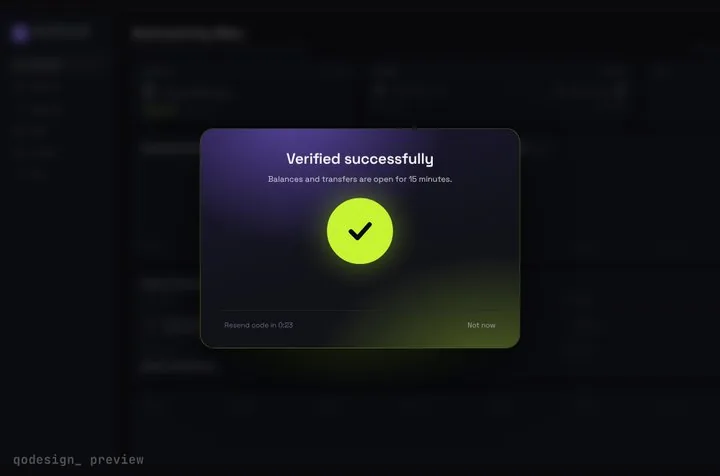
next-auth has no built-in OTP provider, but its Email provider can send a short code: return 6 digits from generateVerificationToken, cut maxAge to 10 minutes, limit the tries and check the code on the route a magic link opens. Step-Up OTP Gate is the screen where it gets typed.
By buying you agree to the Terms.
- Download right after paying
- Use it in client projects
- Won't run on the listed stack? We fix it or refund you
Ready forCursorv0Lovableshadcn CLI
Use it in Next.js
"use client";
import { useState } from "react";
import { useRouter } from "next/navigation";
import { getSession, signIn } from "next-auth/react";
import { StepUpGate } from "@/components/StepUpGate";

export default function LoginPage() {
  const router = useRouter();
  const [email, setEmail] = useState("");
  const [sentTo, setSentTo] = useState<string | null>(null);
  const [hint, setHint] = useState("");
  const [error, setError] = useState("");

  async function sendCode(raw: string) {
    setError("");
    // next-auth lowercases the address when it stores the code, and the callback
    // compares it as typed. Send the same lowercase address both times.
    const address = raw.trim().toLowerCase();
    const res = await signIn("email", { email: address, redirect: false });
    if (!res || res.error) return setError("We couldn't send a code. Check the address and try again.");
    setSentTo(address);
    setHint(`We emailed a 6-digit code to ${address}.`);
  }

  if (!sentTo) {
    return (
      <main className="grid min-h-dvh place-items-center bg-[#0b0c10] text-white">
        <form
          onSubmit={(e) => {
            e.preventDefault();
            void sendCode(email);
          }}
          className="grid w-80 gap-3"
        >
          <label htmlFor="email" className="text-sm text-white/70">Email</label>
          <input id="email" type="email" autoComplete="email" required value={email} onChange={(e) => setEmail(e.target.value)}
            className="rounded-lg bg-white/10 px-3 py-2 outline-none focus:ring-2 focus:ring-[#C6F432]" />
          <button className="rounded-lg bg-[#C6F432] px-3 py-2 font-medium text-black">Email me a code</button>
          {error ? <p role="alert" className="text-sm text-red-400">{error}</p> : null}
        </form>
      </main>
    );
  }

  return (
    <StepUpGate
      title="Check your email"
      description={hint}
      successTitle="You're in"
      successDescription="Opening your dashboard."
      onVerify={async (code) => {
        // the same route a magic link opens, called with the typed code
        const params = new URLSearchParams({ email: sentTo, token: code, callbackUrl: "/api/auth/session" });
        const res = await fetch(`/api/auth/callback/email?${params}`);
        if (res.status === 429) {
          setHint("Too many tries. Wait a few minutes, then tap Resend code.");
          return false;
        }
        const session = await getSession();
        return Boolean(session?.user); // false shakes the cells
      }}
      onResend={() => void sendCode(sentTo)}
      onCancel={() => setSentTo(null)}
      onVerified={() => {
        router.push("/dashboard");
        router.refresh();
      }}
    >
      {/* what sits frosted behind the card */}
      <div className="grid min-h-dvh place-items-center bg-[#0b0c10] text-white/40">Your dashboard</div>
    </StepUpGate>
  );
}import type { NextAuthOptions } from "next-auth";
import EmailProvider from "next-auth/providers/email";
import { randomInt } from "node:crypto";
import { adapter } from "@/lib/db"; // your database adapter: the Email provider needs one
import { sendEmail } from "@/lib/email";
export const authOptions: NextAuthOptions = {
adapter,
providers: [
EmailProvider({
maxAge: 10 * 60, // seconds; the default is 24 hours, far too long for a 6-digit code
// a 6-digit code instead of the default 64-character link token
generateVerificationToken: () => randomInt(0, 1_000_000).toString().padStart(6, "0"),
// email the code only, not the link, so mail scanners can't use it up
async sendVerificationRequest({ identifier, token }) {
await sendEmail({
to: identifier,
subject: "Your sign-in code",
text: `Your code is ${token}. It expires in 10 minutes.`,
});
},
}),
],
};import NextAuth from "next-auth";
import { authOptions } from "@/lib/auth";
import { tooManyTries } from "@/lib/code-limit";
const handler = NextAuth(authOptions);
type Ctx = { params: Promise<{ nextauth: string[] }> };
async function GET(req: Request, ctx: Ctx) {
const url = new URL(req.url);
if (url.pathname.endsWith("/callback/email")) {
const email = url.searchParams.get("email");
if (!email || tooManyTries(email)) return new Response("Too many tries", { status: 429 });
}
return handler(req, ctx);
}
export { GET, handler as POST };// Wrong codes never burn a next-auth verification token, so cap the guesses yourself.
// This Map works on one long-running server. On serverless or several instances, keep the count in Redis or your database.
const WINDOW_MS = 10 * 60 * 1000;
const MAX_TRIES = 5;
const tries = new Map<string, { count: number; since: number }>();
export function tooManyTries(email: string): boolean {
const now = Date.now();
const entry = tries.get(email);
if (!entry || now - entry.since > WINDOW_MS) {
tries.set(email, { count: 1, since: now });
return false;
}
entry.count += 1;
return entry.count > MAX_TRIES;
}import { getServerSession } from "next-auth";
import { redirect } from "next/navigation";
import { authOptions } from "@/lib/auth";
export default async function Dashboard() {
const session = await getServerSession(authOptions);
if (!session) redirect("/login");
return <main className="p-8">Signed in as {session.user?.email}</main>;
}Good to know
- Free first: if a link in the email is fine, keep next-auth's built-in magic link. It needs no extra screen and it is the flow the Email provider docs describe. A code helps when people read mail on their phone but sign in on a laptop, and the email then carries no link that anything in the mailbox could open.
- If you can move off next-auth, Better Auth's emailOTP plugin has codes built in, with expiry and a wrong-try limit, and it fits better than this pattern. Both docs sites now carry a banner about it: next-auth.js.org says "NextAuth.js is now part of Better Auth!" and authjs.dev says "The Auth.js project is now part of Better Auth." Our Better Auth email OTP guide wires the same card to it. This page is for apps that are staying on next-auth.
- This is a community pattern, not an OTP feature. PR #8825 "Built in OTP provider" has been open on nextauthjs/next-auth since October 10, 2023 (checked October 25, 2026). The page only uses documented Email provider options: generateVerificationToken, maxAge and sendVerificationRequest.
- The Email provider needs a database adapter to store the codes, even with JWT sessions. lib/db is yours (Prisma, Drizzle, Mongo and so on), and so is lib/email, your mail sender. next-auth/providers/email loads nodemailer when it is imported, so install it even if you send mail some other way; next-auth 4.24.15 lists nodemailer ^7.0.7 as a peer.
- Send the address in lowercase. next-auth lowercases and trims the email before it stores the code, but the callback compares the email query parameter as it arrives. We tested it: [email protected] with the right code failed, [email protected] with the same code signed in. If you write your own normalizeIdentifier, apply the same rule in the browser.
- Wrong codes don't count. In next-auth 4.24.15 the callback looks up the email and the hashed code and deletes the row only on a match, so a 6-digit code would survive guessing for as long as maxAge allows. That is why maxAge is 10 minutes here instead of the default 24 hours, and why route.ts answers 429 after 5 tries per email. Rate-limit POST /api/auth/signin/email too, so nobody can flood an inbox with codes.
- Resend makes a new code and the old one keeps working until it expires. We tested that too: the first code still signed in after a resend. With a 10-minute life and the try limit that is acceptable. If you want only the newest code to work, delete the email's older rows in your adapter's createVerificationToken.
- onVerify calls /api/auth/callback/email, the same GET route a magic link opens, with callbackUrl set to /api/auth/session so the redirect lands on a small JSON response. getSession() then says whether the cookie was set. A wrong or expired code redirects to /api/auth/error?error=Verification instead, and the card shakes.
- Copy StepUpGate.tsx, step-up-gate.css and timeline.ts from react/src/components. The card frosts whatever you pass as children.
- What we ran, on October 25, 2026: every file on this page was type-checked against next-auth 4.24.15, next 16.4.3, react 19.3.1, @types/react 19.3.0, framer-motion 14.6.0 and TypeScript 5.9.3 with the shipped StepUpGate, and next build passed. Then we ran it in a scratch Next.js app with an in-memory adapter and a mailer that wrote to a file. In headless Chromium at 390 px, a mixed-case email got a code, a wrong code shook the card, and the right code landed on /dashboard signed in. Over plain HTTP we checked a reused code (refused), the sixth try (429) and an old code after a resend (still works). We didn't run it against a real database adapter, a real mail sender or on a phone, and we didn't wait out the 10 minutes: the expiry comes from reading the source.
When the magic link or Better Auth fits better
- next-auth's Email provider sends a sign-in link. Its v4 docs say "By default this token is valid for 24 hours" and that "You can define a generateVerificationToken method in your provider options". Nothing else about the flow changes when the token is 6 digits, which is what this page relies on.
- Keep the link when your users sign in on the device where they read mail. It is less code and there is no guessing to limit.
- Move to Better Auth's emailOTP plugin when you can change auth libraries. It counts wrong tries for you and burns the code after the limit, which this pattern has to add by hand.
- Use this page when you are staying on next-auth and want a code screen that feels like part of the product: the page waits frosted behind the card, 6 cells fill in, a wrong code shakes them and Resend counts down.
How next-auth checks the code
- Read in the next-auth 4.24.15 source on October 25, 2026. On sign-in, the token comes from generateVerificationToken() or, without it, 32 random bytes as hex. It expires after maxAge seconds, 86,400 by default. The adapter stores a hash of the token plus your secret, never the code itself.
- On GET /api/auth/callback/email the handler hashes the token parameter, asks the adapter for that email and hash, and treats a missing, expired or mismatched row as a failed verification. A match deletes the row, so each code works once.
- Nothing in that path counts failures. The limiter in route.ts is the only thing between a 6-digit code and a script. 5 tries in 10 minutes gives a guesser 5 chances in a million per code.
Next Auth v5 (Auth.js beta): the same idea
- npm's latest tag for next-auth is 4.24.15. v5 is still the beta tag, 5.0.0-beta.32, on @auth/core 0.41.3. Its email providers (Nodemailer, Resend and others) take the same generateVerificationToken and maxAge options, and the callback works the same way, with one change for the card: the path ends in the provider's id, so it is /api/auth/callback/resend for Resend.
- These two files were type-checked against next-auth 5.0.0-beta.32 on October 25, 2026, and a misspelled option failed the check as it should. We didn't run v5. Lowercase the email and add the try limit the same way as above.
import NextAuth from "next-auth";
import Resend from "next-auth/providers/resend";
import { randomInt } from "node:crypto";
import { adapter } from "@/lib/db";
import { sendEmail } from "@/lib/email";

export const { handlers, auth, signIn } = NextAuth({
  adapter,
  providers: [
    Resend({
      from: "[email protected]",
      maxAge: 10 * 60,
      generateVerificationToken: () => randomInt(0, 1_000_000).toString().padStart(6, "0"),
      async sendVerificationRequest({ identifier, token }) {
        await sendEmail({ to: identifier, subject: "Your sign-in code", text: `Your code is ${token}.` });
      },
    }),
  ],
});// v5: the callback path ends in the provider's id ("resend" here, "nodemailer" for Nodemailer)
const params = new URLSearchParams({ email: sentTo, token: code, callbackUrl: "/api/auth/session" });
const res = await fetch(`/api/auth/callback/resend?${params}`);Tailwind v4
- Step-Up OTP Gate ships with Tailwind CSS 3.4 and the base reset (preflight) switched off. Tailwind v4 ignores that setting, so a plain @import "tailwindcss" turns the reset back on. In our v4 check (Tailwind 4.3.3, October 25, 2026) line-height went from normal to 1.5 on every element, which pushes the card's text down, and the code cells' grid tracks widened from 26 px to 38 px.
- The fix is to replace that one import with the three lines below. It also removes the reset from your own pages, so check them after the change. With the fix, the piece's computed styles matched the 3.4 build.
/* app/globals.css: Tailwind v4, without the base reset the piece was built without */
@layer theme, base, components, utilities;
@import "tailwindcss/theme.css" layer(theme);
@import "tailwindcss/utilities.css" layer(utilities);
Install
- Copy from the zipPut
react/src/componentsintosrc/, thennpm i next-auth nodemailer framer-motion. - Or ask your AIPaste PROMPT.md into Cursor, Lovable or v0.
Props
- onVerify
- gets the 6 digits; return true once next-auth has set the session
- onResend
- calls signIn("email") again for a new code
- onCancel
- back to the email field
- onVerified
- runs after the unlock; push to the dashboard here
- description
- the line under the title; the snippet uses it for the address and the too-many-tries hint
How qodesign compares
- qodesign vs Magic UIMagic UI is best for: landing pages built with shadcn/ui.
- qodesign vs Aceternity UIAceternity UI is best for: teams building many marketing pages who want one big library.
All comparisons, with prices read on each library's own site.
Questions
Does next-auth have a built-in email OTP?
No. The Email provider sends magic links, and the PR for a built-in OTP provider (#8825) has been open since 2023. A short generateVerificationToken plus a code screen, as on this page, is the usual workaround.
How long does the code last?
maxAge seconds. The default is 86,400 (24 hours), which is far too long for 6 digits. The snippet sets 10 * 60.
Why does the right code fail?
Usually the email: the callback compares it as sent, and next-auth stored it in lowercase. Otherwise the code expired, was already used, or the try limit kicked in (the card's line says so).
Does it work with JWT sessions?
Yes. The email callback in 4.24.15 handles both JWT and database sessions. You still need an adapter, because that is where the codes live.
Can I do it with the Credentials provider instead?
You can, but then you store, expire and count the codes yourself, and next-auth's docs say the Credentials provider "can only be used if JSON Web Tokens are enabled for sessions". The Email provider already does the storing and expiry.
Can Cursor or v0 add it for me?
Yes. Each download has a PROMPT.md. Paste it into Cursor, Lovable, v0 or Claude Code and it fits the piece into your app.
Can I use it in client work?
Yes, in personal and client projects. You can't resell the code itself as a kit.