Better Auth login page
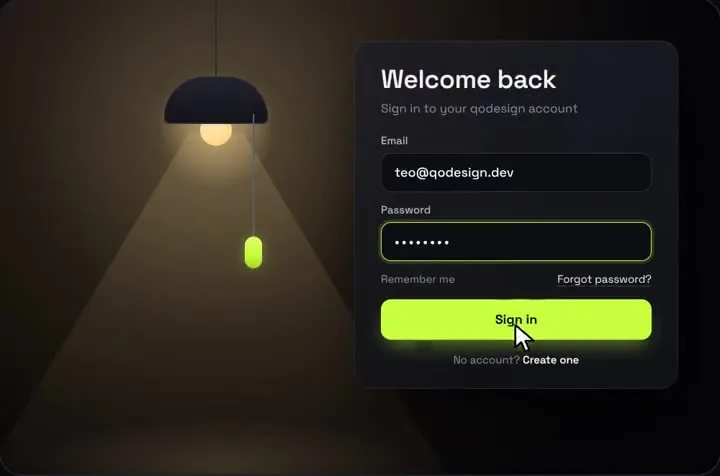
The pull-cord lamp login calling Better Auth's signIn.email: Better Auth's own error text on a wrong password, a shake, and a redirect when it works.
Use it in Next.js
"use client";
import { useState } from "react";
import { useRouter } from "next/navigation";
import PullCordLogin from "@/components/PullCordLogin";
import { authClient } from "@/lib/auth-client";

export default function SignInPage() {
  const router = useRouter();
  const [error, setError] = useState("");

  return (
    <main className="relative grid min-h-dvh place-items-center overflow-hidden bg-[#07080c]">
      <PullCordLogin
        defaultOn
        subtitle="Sign in to your account"
        forgotHref="/forgot-password"
        onFooterAction={() => router.push("/sign-up")}
        onSubmit={async (email, password) => {
          setError("");
          const { error } = await authClient.signIn.email({ email, password });
          if (error) {
            setError(error.message ?? "Wrong email or password.");
            throw new Error("sign-in failed"); // the card shakes and the button resets
          }
          setTimeout(() => router.push("/dashboard"), 900); // let the success label show first
        }}
      />
      {error ? <p role="alert" className="absolute bottom-8 text-sm text-red-400">{error}</p> : null}
    </main>
  );
}import { createAuthClient } from "better-auth/react";
// Same origin as the app, so no baseURL is needed.
export const authClient = createAuthClient();import { auth } from "@/lib/auth";
import { toNextJsHandler } from "better-auth/next-js";
export const { GET, POST } = toNextJsHandler(auth);Good to know
- lib/auth.ts is your Better Auth server config from their installation guide, with emailAndPassword: { enabled: true } and your database. Set BETTER_AUTH_SECRET and BETTER_AUTH_URL in your env; the build warns without them.
- signIn.email returns { data, error } instead of throwing. The snippet throws on error so the card shakes, and prints Better Auth's message ("Invalid email or password") under it, since the piece has no error text of its own.
- Always call authClient from the browser, as Better Auth's docs say. For server components, read the session with auth.api.getSession({ headers: await headers() }).
- The room is drawn at 1000 x 660. On small screens, scale it with the className or style props.
Install
- Copy from the zipPut
react/src/componentsintosrc/, thennpm i framer-motion better-auth. - Or ask your AIPaste PROMPT.md into Cursor, Lovable or v0.
Props
- onSubmit
- (email, password) → promise; reject to shake
- defaultOn
- start with the light on
- onFooterAction
- the Create one link
- forgotHref
- your reset-password page
- accent
- bead and button colour
How qodesign compares
- qodesign vs Magic UIMagic UI is best for: landing pages built with shadcn/ui.
- qodesign vs Aceternity UIAceternity UI is best for: teams building many marketing pages who want one big library.
All comparisons, with prices read on each library's own site.
From the blog: Accessible Login Form in React: Labels, Errors, Motion
Questions
Does it work with GitHub or Google sign-in?
The piece is an email and password form. Put a button next to it that calls authClient.signIn.social({ provider: "github" }).
Why a timeout before the redirect?
It lets the success label show for a moment. Drop it if you'd rather redirect at once.
Can Cursor or v0 add it for me?
Yes. Each download has a PROMPT.md. Paste it into Cursor, Lovable, v0 or Claude Code and it fits the piece into your app.
Can I use it in client work?
Yes, in personal and client projects. You can't resell the code itself as a kit.