SuperTokens custom UI: an email and password login
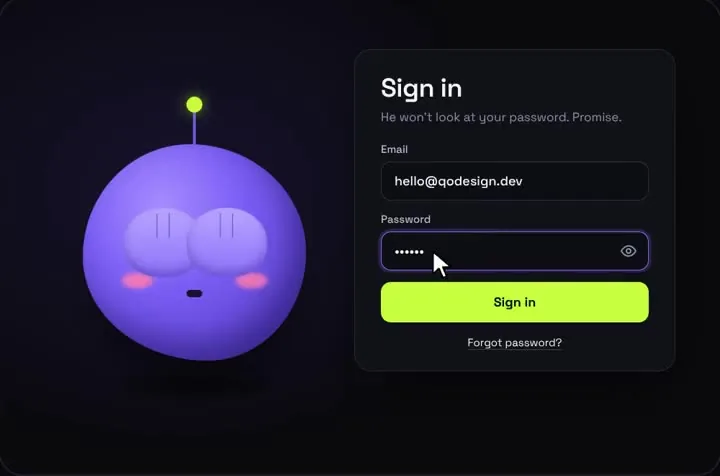
SuperTokens lets you skip its pre-built screens and call the SDK from your own form. This is that form: the shy mascot login calling signIn from supertokens-web-js, with every answer the call can give turned into something the mascot reacts to.
By buying you agree to the Terms.
- Download right after paying
- Use it in client projects
- Won't run on the listed stack? We fix it or refund you
Ready forCursorv0Lovableshadcn CLI
Use it in Next.js
"use client";
import { useEffect } from "react";
import { useRouter } from "next/navigation";
import { signIn } from "supertokens-web-js/recipe/emailpassword";
import Session from "supertokens-web-js/recipe/session";
import STGeneralError from "supertokens-web-js/utils/error";
import ShyEyesLogin from "@/components/ShyEyesLogin";
import { ensureSuperTokensInit } from "@/lib/supertokens";

ensureSuperTokensInit();

class SignInFailed extends Error {}

// Every status signIn can return in supertokens-web-js 0.16.0 becomes
// either a normal return (OK) or a thrown SignInFailed with a message to show.
async function signInWithSuperTokens(email: string, password: string) {
  let response;
  try {
    response = await signIn({
      formFields: [
        { id: "email", value: email },
        { id: "password", value: password },
      ],
    });
  } catch (err) {
    // A GENERAL_ERROR from your backend arrives as a thrown STGeneralError
    if (STGeneralError.isThisError(err)) throw new SignInFailed(err.message);
    throw new SignInFailed("We couldn't reach the server. Try again.");
  }

  switch (response.status) {
    case "OK":
      return; // the SDK has already stored the session
    case "FIELD_ERROR":
      throw new SignInFailed(response.formFields.map((f) => f.error).join(" "));
    case "WRONG_CREDENTIALS_ERROR":
      throw new SignInFailed("That email and password don't match.");
    case "SIGN_IN_NOT_ALLOWED":
      throw new SignInFailed(response.reason);
  }
}

export default function LoginCard() {
  const router = useRouter();

  // Already signed in? Skip the form.
  useEffect(() => {
    Session.doesSessionExist().then((signedIn) => {
      if (signedIn) router.replace("/dashboard");
    });
  }, [router]);

  return (
    <ShyEyesLogin
      title="Welcome back"
      forgotHref="/reset-password"
      resetAfter={null}
      signInError={(err) =>
        err instanceof SignInFailed ? err.message : "Something went wrong. Try again."
      }
      onSubmit={async (email, password) => {
        await signInWithSuperTokens(email, password);
        // Let the mascot's happy jump play, then leave
        setTimeout(() => router.replace("/dashboard"), 900);
      }}
    />
  );
}import SuperTokens from "supertokens-web-js";
import Session from "supertokens-web-js/recipe/session";
import EmailPassword from "supertokens-web-js/recipe/emailpassword";
let started = false;
// SuperTokens wraps fetch in the browser to attach and refresh the session,
// so it starts once, on the client only.
export function ensureSuperTokensInit() {
if (started || typeof window === "undefined") return;
SuperTokens.init({
appInfo: {
appName: "Acme",
apiDomain: process.env.NEXT_PUBLIC_API_DOMAIN ?? "http://localhost:3001",
apiBasePath: "/auth",
},
recipeList: [Session.init(), EmailPassword.init()],
});
started = true;
}"use client";
import { ensureSuperTokensInit } from "@/lib/supertokens";
ensureSuperTokensInit();
// Render once in app/layout.tsx: <body><SuperTokensInit />{children}</body>
export default function SuperTokensInit() {
return null;
}import type { ReactNode } from "react";
import SuperTokensInit from "./supertokens-init";
export default function RootLayout({ children }: { children: ReactNode }) {
return (
<html lang="en">
<body>
<SuperTokensInit />
{children}
</body>
</html>
);
}import LoginCard from "./login-card";
export const metadata = { title: "Sign in" };
export default function LoginPage() {
return (
<main className="grid min-h-dvh place-items-center bg-neutral-950 p-4">
<LoginCard />
</main>
);
}Good to know
- signIn sends the email and password as formFields with the ids "email" and "password", the same ids SuperTokens uses in its own custom UI example. Keep them even if your labels say something else.
- After an OK, the SDK keeps the session for you. SuperTokens' setup guide says the session tokens come back in the response headers and "are automatically handled by our frontend SDK for you." On the web that means httpOnly cookies by default, so your form code never touches a token.
- The doesSessionExist check in LoginCard only skips the form for someone already signed in. It doesn't protect anything. Check the session on the server with supertokens-node (24.0.4, published October 21, 2026): its supertokens-node/nextjs export has getSSRSession for Server Components and withSession for route handlers. We read those names from the 24.0.4 types and didn't run them.
- If your SuperTokens API runs on a different domain from the site, the backend has to allow credentialed CORS requests with SuperTokens' headers. supertokens-node gives you the header list through getAllCORSHeaders().
- Type-checked in a scratch project against supertokens-web-js 0.16.0, next 16.4.3, react 19.3.1, @types/react 19.3.0, framer-motion 14.6.0 and TypeScript 5.9.3, with the shipped ShyEyesLogin source. We also built it with next build and ran it in headless Chromium at 390 and 1440 px against a small stand-in server that answers POST /auth/signin with the documented statuses. A wrong password showed "That email and password don't match.", a SIGN_IN_NOT_ALLOWED reason showed as written, and OK went to /dashboard after the happy jump, with no sideways scroll. It hasn't run against a real SuperTokens core or supertokens-node backend, so real session cookies and refresh weren't tested.
- The mascot is one sign-in card. Sign-up, password reset and email verification aren't in it. With a custom UI you build those screens too, using signUp, sendPasswordResetEmail and submitNewPassword from the same import. All three take formFields the same way signIn does.
SuperTokens custom UI or the pre-built UI: which one fits
- SuperTokens gives React apps two ways in. Its email and password setup guide says it "uses the SuperTokens pre-built UI components. If you want to create your own interface please check the Custom UI tutorial." Both are free. The pre-built screens come from supertokens-auth-react and the custom UI calls come from supertokens-web-js, and both packages are Apache 2.0.
- Start with the pre-built UI if you need the whole flow working soon. At /auth it renders a sign-in and a sign-up form, /auth/reset-password handles forgotten passwords, and there are email verification screens as well (SuperTokens' UI showcase lists them all). You can change its colours with CSS variables in the style option, restyle any element through its data-supertokens attribute, or override its React components. The override docs say each override "should also render the original component".
- Two things push people to a custom UI. The pre-built UI renders inside a shadow DOM, and SuperTokens' docs list what that costs: "You cannot override the prebuilt UI CSS directly through your CSS files" and "Password managers may not work for your end user." useShadowDom: false fixes both, but then your CSS can reach into its components. The other is a sign-in that doesn't look like a form card at all, like a character that hides its eyes while you type a password. That's easier to build straight on the SDK calls.
- A custom UI means you build every screen yourself: sign-in, sign-up, password reset and email verification. If you only want a different colour on the sign-in step, the pre-built UI with a style override is the better choice.
supertokens-web-js signIn: four statuses and one thrown error
- We read this from the supertokens-web-js 0.16.0 types on October 25, 2026. Import signIn from "supertokens-web-js/recipe/emailpassword" and pass { formFields: [{ id: "email", value }, { id: "password", value }] }. It resolves to one of four statuses: OK with the user, FIELD_ERROR with a formFields list of { id, error }, WRONG_CREDENTIALS_ERROR, or SIGN_IN_NOT_ALLOWED with a reason.
- GENERAL_ERROR isn't one of them. The types say signIn throws an STGeneralError when the backend answers with that status, so the snippet catches it and checks STGeneralError.isThisError(err). Custom messages you send from a backend override arrive this way.
- SIGN_IN_NOT_ALLOWED shows up with account linking and multi-factor setups. SuperTokens' docs call the reason a user friendly message that can carry a support code, so the snippet shows it unchanged.
- Two calls that look right fail the type-check against 0.16.0: signIn({ email, password }), and a check for status "GENERAL_ERROR" on the result.
- supertokens-auth-react 0.51.3 exports the same signIn from supertokens-auth-react/recipe/emailpassword, with the same input and statuses, and lists supertokens-web-js ^0.16.0 as a peer dependency. So if you keep the pre-built UI for sign-up and reset, you can call signIn from there with that package's own init. We only type-checked the supertokens-web-js route.
SuperTokens packages in October 2026
- supertokens-web-js 0.16.0 was published August 15, 2025 and is still the latest version. npm counted 67,384 downloads in the week of October 16 to 22, 2026. It has no React dependency at all, so React 19 doesn't matter to it.
- supertokens-auth-react 0.51.3 came out July 30, 2026, with 50,811 downloads that week, and its React peer range is >=16.8.0. supertokens-node 24.0.4 came out October 21, 2026, with 33,124. Neither frontend repo on GitHub is archived. Both were last pushed August 25, 2026.
Install
- Copy from the zipPut
react/src/componentsintosrc/, thennpm i framer-motion supertokens-web-js. - Or ask your AIPaste PROMPT.md into Cursor, Lovable or v0.
Props
- onSubmit
- (email, password) → promise; throw to shake
- signInError
- message, or a function of the thrown error
- forgotHref
- your reset-password page
- resetAfter
- null keeps the success state
- error
- a controlled message above the button
- accent
- button colour
How qodesign compares
- qodesign vs Magic UIMagic UI is best for: landing pages built with shadcn/ui.
- qodesign vs Aceternity UIAceternity UI is best for: teams building many marketing pages who want one big library.
All comparisons, with prices read on each library's own site.
Questions
What is SuperTokens custom UI?
It's SuperTokens' name for building the login screens yourself and calling its frontend SDK from them, instead of using its pre-built screens. On the web that SDK is supertokens-web-js. signIn, signUp and the password reset calls come from supertokens-web-js/recipe/emailpassword.
Do I need supertokens-auth-react for a custom UI?
No. SuperTokens' custom UI setup installs supertokens-web-js only. supertokens-auth-react is the package for the pre-built UI. It exports the same signIn too, which helps if you use both.
Does it work with React 19?
Yes for this setup. supertokens-web-js has no React dependency, and we ran the snippet on React 19.3.1. supertokens-auth-react 0.51.3 accepts React 16.8 and newer.
Where does the session go after signIn?
The SDK stores it. On the web it uses httpOnly cookies by default and refreshes them as your app makes requests. That's also why SuperTokens.init has to run in the browser before any call, which the init file handles.
Can Cursor or v0 add it for me?
Yes. Each download has a PROMPT.md. Paste it into Cursor, Lovable, v0 or Claude Code and it fits the piece into your app.
Can I use it in client work?
Yes, in personal and client projects. You can't resell the code itself as a kit.
Which Tailwind version?
The package is set up with Tailwind CSS 3.4. Styles that Tailwind can't express live in a small CSS file next to the component.