Framer Motion login form
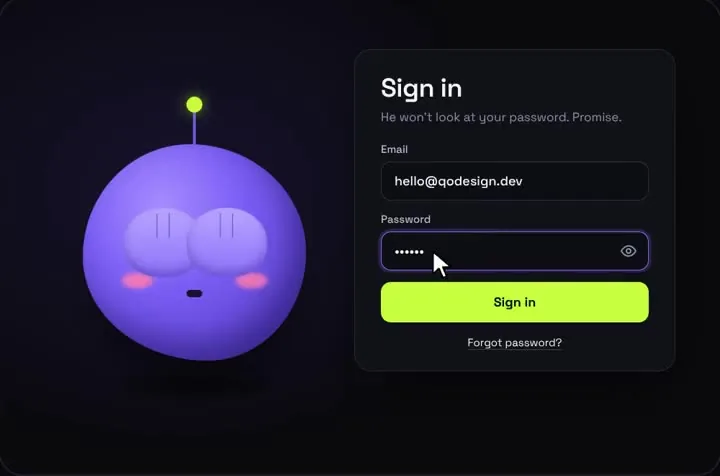
A login form with a mascot who watches you type your email and covers his eyes for the password. React, Tailwind and Framer Motion, for the Next.js App Router.
By buying you agree to the Terms and ask for instant access, so you lose the 14-day withdrawal right. When we still refundWe'll also email you when a new piece lands (about once a week). Unsubscribe in one click, anytime.
Use it in Next.js
"use client";
import { useRouter } from "next/navigation";
import ShyEyesLogin from "@/components/ShyEyesLogin";
import { signIn } from "./actions";

export default function LoginPage() {
  const router = useRouter();
  return (
    <ShyEyesLogin
      signInError="Wrong email or password"
      onSubmit={async (email, password) => {
        const ok = await signIn(email, password);
        // false: he shakes his head. true: two happy hops, then go on.
        if (ok) setTimeout(() => router.push("/dashboard"), 1800);
        return ok;
      }}
    />
  );
}"use server";
export async function signIn(email: string, password: string) {
// Check the password with Supabase, Clerk, Auth.js, Better Auth or your own database.
const ok = await checkPassword(email, password);
return ok;
}Good to know
- Framer Motion runs the reactions to the result. useAnimate plays the small head shake when onSubmit rejects or resolves false, and two happy hops when it succeeds.
- useReducedMotion skips the shake and the hops for visitors who ask for less motion, and a prefers-reduced-motion rule in the CSS calms the rest.
- The eyes follow the text caret while you type the email. The component measures where the caret sits and moves the pupils with a CSS transform. Focus the password field and his hands come up.
- The other two login forms on the shelf use Framer Motion differently. Spotlight Lamp Login draws its beam on useAnimationFrame. Pull-Cord Login runs its own cord physics on useAnimationFrame and shakes the card with useAnimate.
- The mascot login page below has the full props table.
Install
- Copy from the zipPut
react/src/componentsintosrc/, thennpm i framer-motion. - Or ask your AIPaste PROMPT.md into Cursor, Lovable or v0.
Props
- onSubmit
- (email, password), reject or resolve false for a failed sign-in
- signInError
- message shown after a failed sign-in
- accent
- button colour
- title / submitLabel
- every label is a prop
How qodesign compares
- qodesign vs Magic UIMagic UI is best for: landing pages built with shadcn/ui.
- qodesign vs Aceternity UIAceternity UI is best for: teams building many marketing pages who want one big library.
All comparisons, with prices read on each library's own site.
From the blog: Eyes That Follow the Cursor in React and Tailwind
From the blog: Accessible Login Form in React: Labels, Errors, Motion
Questions
Which framer-motion version does it need?
The package.json asks for framer-motion ^11.11.0. Install that and the component works as shipped.
Can I import from motion/react instead?
We haven't tested this piece with the motion package yet. The files import from framer-motion, so keep that dependency.
Does it handle authentication?
No, it's the interface. onSubmit calls your own check: Supabase, Clerk, Auth.js, Better Auth or an API route.
Can Cursor or v0 add it for me?
Yes. Each download has a PROMPT.md. Paste it into Cursor, Lovable, v0 or Claude Code and it fits the piece into your app.
Can I use it in client work?
Yes, in personal and client projects. You can't resell the code itself as a kit.