Supabase Storage delete file from Next.js, with a hold-to-delete file card
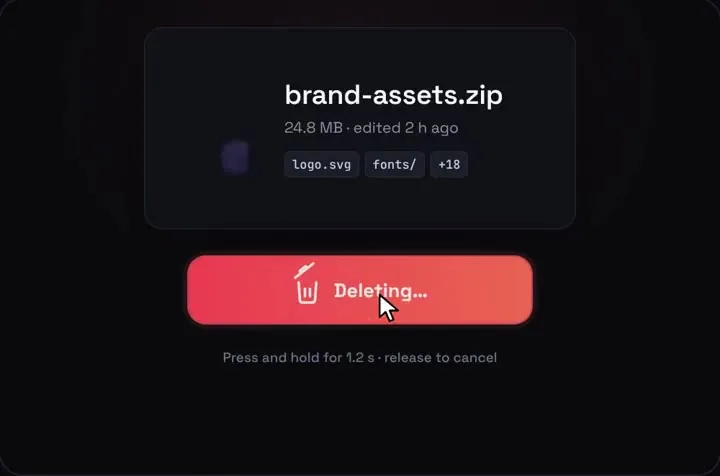
Supabase deletes a file with storage.from(bucket).remove([path]). It's free, and with two RLS policies on storage.objects it's the whole job: one server action and any button. The catch that sends people searching is that a blocked delete doesn't throw. You get an empty array back and the file stays. If you'd also like a delete that can't fire on a misclick, Hold to Delete shows the file as a card, asks for a 1.2 second hold and gives five seconds to undo before remove() runs.
By buying you agree to the Terms.
- Download right after paying
- Use it in client projects
- Won't run on the listed stack? We fix it or refund you
Ready forCursorv0Lovableshadcn CLI
Supabase Storage delete file: the server action (free, works with any button)
"use server";
import { revalidatePath } from "next/cache";
import { createClient } from "@/lib/supabase/server";

const BUCKET = "documents";

export async function deleteFile(path: string): Promise<{ error?: string }> {
  // the signed-in user's own client: your Storage RLS policies decide what it may delete
  const supabase = await createClient();
  const { data: auth } = await supabase.auth.getClaims();
  if (!auth?.claims.sub) return { error: "You're signed out. Sign in and try again." };

  const { data, error } = await supabase.storage.from(BUCKET).remove([path]);
  if (error) return { error: error.message };

  // remove() answers with the objects it actually deleted. A path your policies
  // block, or a path that isn't there, is left out of that list with no error.
  if (data.length === 0) {
    return { error: "Nothing was deleted. The file is gone already, or your delete policy doesn't cover it." };
  }

  revalidatePath("/files");
  return {};
}-- remove() needs DELETE and SELECT on storage.objects (supabase-js 2.118.0 notes).
-- These two let a signed-in user delete only the files they uploaded to "documents".
create policy "Users can read their own documents"
on storage.objects for select
to authenticated
using (
bucket_id = 'documents'
and owner_id = (select auth.uid()::text)
);
create policy "Users can delete their own documents"
on storage.objects for delete
to authenticated
using (
bucket_id = 'documents'
and owner_id = (select auth.uid()::text)
);import { createServerClient } from "@supabase/ssr";
import { cookies } from "next/headers";
// Supabase's own server client for Next.js (from its SSR guide)
export async function createClient() {
const cookieStore = await cookies();
return createServerClient(
process.env.NEXT_PUBLIC_SUPABASE_URL!,
process.env.NEXT_PUBLIC_SUPABASE_PUBLISHABLE_KEY!,
{
cookies: {
getAll() {
return cookieStore.getAll();
},
setAll(cookiesToSet) {
try {
cookiesToSet.forEach(({ name, value, options }) => cookieStore.set(name, value, options));
} catch {
// called from a Server Component; the proxy refreshes the session
}
},
},
},
);
}"use client";
import { useTransition } from "react";
import { deleteFile } from "./actions";
// The free route: the same server action behind a plain confirm.
// Swap window.confirm for shadcn's AlertDialog if you use shadcn.
export function FreeDeleteButton({ path, name }: { path: string; name: string }) {
const [pending, startTransition] = useTransition();
return (
<button
type="button"
disabled={pending}
onClick={() => {
if (!window.confirm(`Delete ${name}? This can't be undone.`)) return;
startTransition(async () => {
const { error } = await deleteFile(path);
if (error) alert(error);
});
}}
>
{pending ? "Deleting…" : "Delete"}
</button>
);
}// Server only: call it from a server action or route handler.
import type { SupabaseClient } from "@supabase/supabase-js";
// Supabase Storage has no "delete folder" call: a folder is just a shared
// path prefix. List what's under it and remove() the files, at most 1000 at a time.
export async function emptyFolder(supabase: SupabaseClient, bucket: string, folder: string) {
const storage = supabase.storage.from(bucket);
let removed = 0;
for (;;) {
const { data: items, error } = await storage.list(folder, { limit: 1000 });
if (error) throw error;
if (items.length === 0) return removed;
// folders come back with id null: empty them first
for (const sub of items.filter((item) => item.id === null)) {
removed += await emptyFolder(supabase, bucket, `${folder}/${sub.name}`);
}
const paths = items.filter((item) => item.id !== null).map((item) => `${folder}/${item.name}`);
if (paths.length === 0) return removed;
const { data, error: removeError } = await storage.remove(paths);
if (removeError) throw removeError;
// fewer deleted than asked: a policy is blocking some files, stop instead of looping
if (data.length < paths.length) {
throw new Error(`Deleted ${data.length} of ${paths.length} files in ${folder}. Check your delete and select policies.`);
}
removed += data.length;
}
}"use client";
import { useEffect, useState } from "react";
// Hold to Delete draws on a fixed 1000 x 660 stage. This scales it to the
// width of its box and hands back a helper that moves keyboard focus inside.
export function useHoldStage() {
const [el, setEl] = useState<HTMLDivElement | null>(null);
const [scale, setScale] = useState(0);
useEffect(() => {
if (!el) return;
const ro = new ResizeObserver(([entry]) => setScale(entry.contentRect.width / 1000));
ro.observe(el);
return () => ro.disconnect();
}, [el]);
const focusIn = (selector: string, delay = 0) =>
window.setTimeout(() => el?.querySelector<HTMLElement>(selector)?.focus(), delay);
return { ref: setEl, scale, focusIn };
}"use client";
import { useState } from "react";
import { useRouter } from "next/navigation";
import HoldToDelete from "@/components/HoldToDelete";
import { useHoldStage } from "@/components/hold-stage";
import { deleteFile } from "../actions";
type Props = { path: string; name: string; meta: string };
export function FileCard({ path, name, meta }: Props) {
const router = useRouter();
const { ref, scale, focusIn } = useHoldStage();
const [attempt, setAttempt] = useState(0); // a new key puts the file back
const [message, setMessage] = useState("");
const ext = name.includes(".") ? name.split(".").pop()!.slice(0, 4).toUpperCase() : "FILE";
// runs only when the undo window is over: the one call that can't be taken back
const commit = async () => {
const { error } = await deleteFile(path);
if (error) {
setMessage(`${name} was not deleted: ${error}`);
setAttempt((n) => n + 1);
return;
}
router.replace("/files");
};
return (
<section className="space-y-3">
<div ref={ref} className="relative aspect-[1000/660] w-full overflow-hidden rounded-xl">
{scale > 0 && (
<HoldToDelete
key={attempt}
fileName={name}
fileMeta={meta}
fileType={ext}
tags={[]}
emptyText="File deleted"
restoreLabel={null}
onDelete={() => focusIn(".qhd-toast button", 1100)}
onUndo={() => focusIn(".qhd-hold")}
onCommit={commit}
style={{ position: "absolute", left: 0, top: 0, transform: `scale(${scale})`, transformOrigin: "0 0" }}
/>
)}
</div>
<p role="alert" className="text-sm text-red-600">{message}</p>
</section>
);
}import { notFound, redirect } from "next/navigation";
import { createClient } from "@/lib/supabase/server";
import { FileCard } from "./file-card";
import { FreeDeleteButton } from "../free-delete-button";
// /files/<name>: one file in the user's own folder of the "documents" bucket
export default async function FilePage({ params }: { params: Promise<{ name: string }> }) {
const { name: raw } = await params;
const name = decodeURIComponent(raw);
const supabase = await createClient();
const { data: auth } = await supabase.auth.getClaims();
const userId = auth?.claims.sub;
if (!userId) redirect("/login");
const { data: files } = await supabase.storage.from("documents").list(userId, { search: name, limit: 100 });
const file = files?.find((f) => f.name === name && f.id !== null);
if (!file) notFound();
const kb = Math.max(1, Math.round(Number(file.metadata?.size ?? 0) / 1024));
const meta = `${kb} KB · uploaded ${new Date(file.created_at ?? Date.now()).toLocaleDateString("en")}`;
return (
<main className="mx-auto max-w-2xl space-y-6 p-6">
<h1 className="text-xl font-semibold">{name}</h1>
<p>Hold the button to delete it. You get five seconds to undo before anything is sent.</p>
<FileCard path={`${userId}/${name}`} name={name} meta={meta} />
<details className="text-sm">
<summary>Can't hold the button?</summary>
<div className="mt-2">
<FreeDeleteButton path={`${userId}/${name}`} name={name} />
</div>
</details>
</main>
);
}Good to know
- The action uses the signed-in user's own Supabase client, not a secret key, so your Storage policies decide what each person can delete. Never put the secret key (or the legacy service_role key) in client code. It skips every policy.
- Check data.length after remove(). An error only means the request failed. A file your policies hide, or a path that isn't there, is simply missing from data, so data.length === 0 is how you spot a blocked delete. The snippet turns that into a message the user can read.
- Hold to Delete calls onCommit only when the five-second undo window runs out, so remove() never runs for someone who pressed Undo. If the tab closes during that window, nothing is deleted. That's the safe way to fail.
- The piece is one file card that crumples into a bin, drawn on a 1000 x 660 stage. It fits a file's own page or a preview panel. For a long list of files, use the plain button per row and keep the card for the file someone has open.
- Holding is slower than clicking, and some people can't hold a key or a touch for a second. That's why the page keeps the plain button under "Can't hold the button?". The piece also gives no spoken progress while held; a screen reader user hears the button's label only.
- What we ran on Oct 25 2026: every TypeScript file on this page type-checks with TypeScript 5.9.3 against @supabase/supabase-js 2.118.0, @supabase/ssr 0.12.7, next 15.5.28, @types/react 19.3.0, framer-motion 14.6.0 and the shipped HoldToDelete. Three deliberate mistakes fail that check: remove() given a string instead of an array, data used without checking error first, and an onCommit that expects an argument. We didn't call a real Supabase project, so the empty-array behaviour comes from reading the source, not from a live delete. The SQL wasn't run, and we didn't test Safari, Firefox, a real phone or a screen reader.
Why Supabase Storage remove() returns an empty array
- This is the "remove not working" case: no error, data is [], and the file is still in the bucket. We read the Storage server's source on GitHub on Oct 25 2026. Its delete route locks the paths you sent, asks Postgres which of the existing ones your policies let you delete, deletes only those, and answers 200 with that list. A path that doesn't exist, or one your policies won't let you see or delete, is dropped from the answer without an error.
- The notes on remove() in storage-js 2.118.0 list what it needs: "objects table permissions: delete and select", and nothing on the buckets table. So a DELETE policy alone isn't enough. If the user can't select the row, they can't delete it either, and you get the same empty array.
- Two more ways to hit it. Files uploaded from the Dashboard or with the secret key have no owner, per Supabase's Ownership guide ("When using the service_key to create a resource, the owner will not be set"), so an owner_id policy never matches them. And the path is relative to the bucket: "documents/report.pdf" sent to the documents bucket looks for a file named documents/report.pdf, which is usually not the one you meant.
Supabase storage delete policy: the SQL
- storage-delete-policies.sql above adds a select policy and a delete policy on storage.objects, both limited to the documents bucket and to rows whose owner_id is the signed-in user. The delete policy is the one Supabase's Ownership guide shows, with a bucket check added. owner_id is set to the JWT's sub when a user uploads, so the same user can delete it later.
- Supabase's Delete Objects page shows the same delete policy written with owner. The Ownership guide says "owner is deprecated and will be removed. Use owner_id instead." That's why the SQL here uses owner_id.
- If your app stores each user's files under a folder named after their id (the common upload pattern), you can match on (storage.foldername(name))[1] = (select auth.jwt() ->> 'sub') instead, the way Supabase's Access Control guide does for uploads. Whichever you choose, give select and delete the same rule.
Delete through the API, never with SQL
- Supabase's Delete Objects guide is blunt about this: "Deleting objects should always be done via the Storage API and NOT via a SQL query. Deleting objects via a SQL query will not remove the object from the bucket and will result in the object being orphaned." The Storage schema page adds that the file then becomes "inaccessible, but you'll still be billed for it."
- So a delete from storage.objects in SQL isn't a real delete. Call remove() from your server, as above.
Supabase storage delete folder
- There's no delete-folder call. A folder is only a shared path prefix. empty-folder.ts lists what's inside, goes into subfolders first (list() returns them with id null), and removes the files in batches. remove() takes at most 1000 paths per call, per Supabase's Delete Objects guide, and list() returns 100 items unless you pass a limit.
- It stops with an error when remove() deletes fewer files than it was given, instead of listing the same blocked files forever. For a whole bucket over 200,000 objects, the same guide says the Dashboard and Storage API can't empty it and points to the AWS CLI with Supabase's S3 endpoint.
When a plain button fits better than holding
- For most apps the free route is enough: free-delete-button.tsx calls the same server action after window.confirm. If you use shadcn, its AlertDialog is the standard version, and our shadcn delete confirmation dialog guide shows one that stays open while the delete runs.
- Hold to Delete earns its place when the file matters and a misclick would hurt: a contract, an export, the only copy of something. It's a worse fit for a gallery where people clear dozens of images in a row.
Tailwind v4 and shadcn apps
- In our Oct 25 2026 check of every piece on Tailwind v4, Hold to Delete works as-is with no config change. We re-read its CSS file today: every selector starts with qhd-, both keyframes are named qhd-, and there's no :root, html or body rule, so your shadcn Buttons and theme stay as they are.
Install
- Copy from the zipPut
react/src/componentsintosrc/, thennpm i @supabase/supabase-js @supabase/ssr framer-motion. - Or ask your AIPaste PROMPT.md into Cursor, Lovable or v0.
Props
- onCommit
- the undo window ran out: call remove() here
- onUndo
- Undo was pressed and nothing was sent
- fileName / fileMeta / fileType
- the object's name, a size and date line, a short label like PDF
- emptyText / toastText
- the text after the hold
- holdMs / undoMs
- 1200 ms hold and 5000 ms undo by default
How qodesign compares
- qodesign vs UiverseUiverse is best for: single small elements: buttons, loaders, toggles, checkboxes, inputs.
- qodesign vs AnimataAnimata is best for: free animated building blocks you copy and adapt.
- qodesign vs Motion PrimitivesMotion Primitives is best for: small motion building blocks you compose yourself: text effects, number tickers, dialogs, toolbars.
All comparisons, with prices read on each library's own site.
Questions
Why does Supabase Storage remove() return an empty array?
Nothing was deleted. Either the path doesn't exist or your policies don't let this user select and delete that row. remove() doesn't return an error for either case, so check data.length.
What policies does remove() need?
Delete and select on storage.objects, per the notes in storage-js 2.118.0. Nothing on storage.buckets.
Can I delete a Storage file with SQL?
No. Supabase says a SQL delete leaves the file in the bucket, orphaned, and you keep paying for it. Use remove().
How do I delete a folder in Supabase Storage?
List it and remove the files, at most 1000 per call. Subfolders come back from list() with id null; empty those first. empty-folder.ts above does this.
Should I use the service role key to delete?
Only on a server, and only for admin jobs. It skips every policy. For user deletes, the user's own client keeps your policies in charge.
Will it change my shadcn styles?
No. Hold to Delete's CSS only targets its own qhd- classes, with no :root, html or body rules.
Can Cursor or v0 add it for me?
Yes. Each download has a PROMPT.md. Paste it into Cursor, Lovable, v0 or Claude Code and it fits the piece into your app.
Can I use it in client work?
Yes, in personal and client projects. You can't resell the code itself as a kit.