A react-stripe-checkout alternative
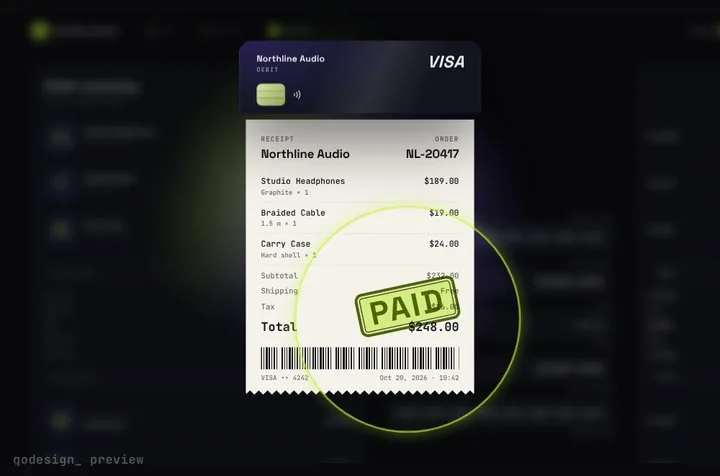
react-stripe-checkout wraps Stripe's legacy Checkout popup and hasn't had a release since 2017. This is the current route: a PaymentIntent on your server and Stripe's own card fields inside a checkout that turns into a receipt when the payment clears.
By buying you agree to the Terms.
- Download right after paying
- Use it in client projects
- Won't run on the listed stack? We fix it or refund you
Ready forCursorv0Lovableshadcn CLI
Use it in Next.js
"use client";
// Before: <StripeCheckout stripeKey="pk_..." token={onToken} amount={24800} name="Northline Audio" />
import { useRef } from "react";
import { loadStripe } from "@stripe/stripe-js";
import { Elements, CardNumberElement, CardExpiryElement, CardCvcElement, useStripe, useElements } from "@stripe/react-stripe-js";
import { CheckoutReceiptMorph } from "@/components/CheckoutReceiptMorph";

const stripePromise = loadStripe(process.env.NEXT_PUBLIC_STRIPE_PUBLISHABLE_KEY!); // was stripeKey
const style = { base: { color: "#F4F2FF", fontSize: "16px" } };

function Pay({ clientSecret }: { clientSecret: string }) {
  const stripe = useStripe();
  const elements = useElements();
  const done = useRef({ number: false, expiry: false, cvc: false }).current;

  return (
    <CheckoutReceiptMorph
      autoplayDemo={false}
      renderCardFields={(slot) => {
        const track = (k: keyof typeof done) => (e: { complete: boolean; brand?: string }) => {
          done[k] = e.complete;
          slot.onChange({ complete: done.number && done.expiry && done.cvc, ...(e.brand ? { brand: e.brand } : {}) });
        };
        return (
          <div className="grid gap-3">
            <div className={slot.fieldClassName}><CardNumberElement options={{ style }} onChange={track("number")} /></div>
            <div className={slot.fieldClassName}><CardExpiryElement options={{ style }} onChange={track("expiry")} /></div>
            <div className={slot.fieldClassName}>
              <CardCvcElement options={{ style }} onChange={track("cvc")}
                onFocus={() => slot.onChange({ focus: "cvc" })} onBlur={() => slot.onChange({ focus: null })} />
            </div>
          </div>
        );
      }}
      onConfirm={async ({ name }) => {
        // was the token callback: Stripe confirms the payment here, no token goes to your server
        const card = elements?.getElement(CardNumberElement);
        if (!stripe || !card) return { ok: false, message: "Stripe hasn't loaded yet." };
        const { error, paymentIntent } = await stripe.confirmCardPayment(clientSecret, { payment_method: { card, billing_details: { name } } });
        if (error) return { ok: false, message: error.message };
        return { ok: paymentIntent?.status === "succeeded" };
      }}
      onComplete={(receipt) => console.log("paid", receipt.orderId)}
    />
  );
}

export default function Checkout({ clientSecret }: { clientSecret: string }) {
  return (
    <Elements stripe={stripePromise} options={{ clientSecret }}>
      <Pay clientSecret={clientSecret} />
    </Elements>
  );
}import Stripe from "stripe";
import Checkout from "./checkout";
const stripe = new Stripe(process.env.STRIPE_SECRET_KEY!);
export const dynamic = "force-dynamic";
export default async function PayPage() {
// was the amount prop: the server sets it now, so the browser can't change it
const intent = await stripe.paymentIntents.create({
amount: 24800, // in cents
currency: "usd",
automatic_payment_methods: { enabled: true, allow_redirects: "never" },
});
return (
<main className="grid min-h-dvh place-items-center overflow-hidden bg-[#0b0a14] p-4">
<Checkout clientSecret={intent.client_secret!} />
</main>
);
}Good to know
- react-stripe-checkout 2.6.3 is its last release, published July 30, 2017. The GitHub repo had its last push in August 2020 and has 40 open issues. npm still counted 9,308 downloads in the last week of October 2026.
- Its README says token and stripeKey are the only required props and points to Stripe's legacy Checkout docs. Stripe's migration guide describes legacy Checkout as "a modal dialog that collected card information, and returned a token or a source to your website", which your server then charged.
- react-stripe-js (@stripe/react-stripe-js) is Stripe's own React library. It gives you the card fields; it doesn't draw a checkout around them. This page uses it inside the receipt checkout.
- If you want Stripe to host the whole payment page, the free route is Stripe Checkout today: create a Checkout Session on the server and redirect. Our Stripe cart drawer guide shows that. Pick this page when the payment should happen inside your own design.
- The receipt prints after confirmCardPayment succeeds. That isn't proof of payment for fulfilment; ship orders from Stripe's payment_intent.succeeded webhook.
- We type-checked both files against stripe 23.0, @stripe/stripe-js 10.1, @stripe/react-stripe-js 7.0 and Next.js 15.5. We didn't run them against a live Stripe account.
What each react-stripe-checkout prop becomes
- stripeKey: loadStripe(NEXT_PUBLIC_STRIPE_PUBLISHABLE_KEY), passed to Elements.
- token: gone. onConfirm calls stripe.confirmCardPayment with the PaymentIntent's client secret, so there is no token for your server to charge.
- amount and currency: set on the server when you create the PaymentIntent (app/pay/page.tsx).
- name, description and image (the popup header): pass your store name, line items and totals in the order prop. Leave it out and the receipt prints the demo store.
- email and billing address: pass them in billing_details inside confirmCardPayment.
- label and panelLabel (button text): the Pay button is part of the checkout. Its text lives in the component file, which you can edit.
Install
- Copy from the zipPut
react/src/components + react/src/dataintosrc/, thennpm uninstall react-stripe-checkout && npm i framer-motion stripe @stripe/stripe-js @stripe/react-stripe-js. - Or ask your AIPaste PROMPT.md into Cursor, Lovable or v0.
Props
- renderCardFields
- Stripe Elements inside the design
- onConfirm
- confirm with Stripe, resolve { ok, message? }
- order
- store name, line items and totals for the receipt
- onComplete
- the stamped receipt
How qodesign compares
- qodesign vs 21st.dev21st.dev is best for: browsing a huge marketplace and copying many components a month.
- qodesign vs Skiper UISkiper UI is best for: unusual interaction details for landing pages: image reveals, cursor trails, tooltips, drag-and-scroll galleries.
All comparisons, with prices read on each library's own site.
Questions
Is react-stripe-checkout deprecated?
npm doesn't flag it, but its last release was in July 2017 and it wraps legacy Checkout, which Stripe documents under "Migrate from legacy Checkout".
react-stripe-checkout or react-stripe-js?
For new code, react-stripe-js. It's Stripe's maintained React library and works with PaymentIntents. This checkout uses its card fields.
Do card numbers touch my server?
No. With renderCardFields the digits stay inside Stripe's iframes. Your server only creates the PaymentIntent.
Does the checkout work in Next.js?
Yes, as a client component. Keep "use client" at the top of the file that renders it, as in the snippet above. App Router and Pages Router both work.
Can I use it in client work?
Yes, in personal and client projects. You can't resell the code itself as a kit.