HeroUI navbar in v3, and an animated one for Next.js
HeroUI v3 has no Navbar component. Here is what HeroUI tells you to build instead, when to keep the v2 Navbar, and a Next.js navbar built around the Dynamic Island: page search, a live notification, and real links in the footer.
By buying you agree to the Terms.
- Download right after paying
- Use it in client projects
- Won't run on the listed stack? We fix it or refund you
Ready forCursorv0Lovableshadcn CLI
Use it in Next.js
import type { ReactNode } from "react";
import "./globals.css";
import { SiteNav } from "./site-nav";
import { SiteFooter } from "./site-footer";

export default function RootLayout({ children }: { children: ReactNode }) {
  return (
    <html lang="en">
      <body className="bg-background text-foreground">
        <SiteNav />
        {/* room for the island: 76 px tall at top 16 (60 px on phones) */}
        <main className="mx-auto max-w-5xl px-4 pt-28">{children}</main>
        <SiteFooter />
      </body>
    </html>
  );
}"use client";
import { useRouter } from "next/navigation";
import DynamicIsland from "@/components/DynamicIsland";
import { PAGES } from "./pages";
export function SiteNav() {
const router = useRouter();
return (
// The island is absolutely positioned, so a fixed, zero-height header is enough.
<header className="fixed inset-x-0 top-0 z-40">
<DynamicIsland
size="auto"
top={16}
tabs={["search", "notify"]}
items={PAGES.map((page) => page.label)}
resultTag="Page"
searchPlaceholder="Search pages"
avatar="A"
notificationTitle="Deploy finished"
notificationText="main is live on production"
notificationAction="Open"
onHome={() => router.push("/")}
onSelect={(label) => {
const page = PAGES.find((p) => p.label === label);
if (page) router.push(page.href);
}}
onNotificationAction={() => router.push("/deploys")}
/>
</header>
);
}export const PAGES = [
{ label: "Dashboard", href: "/dashboard" },
{ label: "Deploys", href: "/deploys" },
{ label: "Billing", href: "/billing" },
{ label: "Team settings", href: "/settings/team" },
{ label: "API keys", href: "/settings/api-keys" },
{ label: "Docs", href: "/docs" },
];import NextLink from "next/link";
import { linkVariants } from "@heroui/styles";
import { PAGES } from "./pages";
// The island's search results are buttons, not links.
// Keep real links on every page for crawlers and for people who never open search.
export function SiteFooter() {
const slots = linkVariants();
return (
<footer className="mt-24 border-t border-separator">
<nav aria-label="Pages" className="mx-auto max-w-5xl px-4 py-6">
<ul className="flex flex-wrap gap-x-6 gap-y-2">
{PAGES.map((page) => (
<li key={page.href}>
<NextLink href={page.href} className={slots.base()}>
{page.label}
</NextLink>
</li>
))}
</ul>
</nav>
</footer>
);
}@import "tailwindcss";
@import "@heroui/styles";Good to know
- What we ran on Oct 25 2026: these five files and the shipped DynamicIsland.tsx in a scratch Next.js 16.4.3 app with React 19.3.1, @heroui/react 3.2.6, @heroui/styles 3.2.6, Tailwind CSS 4.3.3, framer-motion 14.6.0 and TypeScript 5.9.3. tsc and next build passed. A wrong tab name and a wrong onSelect type both failed tsc, so the props really are checked. In headless Chromium at 1440 px the island showed at its regular size; at 390 px size="auto" switched it to the compact size (344 px wide with search open). At both widths, typing "dep" listed Deploys, picking it went to /deploys, and nothing scrolled sideways.
- What we didn't run: a real phone, Safari or Firefox, a screen reader, or your own routes and HeroUI theme. The /deploys page in our run was a placeholder.
- The island's search results are buttons that call onSelect, not links. That's why the footer keeps a plain list of links: crawlers follow those, and so do people who never open search.
- The island's CSS names Space Grotesk and JetBrains Mono but doesn't load them. The demo loads them from Google Fonts in its index.html. In your app, load the same two fonts or change the names in dynamic-island.css to your theme's font. Otherwise it falls back to system-ui.
- The notification opens when someone taps the bell. To open it from code (say, when a deploy finishes), PROMPT.md in the download describes adding a state prop.
- On phones the open search box grows down over the top of your page. Keep the top padding on main (pt-28 above) so the closed island doesn't cover your heading.
HeroUI navbar in v3: the Navbar component is gone
- HeroUI's v2 to v3 migration guide for Navbar opens with: "The Navbar component has been removed in HeroUI v3. Build navigation bars manually using native HTML elements and Tailwind CSS classes." Its list of removed features includes "shouldHideOnScroll - Requires custom scroll detection" and "Mobile menu animations - Requires custom implementation".
- The v3 component list, read Oct 25 2026, has no Navbar and no Sidebar. Under Navigation it lists Accordion, Breadcrumbs, Disclosure, DisclosureGroup, Link, Pagination and Tabs. The old heroui.com/docs/components/navbar address now redirects to the migration guide, and the v2 Navbar docs are still up at v2.heroui.com.
- npm, week of Oct 16 to 22, 2026: @heroui/react 3.2.6 (published Sep 17 2026) had 477,326 downloads and needs react >=19.0.0 and tailwindcss >=4.0.0. The standalone v2 package @heroui/navbar 2.2.30 (published Mar 7 2026) still had 176,768, so a lot of apps run the v2 Navbar today.
The free routes, and when they fit better
- Keep the v2 Navbar. HeroUI's incremental migration guide runs v2 and v3 side by side and names Navbar among the v2 components with no v3 counterpart: "These components will continue to work during migration", and "You do not need to replace them to complete the migration." The same guide lists the costs: both versions in your bundle, possible style conflicts, and React 19 for v3.
- Build the plain one. The migration guide's v3 example is a sticky nav element with Tailwind classes (border-b border-separator bg-background/70 backdrop-blur-lg), HeroUI's Link and Button inside, and a useState flag for the phone menu. For a marketing or docs header with a logo, a few links and a Sign up button, that is the better choice: it's free, it's short, and it's HeroUI's own pattern. Copy it from the guide.
- HeroUI Pro, HeroUI's paid tier, has a Navbar its docs describe as "A composable top navigation bar with hide-on-scroll, responsive mobile menu, and client-side routing support." We haven't used it and don't compare it here.
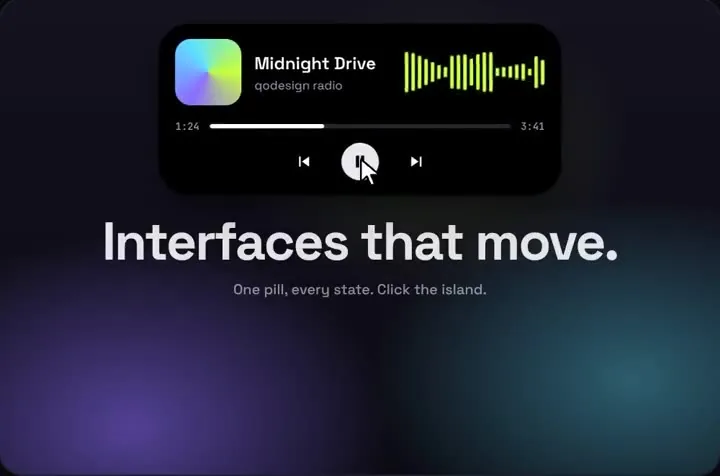
- The island fits a different job: an app header where search is the main way around, plus one live status such as a deploy, an order or a message. It isn't a logo-and-links bar, and it has no hamburger menu.
HeroUI navbar menu toggle, brand and hide on scroll in v3
- Menu toggle: in HeroUI's guide, v2's NavbarMenuToggle and NavbarMenu become a button with aria-label="Toggle menu", a useState flag, and a list that renders while the flag is true. The island has no menu. With size="auto" it switches to its compact size below 640 px (280 to 344 px wide, 44 px tap targets), and search does the menu's job.
- Brand: NavbarBrand becomes a plain div holding your logo. The island has no brand slot on the left. Its avatar prop takes any short node at the right end, so a logo mark or an initial fits there; or keep the logo in your page header outside the island.
- Hide on scroll: neither HeroUI v3 nor the island does it for you. The guide says shouldHideOnScroll "Requires custom scroll detection", and the Pro Navbar lists hide-on-scroll as a feature.
Dynamic Island next to HeroUI v3: Tailwind v4 and React 19
- HeroUI's introduction says "HeroUI is a React component library built on Tailwind CSS v4 and React Aria Components." The Dynamic Island download is a Vite project set up with Tailwind CSS 3.4, React 18 and framer-motion ^11.11.0. You don't change your Tailwind version for it. The component styles itself in dynamic-island.css with qdi- classes, so Tailwind has nothing to compile for it.
- Our Tailwind v4 check of every piece (Oct 25 2026, Tailwind 4.3.3 against 3.4.19) rated Dynamic Island a one-line fix: "The island label, subtitle and controls (font-sans on main and children, 4 elements) render in the system sans instead of Space Grotesk." The elements it measured are the demo stage in App.tsx (the main element and the headline under the island), which gets font-sans from tailwind.config.js. If you keep that stage, add @config "../tailwind.config.js"; under @import "tailwindcss"; with the path running from app/globals.css to the config in the zip. The navbar above doesn't use the stage, so it doesn't need the line. In our run the island kept its own Space Grotesk font stack under Tailwind 4.3.3 and @heroui/styles.
- React 19: @heroui/react 3.2.6 requires it. The piece's package.json lists React 18, and the snippet type-checked against React 19.3.1 and @types/react 19.3.0. HeroUI's migration overview lists "remove Framer Motion" for v3, since v3 doesn't need it. The island does, so this puts framer-motion back; we used 14.6.0, whose peer range is react ^18.0.0 || ^19.0.0.
- The footer links follow HeroUI's Link docs: "Use variant functions to style framework-specific links like Next.js", with linkVariants from @heroui/styles on next/link. So the links get client-side navigation and HeroUI's link style.
Install
- Copy from the zipPut
react/src/componentsintosrc/, thennpm i @heroui/react @heroui/styles framer-motion. - Or ask your AIPaste PROMPT.md into Cursor, Lovable or v0.
Props
- tabs
- icons next to Home: "search", "music", "notify"
- items / onSelect
- what search finds, and the pick (push the route here)
- onHome
- the Home icon
- size
- "regular", "compact" or "auto" (compact under 640 px)
- top
- px from the top of the positioned parent
- avatar
- any short node at the right end
- notificationTitle / notificationText / notificationAction
- the bell state's text; onNotificationAction for its button
- onStateChange
- idle, notify, music or search
- accent
- any hex colour
How qodesign compares
- qodesign vs Hover.devHover.dev is best for: animated website sections you copy and paste.
- qodesign vs Cult UICult UI is best for: free animated shadcn components and device mockups.
All comparisons, with prices read on each library's own site.
Questions
Does HeroUI v3 have a Navbar component?
No. HeroUI's migration guide says "The Navbar component has been removed in HeroUI v3" and shows how to build one with native HTML and Tailwind classes. HeroUI Pro, the paid tier, has a Navbar.
Can I keep the HeroUI v2 Navbar after moving to v3?
Yes, during an incremental migration. HeroUI lists Navbar among the v2 components with no v3 counterpart that "will continue to work during migration", with both versions installed side by side.
How do I add a HeroUI navbar menu toggle in v3?
Use a button with an aria-label and a useState flag, and render the menu list while it's true, as in HeroUI's Navbar migration guide. v3 has no NavbarMenuToggle.
Does the Dynamic Island need Tailwind v4 changes for HeroUI?
Not for the navbar above. The island styles itself in its own CSS file, so it works in a HeroUI v3 app on Tailwind v4. Only the demo stage from the download needs the @config line from the Tailwind section.
Is the island a full replacement for a navbar?
Not for a logo-and-links header. It's built for search and one live status. Keep real links on the page too, like the footer above.
Can Cursor or v0 add it for me?
Yes. Each download has a PROMPT.md. Paste it into Cursor, Lovable, v0 or Claude Code and it fits the piece into your app.
Can I use it in client work?
Yes, in personal and client projects. You can't resell the code itself as a kit.