A HeroUI login page for Next.js
A HeroUI v3 login page with one server action behind two forms: the pull-cord lamp login on wide screens and HeroUI's own Form, TextField and Button on phones.
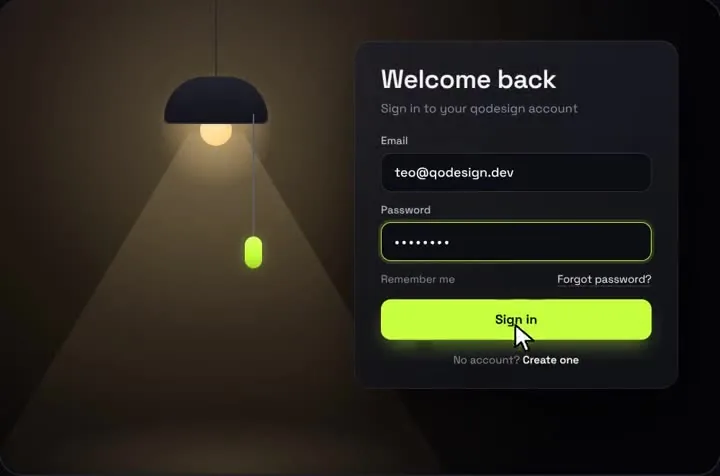
By buying you agree to the Terms.
- Download right after paying
- Use it in client projects
- Won't run on the listed stack? We fix it or refund you
Ready forCursorv0Lovableshadcn CLI
Use it in Next.js
"use client";
import { useState } from "react";
import { useRouter } from "next/navigation";
import { Alert } from "@heroui/react";
import PullCordLogin from "@/components/PullCordLogin";
import { HeroUILoginForm } from "./heroui-login-form";
import { signIn } from "./actions";

export default function LoginPage() {
  const router = useRouter();
  const [error, setError] = useState("");

  return (
    <main className="min-h-dvh bg-[#07080c]">
      {/* The lamp room is drawn at 1000 x 660, so it only shows where it fits. */}
      <div className="hidden min-h-dvh place-items-center lg:grid">
        <div className="relative">
          <PullCordLogin
            forgotHref="/forgot-password"
            onFooterAction={() => router.push("/sign-up")}
            onSubmit={async (email, password) => {
              setError("");
              const res = await signIn(email, password);
              if (!res.ok) {
                setError(Object.values(res.errors)[0]);
                throw new Error("sign-in failed"); // the card shakes, the button resets
              }
              setTimeout(() => router.push("/dashboard"), 900); // let "Signed in" show first
            }}
          />
          {error ? (
            <Alert status="danger" className="absolute left-[492px] top-full mt-3 w-[450px]">
              <Alert.Indicator />
              <Alert.Content>
                <Alert.Title>{error}</Alert.Title>
              </Alert.Content>
            </Alert>
          ) : null}
        </div>
      </div>

      {/* Phones and tablets: HeroUI's own form, same server action. */}
      <div className="grid min-h-dvh place-items-center p-6 lg:hidden">
        <HeroUILoginForm />
      </div>
    </main>
  );
}"use client";
import { useState, useTransition } from "react";
import { useRouter } from "next/navigation";
import { Button, FieldError, Form, Input, Label, Link, TextField } from "@heroui/react";
import { signIn } from "./actions";
export function HeroUILoginForm() {
const router = useRouter();
const [errors, setErrors] = useState<Record<string, string>>({});
const [pending, startTransition] = useTransition();
return (
<Form
className="flex w-full max-w-sm flex-col gap-4"
validationErrors={errors}
onSubmit={(e) => {
e.preventDefault();
const data = new FormData(e.currentTarget);
startTransition(async () => {
const res = await signIn(String(data.get("email")), String(data.get("password")));
if (res.ok) router.push("/dashboard");
else setErrors(res.errors);
});
}}
>
<h1 className="text-2xl font-semibold">Welcome back</h1>
<TextField isRequired name="email" type="email" autoComplete="email">
<Label>Email</Label>
<Input placeholder="[email protected]" />
<FieldError />
</TextField>
<TextField isRequired name="password" type="password" autoComplete="current-password">
<Label>Password</Label>
<Input placeholder="Your password" />
<FieldError />
</TextField>
<Link href="/forgot-password">Forgot password?</Link>
<Button type="submit" isPending={pending} fullWidth>
Sign in
</Button>
</Form>
);
}"use server";
import { verifyCredentials } from "@/lib/auth";
export type SignInResult = { ok: true } | { ok: false; errors: Record<string, string> };
export async function signIn(email: string, password: string): Promise<SignInResult> {
const errors: Record<string, string> = {};
if (!/.+@.+\..+/.test(email)) errors.email = "Enter a valid email";
if (!password) errors.password = "Password is required";
if (Object.keys(errors).length > 0) return { ok: false, errors };
// Your auth layer: checks the password and sets the session cookie.
const ok = await verifyCredentials(email, password);
if (!ok) return { ok: false, errors: { password: "Wrong email or password" } };
return { ok: true };
}@import "tailwindcss";
@import "@heroui/styles";
/* Pull-Cord's inputs carry font-sans. Tailwind v4 reads fonts from @theme, not
the piece's tailwind.config.js, so pin the room's font here instead. */
.qpc-room .font-sans {
font-family: "Space Grotesk", system-ui, sans-serif;
}Good to know
- lib/auth.ts is your auth layer: one function that checks the password and sets the session cookie. The Better Auth, Supabase and Lucia guides on this site each show one.
- Pull-Cord draws its own email and password inputs, so you can't slot HeroUI's TextField into the card. HeroUI shows up around it instead: the Alert under the card, and the whole phone form.
- Both forms are in the HTML and CSS hides one (lg:grid and lg:hidden), so there is no screen-size check in JavaScript and no hydration mismatch. Only the visible form can be focused or submitted.
- The lamp starts off, as in the demo: people pull the cord (or focus it and press Enter) to bring up the card. Pass defaultOn if you want the card visible at once.
- What we ran on Oct 25 2026: this exact code in a scratch Next.js 16.4.3 app with React 19.3.1, @heroui/react 3.2.6, @heroui/styles 3.2.6, Tailwind CSS 4.3.3, framer-motion 14.6.0 and TypeScript 7.0.2, plus the shipped PullCordLogin.tsx. tsc and next build passed. In a headless browser at 1440 px a wrong password showed the HeroUI Alert and the right one showed "Signed in" and went to /dashboard; at 390 px the HeroUI form showed the error under Password and then signed in, with no sideways scroll. The auth function was a stand-in that compares two strings, so no real database or session store was involved.
What HeroUI v3 gives you for a login page
- HeroUI has no login component. Its site calls itself "HeroUI v3 (Previously NextUI)" and says the web library "combines React Aria Components with Tailwind CSS v4". For a sign-in form you compose four parts: Form, TextField (with Label, Input and FieldError inside it) and Button.
- The parts that matter for login, read from @heroui/react 3.2.6 on Oct 25 2026: Form takes validationErrors, which the docs describe as "Server-side validation errors mapped by field name. Displayed immediately and cleared when user modifies the field." That is how the server action's "Wrong email or password" lands under the Password field. TextField takes isRequired, name, type, autoComplete and validate. Button takes isPending, which shows the spinner while the action runs.
- Setup is two CSS lines, @import "tailwindcss"; and then @import "@heroui/styles";. The quick start says "Import order matters. Always import tailwindcss first." and that "HeroUI v3 does not require a Provider".
- npm on Oct 25 2026: @heroui/react 3.2.6 (published Sep 17 2026), 477,326 downloads in the week of Oct 16 to 22, peer dependencies react >=19.0.0 and tailwindcss >=4.0.0. The repo heroui-inc/heroui is not archived and was last pushed Oct 25 2026.
When HeroUI's own form is the better login page
- Most HeroUI apps should use the second file above on every screen size and skip the lamp. It is free and open source, under 50 lines, matches the rest of your HeroUI theme and dark mode, and React Aria wires the labels and error messages to the inputs for you.
- If you are starting from zero, HeroUI's free next-app-template on GitHub ("A Next.js 16 with app directory template pre-configured with HeroUI (v3) and Tailwind CSS (v4)") gets you the setup, and you add the form to it. HeroUI also sells Pro templates; we haven't used them and don't compare them here.
- The pull-cord lamp fits when the login is a moment you want people to remember: a product launch, a studio site, a tool whose brand is playful. It is a fixed 1000 x 660 scene, it has no social login buttons or passkey slot, and it asks people to pull a cord before they can type. If any of that is wrong for your users, keep HeroUI's form.
Pull-Cord Login next to HeroUI v3: Tailwind v4 versus the piece's Tailwind 3.4
- HeroUI v3 needs Tailwind CSS v4. The Pull-Cord download is set up as a Vite project with Tailwind CSS 3.4 and a tailwind.config.js. You don't need to change your Tailwind version to use it: copy PullCordLogin.tsx and pull-cord-login.css into your HeroUI app and Tailwind v4 compiles its classes, because they are stock utilities and arbitrary values like left-[492px].
- One thing doesn't carry over. Tailwind v4 doesn't read tailwind.config.js unless you point it there with @config, so the piece's font setting is ignored and its inputs (which use font-sans) fall back to Tailwind's default sans stack. The globals.css above fixes that with one rule scoped to .qpc-room, so your HeroUI theme keeps its own font. The piece's other config entries (the volt, ultra and ink colours) aren't used by the component.
- HeroUI's migration guide lists "remove Framer Motion" for v3, since v3 doesn't need it. Pull-Cord does: its cord physics and card fade use framer-motion, so adding it puts that dependency back. The snippet was checked with framer-motion 14.6.0.
- We loaded @heroui/styles after Tailwind as HeroUI says and rendered Pull-Cord inside it. The room and the card looked as they do in the demo, and the inputs used Space Grotesk once the font rule was in.
Coming from a NextUI login page
- @nextui-org/react is deprecated on npm with the message "This package has been deprecated. Please use @heroui/react instead." Its last version is 2.6.11 (Jan 5 2025), and it still had 63,624 downloads in the week of Oct 16 to 22, 2026.
- A NextUI or HeroUI v2 login form usually looks like <Input label="Email" isInvalid={...} errorMessage="..." /> inside a NextUIProvider. HeroUI's Input migration guide puts it this way: "v3: Input is now a primitive component (just the input element). For form fields, use TextField which wraps Input with Label, Description, and FieldError components." So label becomes <Label>, errorMessage becomes <FieldError>, and isRequired and isInvalid move to TextField.
- The provider and the Tailwind plugin go too. HeroUI's migration guide says "v3 removes the need for HeroUIProvider" and "Remove heroui() plugin from Tailwind config", and v3 needs React 19 and Tailwind v4. If your NextUI app can't move to React 19 yet, the pull-cord lamp still works there: the piece runs on React 18 and Tailwind 3.4 as shipped, and only the HeroUI phone form needs v3.
Install
- Copy from the zipPut
react/src/componentsintosrc/, thennpm i @heroui/react @heroui/styles framer-motion. - Or ask your AIPaste PROMPT.md into Cursor, Lovable or v0.
Props
- onSubmit
- your server action call; throw to shake the card
- defaultOn
- card visible without pulling the cord
- forgotHref
- link under the password field
- onFooterAction
- the "Create one" link
- accent
- bead, focus ring and button colour (hex)
How qodesign compares
- qodesign vs Magic UIMagic UI is best for: landing pages built with shadcn/ui.
- qodesign vs Aceternity UIAceternity UI is best for: teams building many marketing pages who want one big library.
All comparisons, with prices read on each library's own site.
Questions
Does HeroUI have a login page component?
No. HeroUI v3 gives you Form, TextField, Input, Label, FieldError and Button, and you compose the login form from them, as in the second file above. HeroUI Pro offers paid templates.
Can I put HeroUI inputs inside Pull-Cord Login?
No. The card renders its own inputs and validation. Use HeroUI around it (an Alert for server errors, your nav, the phone form) and pass the same server action to both.
Is NextUI deprecated?
Yes. @nextui-org/react is deprecated on npm and points to @heroui/react. HeroUI's site describes v3 as "Previously NextUI".
Does Pull-Cord Login need Tailwind v4 for HeroUI?
It ships on Tailwind 3.4 but compiles under Tailwind v4. Add the one font rule from globals.css above, because v4 ignores the piece's tailwind.config.js.
Why show a different form on phones?
The lamp scene is drawn at 1000 x 660. Scaled down to a phone, its inputs get too small to type in, so the page shows HeroUI's form below 1024 px.
Can Cursor or v0 add it for me?
Yes. Each download has a PROMPT.md. Paste it into Cursor, Lovable, v0 or Claude Code and it fits the piece into your app.
Can I use it in client work?
Yes, in personal and client projects. You can't resell the code itself as a kit.