A daisyUI login page for Next.js
A daisyUI 5 login page with one server action behind two forms: the pull-cord lamp login on wide screens and daisyUI's own fieldset, input and btn classes on phones.
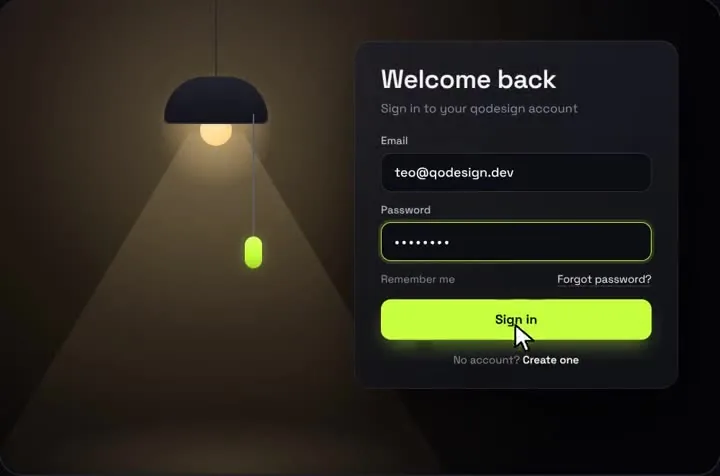
By buying you agree to the Terms.
- Download right after paying
- Use it in client projects
- Won't run on the listed stack? We fix it or refund you
Ready forCursorv0Lovableshadcn CLI
Use it in Next.js
"use client";
import { useState } from "react";
import { useRouter } from "next/navigation";
import PullCordLogin from "@/components/PullCordLogin";
import { DaisyLoginForm } from "./daisy-login-form";
import { signIn } from "./actions";

export default function LoginPage() {
  const router = useRouter();
  const [error, setError] = useState("");

  return (
    <main className="min-h-dvh bg-base-200">
      {/* The lamp room is drawn at 1000 x 660, so it only shows where it fits. */}
      <div className="hidden min-h-dvh place-items-center lg:grid">
        <div className="relative">
          <PullCordLogin
            accent="#C6FF3D"
            forgotHref="/forgot-password"
            onFooterAction={() => router.push("/sign-up")}
            onSubmit={async (email, password) => {
              setError("");
              const res = await signIn(email, password);
              if (!res.ok) {
                setError(Object.values(res.errors)[0]);
                throw new Error("sign-in failed"); // the card shakes, the button resets
              }
              setTimeout(() => router.push("/dashboard"), 900); // let "Signed in" show first
            }}
          />
          {error ? (
            <div role="alert" className="alert alert-error absolute left-[492px] top-full mt-3 w-[450px]">
              <span>{error}</span>
            </div>
          ) : null}
        </div>
      </div>

      {/* Phones and tablets: daisyUI's own login form, same server action. */}
      <div className="grid min-h-dvh place-items-center p-6 lg:hidden">
        <DaisyLoginForm />
      </div>
    </main>
  );
}"use client";
import { useState, useTransition } from "react";
import { useRouter } from "next/navigation";
import { signIn } from "./actions";
export function DaisyLoginForm() {
const router = useRouter();
const [errors, setErrors] = useState<Record<string, string>>({});
const [pending, startTransition] = useTransition();
return (
<form
noValidate
onSubmit={(e) => {
e.preventDefault();
const data = new FormData(e.currentTarget);
startTransition(async () => {
const res = await signIn(String(data.get("email")), String(data.get("password")));
if (res.ok) router.push("/dashboard");
else setErrors(res.errors);
});
}}
>
<fieldset className="fieldset w-xs rounded-box border border-base-300 bg-base-100 p-4">
<legend className="fieldset-legend">Login</legend>
<label className="label" htmlFor="login-email">Email</label>
<input
id="login-email"
name="email"
type="email"
autoComplete="email"
placeholder="[email protected]"
aria-invalid={!!errors.email}
className={`input w-full ${errors.email ? "input-error" : ""}`}
onChange={() => setErrors((e) => ({ ...e, email: "" }))}
/>
{errors.email ? <p className="label text-error">{errors.email}</p> : null}
<label className="label" htmlFor="login-password">Password</label>
<input
id="login-password"
name="password"
type="password"
autoComplete="current-password"
placeholder="Your password"
aria-invalid={!!errors.password}
className={`input w-full ${errors.password ? "input-error" : ""}`}
onChange={() => setErrors((e) => ({ ...e, password: "" }))}
/>
{errors.password ? <p className="label text-error">{errors.password}</p> : null}
<a href="/forgot-password" className="link link-hover mt-1 w-fit">Forgot password?</a>
<button type="submit" className="btn btn-neutral mt-4" disabled={pending}>
{pending ? <span className="loading loading-spinner loading-sm" /> : null}
Login
</button>
</fieldset>
</form>
);
}"use server";
import { verifyCredentials } from "@/lib/auth";
export type SignInResult = { ok: true } | { ok: false; errors: Record<string, string> };
export async function signIn(email: string, password: string): Promise<SignInResult> {
const errors: Record<string, string> = {};
if (!/.+@.+\..+/.test(email)) errors.email = "Enter a valid email";
if (!password) errors.password = "Password is required";
if (Object.keys(errors).length > 0) return { ok: false, errors };
// Your auth layer: checks the password and sets the session cookie.
const ok = await verifyCredentials(email, password);
if (!ok) return { ok: false, errors: { password: "Wrong email or password" } };
return { ok: true };
}@import "tailwindcss";
@plugin "daisyui" {
themes: light --default, dark --prefersdark;
}
/* Pull-Cord's inputs carry font-sans. Tailwind v4 doesn't read the piece's
tailwind.config.js, so pin the room's font here, scoped to the room. */
.qpc-room .font-sans {
font-family: "Space Grotesk", system-ui, sans-serif;
}Good to know
- lib/auth.ts is your auth layer: one function that checks the password and sets the session cookie. The Better Auth, Supabase and Lucia guides on this site each show one.
- Pull-Cord draws its own email and password inputs, so daisyUI's input and btn classes can't go inside the card. daisyUI shows up around it instead: the alert under the card, the page background and the whole phone form.
- Both forms are in the HTML and CSS hides one (lg:grid and lg:hidden), so there is no screen-size check in JavaScript and no hydration mismatch. Only the visible form can be focused or submitted.
- The room names Space Grotesk but doesn't load it. Load it with next/font or a stylesheet link, or the room falls back to system-ui.
- What we ran on Oct 25 2026: this exact code in a scratch Next.js 16.4.3 app with React 19.3.1, daisyUI 5.7.50, Tailwind CSS 4.3.3 (@tailwindcss/postcss 4.3.3), framer-motion 14.6.0 and TypeScript 7.0.2, plus the shipped PullCordLogin.tsx. tsc and next build passed, and a file with a wrong prop failed tsc as it should. In headless Chromium at 1440 px a wrong password showed the daisyUI alert under the card and the right one showed "Signed in" and went to /dashboard. At 390 px the daisyUI form showed both field errors on an empty submit, then "Wrong email or password", then signed in. Neither width scrolled sideways. The auth function was a stand-in that compares two strings, so no real database or session store was involved. We didn't test Safari, Firefox, a real phone, a screen reader, or daisyUI themes other than light and dark.
daisyUI's own login form
- daisyUI has no login component. Its fieldset page has a "Login form with fieldset" example instead: a fieldset with the classes fieldset, bg-base-200, border-base-300, rounded-box, w-xs, border and p-4, a legend with fieldset-legend, a label class="label" above each input class="input", and a button with btn btn-neutral mt-4. The page adds one line under it: "Add proper id and for attributes for accessibility." The second file above is that example turned into a React form, with the ids, htmlFor, autocomplete and name attributes added.
- Errors come from the server action and land under each field with input-error and text-error. daisyUI also has a validator class that colours an input from its HTML rules (required, type="email") with no JavaScript. It can't know a password is wrong, so the snippet uses the server's answer. If you only want format checks, the validator class and a validator-hint line are enough.
- Setup is the two lines from daisyUI's install page, @import "tailwindcss"; and @plugin "daisyui";, which makes daisyUI 5 a Tailwind CSS v4 plugin. Its Next.js guide installs tailwindcss, @tailwindcss/postcss and daisyui, and for Turbopack it warns that "The default Lightning CSS config will modify some styles which may cause issues" and suggests adding "browserslist": "> 1%" to package.json. Our test app had that line.
- npm on Oct 25 2026: daisyui 5.7.50, published Oct 13 2026, MIT, with no dependencies or peer dependencies. npm's counter shows 695,738 downloads for Oct 16 to 22, but it reads zero for Oct 19, 20 and 21, so the real week was bigger. The repo saadeghi/daisyui has about 42,700 stars, is not archived, and was last pushed Oct 17 2026.
When daisyUI's form is the better login page
- Most daisyUI apps should use the second file above on every screen size and skip the lamp. It's free, it's under 70 lines, and it follows whatever data-theme the page has, light, dark or any of the 35 built-in themes. It also leaves room for the things a login often needs: a Google button, a passkey button or a sign-up tab.
- The pull-cord lamp fits when the sign-in is a moment you want people to remember: a launch page, a studio site, a playful product. It's a fixed 1000 x 660 scene, it has no slot for social login or passkeys, and people have to pull a cord (or focus it and press Enter) before they can type. Pass defaultOn to skip the pull. If any of that is wrong for your users, keep daisyUI's form.
daisyUI themes and the lamp room
- daisyUI themes work through CSS variables on the html element. By default the light and dark themes are on, and you pick one with data-theme="cupcake" or let prefers-color-scheme decide. The phone form above uses daisyUI classes, so it changes with the theme.
- The lamp room doesn't. It sets its own background, text colour and font on .qpc-room, because the scene is a dark room. We switched data-theme between light and dark in the test app and the room's background, heading colour and input font stayed the same. The page around it, which uses daisyUI's base colours, changed.
- The accent prop (bead, focus ring and button) takes a hex colour. The component turns it into RGB itself, and daisyUI 5 theme colours are oklch values (the custom theme example in daisyUI's docs uses --color-primary: oklch(55% 0.3 240)), so accent="var(--color-primary)" won't work. Copy a hex that is close to your theme's primary. The button text is a fixed near-black, #0A0A0D, so a light accent reads best.
Pull-Cord Login on Tailwind v4: one font rule, not @config
- daisyUI 5 needs Tailwind CSS v4. The Pull-Cord download is a Vite project on Tailwind CSS 3.4 with a tailwind.config.js. Our Tailwind v4 check of every paid piece (Oct 25 2026) rated Pull-Cord Login a one-line fix: "The email and password inputs (class font-sans) lose Space Grotesk and fall back to a system sans stack, because v4 ignores tailwind.config.js fontFamily." Everything else compiled and rendered the same.
- The check's fix is @config "../tailwind.config.js"; under the Tailwind import. In a daisyUI app that line does more than fix the card. We tried it: the body, daisyUI's btn and daisyUI's input all switched to Space Grotesk, because the piece's config redefines font-sans for the whole app. The globals.css above uses one rule scoped to .qpc-room instead, so your daisyUI theme keeps its own fonts.
- Pull-Cord also needs framer-motion for the cord physics and the card fade. daisyUI itself is CSS only and adds no JavaScript. The snippet was checked with framer-motion 14.6.0.
Install
- Copy from the zipPut
react/src/componentsintosrc/, thennpm i daisyui framer-motion. - Or ask your AIPaste PROMPT.md into Cursor, Lovable or v0.
Props
- onSubmit
- your server action call; throw to shake the card
- defaultOn
- card visible without pulling the cord
- accent
- bead, focus ring and button colour (hex, not a daisyUI variable)
- forgotHref
- link under the password field
- onFooterAction
- the "Create one" link
How qodesign compares
- qodesign vs Magic UIMagic UI is best for: landing pages built with shadcn/ui.
- qodesign vs Aceternity UIAceternity UI is best for: teams building many marketing pages who want one big library.
All comparisons, with prices read on each library's own site.
Questions
Does daisyUI have a login page component?
No. daisyUI gives you classes (fieldset, label, input, btn, alert) and its fieldset docs show a "Login form with fieldset" example. The second file above is that example as a React form.
Can I put daisyUI inputs inside Pull-Cord Login?
No. The card renders its own inputs and validation. Use daisyUI around it (an alert for server errors, the page, the phone form) and pass the same server action to both.
Does Pull-Cord Login follow my daisyUI theme?
Only the accent you pass. The room keeps its own dark colours under every data-theme, and accent takes a hex value, not var(--color-primary).
Should I add @config for the piece's tailwind.config.js?
Not in a daisyUI app. It switches your whole app's sans font to Space Grotesk. The one rule scoped to .qpc-room in globals.css fixes the card's inputs and nothing else.
Why show a different form on phones?
The lamp scene is drawn at 1000 x 660. Scaled down to a phone, its inputs get too small to type in, so the page shows daisyUI's form below 1024 px.
Can Cursor or v0 add it for me?
Yes. Each download has a PROMPT.md. Paste it into Cursor, Lovable, v0 or Claude Code and it fits the piece into your app.
Can I use it in client work?
Yes, in personal and client projects. You can't resell the code itself as a kit.