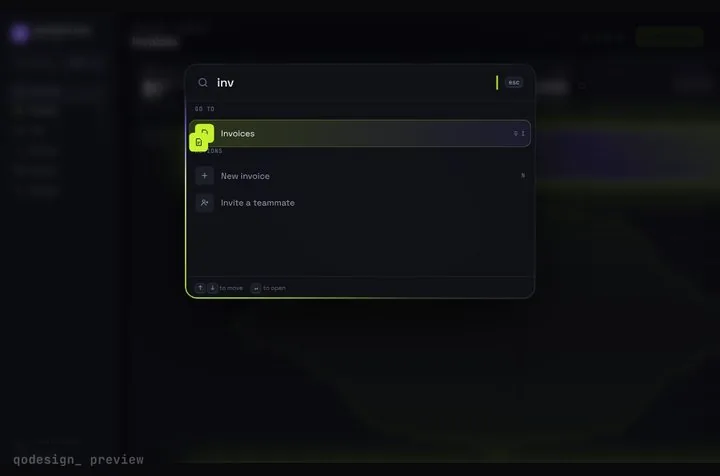
Tailwind command palette
components/command-palette.tsx
"use client";
import { useEffect, useState } from "react";
import { useRouter } from "next/navigation";
import {
Combobox,
ComboboxInput,
ComboboxOption,
ComboboxOptions,
Dialog,
DialogBackdrop,
DialogPanel,
DialogTitle,
} from "@headlessui/react";
export type PaletteItem = { id: string; label: string; group: string; href?: string; shortcut?: string };
const ITEMS: PaletteItem[] = [
{ id: "dashboard", label: "Dashboard", group: "Go to", href: "/dashboard", shortcut: "G D" },
{ id: "invoices", label: "Invoices", group: "Go to", href: "/invoices", shortcut: "G I" },
{ id: "settings", label: "Settings", group: "Go to", href: "/settings" },
{ id: "new-invoice", label: "New invoice", group: "Actions", shortcut: "N" },
{ id: "invite", label: "Invite a teammate", group: "Actions" },
];
// Headless UI gives the modal (Dialog) and the keyboard list (Combobox). Filtering, grouping
// and what a row does are yours. Rows with href navigate; the rest call onCommand.
export function CommandPalette({
items = ITEMS,
onCommand,
}: {
items?: PaletteItem[];
onCommand?: (id: string) => void;
}) {
const router = useRouter();
const [open, setOpen] = useState(false);
const [query, setQuery] = useState("");
useEffect(() => {
const onKey = (e: KeyboardEvent) => {
if (e.key.toLowerCase() === "k" && (e.metaKey || e.ctrlKey)) {
e.preventDefault();
setQuery("");
setOpen((o) => !o);
}
};
window.addEventListener("keydown", onKey);
return () => window.removeEventListener("keydown", onKey);
}, []);
const q = query.trim().toLowerCase();
const results = q ? items.filter((i) => i.label.toLowerCase().includes(q)) : items;
const groups = [...new Set(results.map((i) => i.group))];
function run(item: PaletteItem | null) {
if (!item) return;
setOpen(false);
if (item.href) router.push(item.href);
else onCommand?.(item.id);
}
return (
<>
<button
type="button"
onClick={() => {
setQuery("");
setOpen(true);
}}
className="flex items-center gap-3 rounded-lg border border-neutral-200 px-3 py-1.5 text-sm text-neutral-500 hover:bg-neutral-50 dark:border-neutral-800 dark:hover:bg-neutral-900"
>
Search
<kbd className="hidden font-sans text-xs sm:inline">⌘K</kbd>
</button>
<Dialog open={open} onClose={() => setOpen(false)} className="relative z-50">
<DialogBackdrop className="fixed inset-0 bg-black/40" />
<div className="fixed inset-0 overflow-y-auto p-4 pt-[15vh]">
<DialogPanel className="mx-auto max-w-xl overflow-hidden rounded-xl bg-white text-neutral-950 shadow-2xl ring-1 ring-black/5 dark:bg-neutral-900 dark:text-white dark:ring-white/10">
<DialogTitle className="sr-only">Command palette</DialogTitle>
<Combobox onChange={run}>
<ComboboxInput
autoFocus
placeholder="Type a command or search..."
onChange={(e) => setQuery(e.target.value)}
// After typing, the Combobox takes the first Escape to close its own list; close the dialog too.
onKeyDown={(e) => e.key === "Escape" && setOpen(false)}
className="h-12 w-full border-b border-neutral-200 bg-transparent px-4 text-base outline-none dark:border-neutral-800"
/>
{results.length > 0 && (
<ComboboxOptions static className="max-h-80 scroll-py-2 overflow-y-auto p-2">
{groups.map((group) => (
<div key={group} role="group" aria-label={group} className="pb-1">
<div aria-hidden className="px-2 py-1.5 text-xs font-medium text-neutral-500">
{group}
</div>
{results
.filter((i) => i.group === group)
.map((item) => (
<ComboboxOption
key={item.id}
value={item}
className="flex cursor-default items-center justify-between rounded-md px-2 py-2 text-sm select-none data-focus:bg-neutral-100 dark:data-focus:bg-neutral-800"
>
{item.label}
{item.shortcut && <kbd className="font-sans text-xs text-neutral-500">{item.shortcut}</kbd>}
</ComboboxOption>
))}
</div>
))}
</ComboboxOptions>
)}
{q && results.length === 0 && (
<p className="px-4 py-6 text-sm text-neutral-500">No results for “{query}”.</p>
)}
</Combobox>
</DialogPanel>
</div>
</Dialog>
</>
);
}
components/app-commands.tsx (your actions)
"use client";
import { CommandPalette } from "@/components/command-palette";

// Client wrapper so the root layout (a Server Component) can pass a function.
export function AppCommands() {
  return (
    <CommandPalette
      onCommand={(id) => {
        if (id === "new-invoice") window.dispatchEvent(new CustomEvent("new-invoice"));
        if (id === "invite") console.log("open the invite dialog");
      }}
    />
  );
}
app/layout.tsx (mount it once)
import "./globals.css";
import { AppCommands } from "@/components/app-commands";

export default function RootLayout({ children }: { children: React.ReactNode }) {
  return (
    <html lang="en">
      <body>
        <header className="flex items-center justify-between border-b border-neutral-200 px-4 py-3 dark:border-neutral-800">
          <span className="font-semibold">Acme</span>
          <AppCommands />
        </header>
        {children}
      </body>
    </html>
  );
}