Stytch email OTP with a custom UI
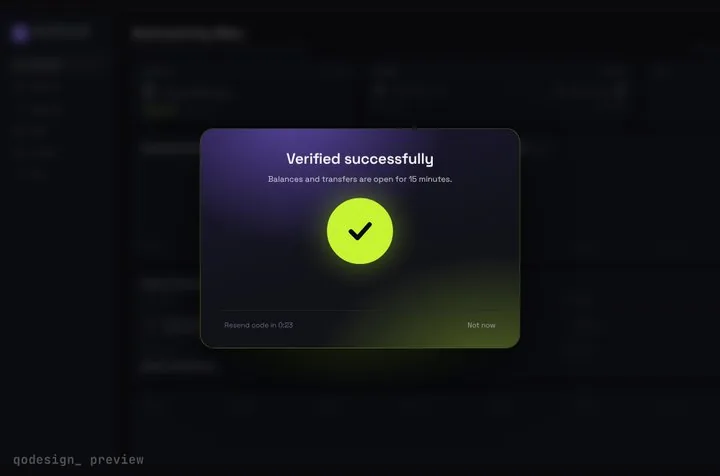
Stytch's headless SDK sends the email code and checks it. You draw the screens. Here the email form calls otps.email.loginOrCreate, and the code goes into an animated 6-digit card that unlocks when otps.authenticate accepts it.
By buying you agree to the Terms.
- Download right after paying
- Use it in client projects
- Won't run on the listed stack? We fix it or refund you
Ready forCursorv0Lovableshadcn CLI
Use it in Next.js
"use client";
import { useEffect, useState } from "react";
import { useRouter } from "next/navigation";
import { useStytch, useStytchUser } from "@stytch/nextjs";
import { StepUpGate } from "@/components/StepUpGate";

export default function StytchEmailOtpPage() {
  const stytch = useStytch();
  const { user, isInitialized } = useStytchUser();
  const router = useRouter();
  const [email, setEmail] = useState("");
  const [methodId, setMethodId] = useState<string | null>(null);
  const [error, setError] = useState("");

  // already signed in: skip the form
  useEffect(() => {
    if (isInitialized && user && !methodId) router.replace("/dashboard");
  }, [isInitialized, user, methodId, router]);

  async function sendCode() {
    setError("");
    try {
      // new and existing users both get a code; expiration_minutes is required once you pass options
      const res = await stytch.otps.email.loginOrCreate(email, { expiration_minutes: 5 });
      setMethodId(res.method_id);
    } catch {
      setError("We couldn't send a code to that address. Check it and try again.");
    }
  }

  if (!methodId) {
    return (
      <main className="grid min-h-dvh place-items-center bg-[#0b0c10] text-white">
        <form
          onSubmit={(e) => {
            e.preventDefault();
            void sendCode();
          }}
          className="grid w-80 gap-3"
        >
          <label htmlFor="email" className="text-sm text-white/70">Email</label>
          <input id="email" type="email" required autoComplete="email" value={email} onChange={(e) => setEmail(e.target.value)}
            className="rounded-lg bg-white/10 px-3 py-2 outline-none focus:ring-2 focus:ring-[#C6F432]" />
          <button className="rounded-lg bg-[#C6F432] px-3 py-2 font-medium text-black">Email me a code</button>
          {error ? <p role="alert" className="text-sm text-red-400">{error}</p> : null}
        </form>
      </main>
    );
  }

  return (
    <StepUpGate
      title="Check your email"
      description={`Enter the 6-digit code we sent to ${email}. It works for 5 minutes.`}
      successTitle="You're in"
      successDescription="Opening your dashboard."
      resendSeconds={30}
      onVerify={async (code) => {
        try {
          // a wrong or expired code throws a StytchAPIError
          await stytch.otps.authenticate(code, methodId, { session_duration_minutes: 60 });
          return true;
        } catch {
          return false; // the cells shake and the user can type again
        }
      }}
      onResend={() => void sendCode()}
      onCancel={() => setMethodId(null)}
      onVerified={() => router.push("/dashboard")}
    >
      {/* whatever should sit blurred behind the code card */}
      <div className="grid min-h-dvh place-items-center bg-[#0b0c10] text-white/40">Your dashboard</div>
    </StepUpGate>
  );
}"use client";
import type { ReactNode } from "react";
import { StytchProvider, createStytchClient } from "@stytch/nextjs";
// v22 name; createStytchHeadlessClient and createStytchUIClient are marked deprecated
const stytch = createStytchClient(process.env.NEXT_PUBLIC_STYTCH_PUBLIC_TOKEN!);
export function Providers({ children }: { children: ReactNode }) {
return <StytchProvider stytch={stytch}>{children}</StytchProvider>;
}import type { ReactNode } from "react";
import { Providers } from "./providers";
export default function RootLayout({ children }: { children: ReactNode }) {
return (
<html lang="en">
<body>
<Providers>{children}</Providers>
</body>
</html>
);
}"use client";
import { useEffect } from "react";
import { useRouter } from "next/navigation";
import { useStytch, useStytchUser } from "@stytch/nextjs";
export default function Dashboard() {
const stytch = useStytch();
const { user, isInitialized } = useStytchUser();
const router = useRouter();
useEffect(() => {
if (isInitialized && !user) router.replace("/login");
}, [isInitialized, user, router]);
if (!user) return null;
return (
<main className="grid min-h-dvh place-items-center bg-[#0b0c10] text-white">
<p>Signed in as {user.emails[0]?.email}</p>
<button onClick={() => void stytch.session.revoke().then(() => router.replace("/login"))}>Sign out</button>
</main>
);
}Good to know
- Stytch's SDK reference for loginOrCreate, read on October 25, 2026: "Call this method to send an email passcode to new or existing users." Use otps.email.send instead if only existing users should get a code. Both return the method_id you pass to otps.authenticate.
- expiration_minutes: the same reference says "The minimum expiration is 1 minute and the maximum is 10 minutes. The default expiration is 2 minutes." In 22.3.0 the type marks it required once you pass an options object, so leave the object out or set it. The snippet uses 5 minutes and says so on the card.
- session_duration_minutes in otps.authenticate has to be at least 5 and no more than the maximum set on the SDK Configuration page of your Stytch dashboard. The SDK keeps the session in browser cookies for you.
- A wrong code and an expired code both throw, so onVerify returns false and the cells shake. If you want a different line for an expired code, read error_type on the StytchAPIError before you return.
- Turn on the frontend SDK and Email OTP in the Stytch dashboard, and add your domain to the authorized list, or the SDK calls get refused.
- This page covers the browser side. Server routes that need the user should check the session with Stytch's backend SDK, which is not shown here.
- Copy StepUpGate.tsx, step-up-gate.css and timeline.ts from react/src/components. The gate frosts whatever you pass as children, so put a preview of the page behind it.
- Type-checked on October 25, 2026 against @stytch/nextjs 22.3.0, next 15.5.28, react 19.1.1 and framer-motion 14.6.0 with TypeScript 5.9.3, using the shipped component. We didn't run it against a live Stytch project, so no real email was sent.
When Stytch's prebuilt login fits better
- Stytch ships a free prebuilt UI, the StytchLogin component. Give it the otp product with the email method and it draws the email field and the code step for you, and the same box can hold magic links, OAuth and passwords. If you want several sign-in methods in one place and its theme options get close enough to your design, use it and skip this page.
- The headless route is for when the code step should look like part of your app. Stytch's guide puts it this way: "Using the frontend SDK headlessly enables you to build your own custom UI, customize auth flows, and handle user and session management." You make the screens, and the SDK still sends the email and checks the code.
Older Stytch tutorials use different client names
- In @stytch/nextjs 22.3.0 and @stytch/react 20.3.0, createStytchHeadlessClient and createStytchUIClient are both marked deprecated in the type definitions, each pointing to createStytchClient. 22.3.0 also has no @stytch/nextjs/ui entry point, so an import from that path fails. Import from @stytch/nextjs. The OTP calls on the client keep their names: otps.email.loginOrCreate and otps.authenticate.
- If you're on an older major and don't want to upgrade yet, keep your client setup and copy only the login page.
How the Stytch calls map to the gate
- otps.email.loginOrCreate(email, options): the email form's submit. Save method_id from the response, and its presence switches the page to the gate.
- otps.authenticate(code, method_id, { session_duration_minutes }): goes in onVerify. Return true when it resolves and false when it throws.
- Resend code: calls loginOrCreate again with the same email. The link waits 30 seconds between sends (resendSeconds).
- Not now: clears method_id, so the user is back on the email form and can fix a typo.
- onVerified: runs after the unlock animation, so the redirect waits for it.
Install
- Copy from the zipPut
react/src/componentsintosrc/, thennpm i framer-motion @stytch/nextjs. - Or ask your AIPaste PROMPT.md into Cursor, Lovable or v0.
Props
- onVerify
- (code) → true when otps.authenticate resolves
- onResend
- call otps.email.loginOrCreate again
- onCancel
- Not now: back to the email form
- onVerified
- runs after the unlock: redirect here
- resendSeconds
- wait between resends (30 by default)
- title / description
- card text
How qodesign compares
- qodesign vs Magic UIMagic UI is best for: landing pages built with shadcn/ui.
- qodesign vs Aceternity UIAceternity UI is best for: teams building many marketing pages who want one big library.
All comparisons, with prices read on each library's own site.
Questions
Does this work with @stytch/react in a Vite app?
Yes. @stytch/react 20.3.0 exports the same createStytchClient, StytchProvider and useStytch. Drop the Next.js router and redirect your own way.
Can I use it for SMS codes?
Yes. Call otps.sms.loginOrCreate with a phone number in E.164 format and pass its method_id to the same otps.authenticate call. The card doesn't care where the code came from.
Is this a B2B email OTP?
No, it's Stytch's consumer API. Stytch's B2B SDK has its own email OTP methods tied to an organization, and they aren't covered here.
Does the code card work in Next.js?
Yes, as a client component. Keep "use client" at the top of the file that renders it, as in the snippet above. App Router and Pages Router both work.
Can Cursor or v0 add it for me?
Yes. Each download has a PROMPT.md. Paste it into Cursor, Lovable, v0 or Claude Code and it fits the piece into your app.
Can I use it in client work?
Yes, in personal and client projects. You can't resell the code itself as a kit.