Privy email OTP with a custom UI
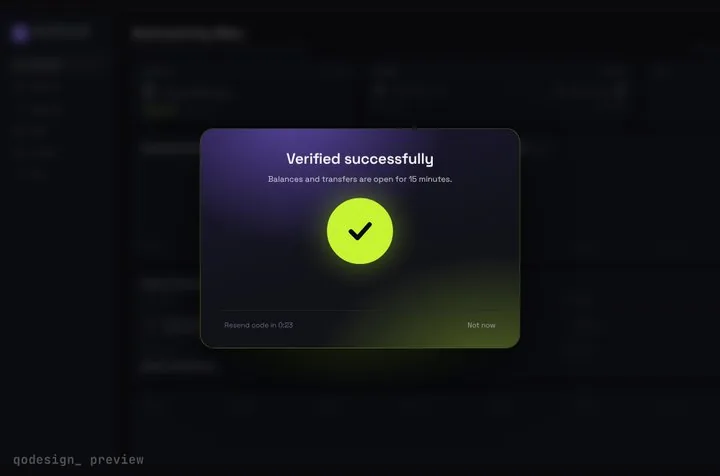
Privy's useLoginWithEmail hook sends the email code and signs the user in. You draw the screens. Here the email form calls sendCode, and the code goes into an animated 6-digit card that unlocks when loginWithCode accepts it.
By buying you agree to the Terms.
- Download right after paying
- Use it in client projects
- Won't run on the listed stack? We fix it or refund you
Ready forCursorv0Lovableshadcn CLI
Use it in Next.js
"use client";
import { useEffect, useRef, useState } from "react";
import { useRouter } from "next/navigation";
import { useLoginWithEmail, usePrivy } from "@privy-io/react-auth";
import { StepUpGate } from "@/components/StepUpGate";

const MAX_TRIES = 5; // Privy accepts 5 attempts per code, then the code is dead

export default function PrivyEmailLoginPage() {
  const router = useRouter();
  const { ready, authenticated } = usePrivy();
  const [email, setEmail] = useState("");
  const [codeSent, setCodeSent] = useState(false);
  const [hint, setHint] = useState("");
  const [error, setError] = useState("");
  const tries = useRef(0);
  const next = useRef("/dashboard");
  const verifying = useRef(false);

  const { sendCode, loginWithCode, state } = useLoginWithEmail({
    // runs once Privy has the session (and the embedded wallet, if you create one on login)
    onComplete: ({ isNewUser }) => {
      next.current = isNewUser ? "/welcome" : "/dashboard";
    },
  });

  // already signed in: skip the form (but not while the gate plays its unlock)
  useEffect(() => {
    if (ready && authenticated && !codeSent) router.replace("/dashboard");
  }, [ready, authenticated, codeSent, router]);

  async function requestCode() {
    setError("");
    try {
      await sendCode({ email }); // pass disableSignup: true to refuse new accounts
      tries.current = 0;
      setHint("");
      setCodeSent(true);
    } catch {
      setError("We couldn't send a code to that address. Check it and try again.");
    }
  }

  if (!codeSent) {
    return (
      <main className="grid min-h-dvh place-items-center bg-[#0b0c10] text-white">
        <form
          onSubmit={(e) => {
            e.preventDefault();
            void requestCode();
          }}
          className="grid w-80 gap-3"
        >
          <label htmlFor="email" className="text-sm text-white/70">Email</label>
          <input id="email" type="email" required autoComplete="email" value={email} onChange={(e) => setEmail(e.target.value)}
            className="rounded-lg bg-white/10 px-3 py-2 outline-none focus:ring-2 focus:ring-[#C6F432]" />
          <button disabled={!ready || state.status === "sending-code"} className="rounded-lg bg-[#C6F432] px-3 py-2 font-medium text-black disabled:opacity-50">
            {state.status === "sending-code" ? "Sending..." : "Email me a code"}
          </button>
          {error ? <p role="alert" className="text-sm text-red-400">{error}</p> : null}
        </form>
      </main>
    );
  }

  return (
    <StepUpGate
      title="Check your email"
      description={hint || `Enter the 6-digit code we sent to ${email}. It works for 10 minutes.`}
      successTitle="You're in"
      successDescription="Taking you to your account."
      resendSeconds={30}
      onVerify={async (code) => {
        if (verifying.current || tries.current >= MAX_TRIES) return false;
        verifying.current = true;
        try {
          await loginWithCode({ code }); // rejects on a wrong or expired code
          return true;
        } catch {
          tries.current += 1;
          if (tries.current >= MAX_TRIES) setHint("That code has run out of tries. Tap Resend code for a new one.");
          return false; // the cells shake and the user can type again
        } finally {
          verifying.current = false;
        }
      }}
      onResend={() => void requestCode()}
      onCancel={() => setCodeSent(false)}
      onVerified={() => router.push(next.current)}
    >
      {/* whatever should sit blurred behind the code card */}
      <div className="grid min-h-dvh place-items-center bg-[#0b0c10] text-white/40">Your dashboard</div>
    </StepUpGate>
  );
}"use client";
import type { ReactNode } from "react";
import { PrivyProvider } from "@privy-io/react-auth";
export function Providers({ children }: { children: ReactNode }) {
return (
<PrivyProvider
appId={process.env.NEXT_PUBLIC_PRIVY_APP_ID!}
clientId={process.env.NEXT_PUBLIC_PRIVY_CLIENT_ID}
config={{
// the modal's list; your own screen only offers email anyway
loginMethods: ["email"],
// leave out, or keep Privy's default, if your app needs a wallet per user
embeddedWallets: { ethereum: { createOnLogin: "off" } },
}}
>
{children}
</PrivyProvider>
);
}import type { ReactNode } from "react";
import { Providers } from "./providers";
export default function RootLayout({ children }: { children: ReactNode }) {
return (
<html lang="en">
<body>
<Providers>{children}</Providers>
</body>
</html>
);
}"use client";
import { useEffect } from "react";
import { useRouter } from "next/navigation";
import { usePrivy } from "@privy-io/react-auth";
export default function Dashboard() {
const { ready, authenticated, user, logout } = usePrivy();
const router = useRouter();
useEffect(() => {
if (ready && !authenticated) router.replace("/login");
}, [ready, authenticated, router]);
if (!ready || !authenticated) return null;
return (
<main className="grid min-h-dvh place-items-center bg-[#0b0c10] text-white">
<p>Signed in as {user?.email?.address}</p>
<button onClick={() => void logout().then(() => router.replace("/login"))}>Sign out</button>
</main>
);
}Good to know
- Privy's whitelabel page, read on October 25, 2026: "To whitelabel Privy's passwordless email flow, use the useLoginWithEmail hook. Then, call sendCode and loginWithCode with the desired email address." In 3.51.0 both return Promise<void>, and the hook's own type comment still tags it @experimental.
- Five tries per code. The JSDoc on loginWithCode says you can call it "up to a maximum of 5 times" for one code, and after that "the existing OTP is no longer valid". The snippet counts failed tries and, at five, stops calling Privy and asks for a new code. Resend code resets the count.
- Privy's email login docs say the code "is valid for 10 minutes", so the card doesn't promise a shorter window.
- sendCode takes { email, disableSignup? }. Pass disableSignup: true if only people who already have an account should get a code.
- onComplete in useLoginWithEmail hands you isNewUser, which the snippet uses to send first-time users to /welcome. Make that route, or point both cases at /dashboard. If you create embedded wallets on login, the type comment says onComplete runs after the wallet is made, so the redirect waits for it.
- Email has to be switched on as a login method on the Authentication page of the Privy Dashboard, and the app needs its App ID (and an App Client ID if you use one) in your env.
- This page covers the browser side. To protect API routes, send the access token from getAccessToken and verify it on the server with Privy's server SDK. On npm, @privy-io/server-auth is marked deprecated in favour of @privy-io/node, so use the newer one. Not shown here.
- Copy StepUpGate.tsx, step-up-gate.css and timeline.ts from react/src/components. The gate frosts whatever you pass as children, so put a preview of the page behind it.
- Type-checked on October 25, 2026 against @privy-io/react-auth 3.51.0, next 15.5.28, react 19.1.10 and framer-motion 11.18.2 with TypeScript 5.9.3, using the shipped component. We didn't run it against a live Privy app, so no real code was emailed.
When Privy's login modal fits better
- Privy's own login modal is free and takes one call: login() from the useLogin hook. You turn login methods on in the dashboard, and the docs describe its look as "highly-customizable to seamlessly match the branding and design system of your app": name, logo, theme and the order of methods. If your app offers email next to wallets, social logins and passkeys, the modal handles all of them in one place, and that's the better choice. Skip this page.
- The custom route makes sense when email is your only sign-in, or the code step should look like the rest of your app. Privy's docs say every flow can be built "with your own UI, while Privy manages security and backend logic". Privy still sends the email and checks the code. You only draw the screens.
- You can mix the two. Keep the modal for wallets, called as login({ loginMethods: ["wallet"] }), and use this screen for email.
How useLoginWithEmail maps to the gate
- sendCode({ email }): the email form's submit. Once it resolves, the page swaps to the gate. It rejects when the send fails, so the form shows an error.
- loginWithCode({ code }): goes in onVerify. Return true when it resolves and false when it rejects, and the cells shake.
- state.status: the hook also reports 'initial', 'sending-code', 'awaiting-code-input', 'submitting-code', 'done' or 'error'. The snippet only reads 'sending-code' to disable the button. The gate shows its own verifying animation, so you don't need the rest.
- Resend code: calls sendCode again with the same email. The link waits 30 seconds between sends (resendSeconds).
- Not now: goes back to the email form so the user can fix a typo.
- onVerified: runs after the unlock animation, so the redirect waits for it.
How this differs from our other code-entry guides
- The Stytch guide passes a method_id from the send to the check. Privy's hook tracks the pending code itself, so here you only hold the email. The Clerk reverification guide asks someone who is already signed in to confirm a risky action, while this page signs people in. The react-otp-input and animated OTP input guides are about the code field itself, with no auth provider attached.
Install
- Copy from the zipPut
react/src/componentsintosrc/, thennpm i framer-motion @privy-io/react-auth. - Or ask your AIPaste PROMPT.md into Cursor, Lovable or v0.
Props
- onVerify
- (code) → true when loginWithCode resolves
- onResend
- call sendCode again
- onCancel
- Not now: back to the email form
- onVerified
- runs after the unlock: redirect here
- resendSeconds
- wait between resends (30 by default)
- title / description
- card text, also used for the out-of-tries hint
How qodesign compares
- qodesign vs Magic UIMagic UI is best for: landing pages built with shadcn/ui.
- qodesign vs Aceternity UIAceternity UI is best for: teams building many marketing pages who want one big library.
All comparisons, with prices read on each library's own site.
Questions
Why does the card stop after five wrong codes?
Privy's own limit. Its type comment says a code can be tried up to 5 times and is no longer valid after that. Rather than send a sixth try that can't work, the snippet tells the user to tap Resend code.
Does it work for SMS codes?
Yes. useLoginWithSms has the same shape: sendCode({ phoneNumber }) and loginWithCode({ code }). Swap the hook and the input, and the card stays the same.
Does this work in a Vite or plain React app?
Yes. @privy-io/react-auth declares React 18 and 19 as peers, and PrivyProvider and the hooks don't need Next.js. Drop the Next.js router and redirect your own way.
Will users still get an embedded wallet?
If your Privy config creates one on login, yes. The snippet turns that off for an email-only app. Set createOnLogin back to 'users-without-wallets' if you need wallets.
Does the code card work in Next.js?
Yes, as a client component. Keep "use client" at the top of the file that renders it, as in the snippet above. App Router and Pages Router both work.
Can Cursor or v0 add it for me?
Yes. Each download has a PROMPT.md. Paste it into Cursor, Lovable, v0 or Claude Code and it fits the piece into your app.
Can I use it in client work?
Yes, in personal and client projects. You can't resell the code itself as a kit.