Medusa cart drawer for Next.js
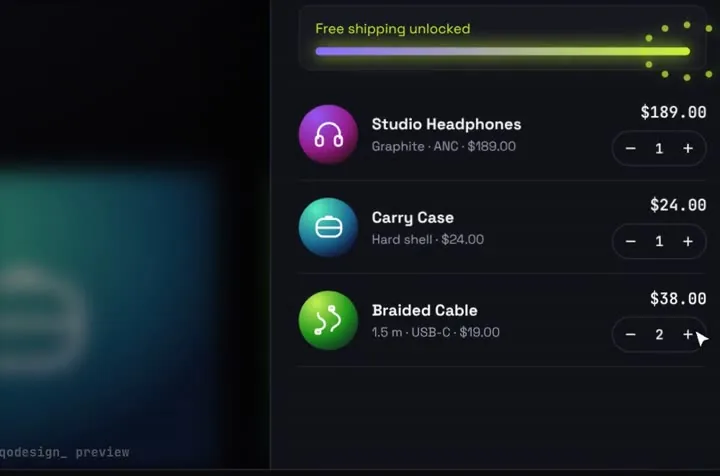
An animated cart drawer for a Medusa v2 store: items fly into the stack, a server action creates the cart with the Medusa JS SDK, and the buyer moves on to your checkout step.
By buying you agree to the Terms.
- Download right after paying
- Use it in client projects
- Won't run on the listed stack? We fix it or refund you
Ready forCursorv0Lovableshadcn CLI
Use it in Next.js
"use client";
import { useRouter } from "next/navigation";
import StackCartDrawer from "@/components/StackCartDrawer";
import { startMedusaCheckout } from "./actions";

export default function Shop() {
  const router = useRouter();
  return (
    <div className="h-dvh">
      <StackCartDrawer
        autoplayDemo={false}
        onCheckout={async (items) => {
          try {
            await startMedusaCheckout(items);
            router.push("/checkout"); // your checkout step reads the cart from the cookie
            return { ok: true };
          } catch {
            return { ok: false }; // the drawer says the payment failed and keeps the cart
          }
        }}
      />
    </div>
  );
}"use server";
import { cookies } from "next/headers";
import Medusa from "@medusajs/js-sdk";
const sdk = new Medusa({
baseUrl: process.env.MEDUSA_BACKEND_URL ?? "http://localhost:9000",
publishableKey: process.env.NEXT_PUBLIC_MEDUSA_PUBLISHABLE_KEY,
});
// product id in the cart data -> Medusa product variant id
const VARIANTS: Record<string, string> = {
orbit: "variant_01ORBIT",
case: "variant_01CASE",
cable: "variant_01CABLE",
};
export async function startMedusaCheckout(items: { id: string; qty: number }[]) {
const { cart } = await sdk.store.cart.create({
region_id: process.env.MEDUSA_REGION_ID,
items: items.map((i) => ({ variant_id: VARIANTS[i.id], quantity: i.qty })),
});
// the same cookie name the Medusa Next.js starter reads
(await cookies()).set("_medusa_cart_id", cart.id, {
httpOnly: true,
sameSite: "strict",
secure: process.env.NODE_ENV === "production",
maxAge: 60 * 60 * 24 * 7,
});
return cart.id;
}Good to know
- We type-checked this against @medusajs/js-sdk 2.22 and next 15.5. We haven't run it against a live Medusa backend.
- The publishable key goes on every store call. Make one under Settings > Publishable API Keys in the Medusa admin and link it to your sales channel, or the cart call fails.
- Medusa has no hosted checkout page. Your storefront collects the address, shipping and payment, then completes the cart. The Medusa Next.js starter keeps the cart id in a cookie named _medusa_cart_id, so its /checkout page picks this cart up as it is.
- The drawer ships with three demo products. Map each product id to a Medusa variant id. To load your own catalogue, widen the NorthwindData type in data/northwind.ts first.
- The total in the drawer is only a preview. Medusa works out prices, tax and shipping for the region you pass.
- If Medusa answers with an error, the action throws and the drawer says the payment failed. Nothing is charged and the cart in the drawer stays as it was.
Install
- Copy from the zipPut
react/src/components + react/src/dataintosrc/, thennpm i framer-motion @medusajs/js-sdk. - Or ask your AIPaste PROMPT.md into Cursor, Lovable or v0.
Props
- onCheckout
- (items, total) → { ok }
- data
- store name, products, free-shipping line
- autoplayDemo
- false for a real shop
How qodesign compares
- qodesign vs 21st.dev21st.dev is best for: browsing a huge marketplace and copying many components a month.
- qodesign vs Skiper UISkiper UI is best for: unusual interaction details for landing pages: image reveals, cursor trails, tooltips, drag-and-scroll galleries.
All comparisons, with prices read on each library's own site.
Questions
Does it work with the Medusa Next.js starter?
Yes. Put the drawer on a page of the starter and keep its /checkout route. The cookie name in the action is the one the starter reads.
Why a server action and not the SDK in the browser?
Either works, since the publishable key is public. The action keeps the variant map and region on the server and sets an httpOnly cookie, which the browser SDK can't do.
Can I add items to an existing cart?
Yes. Read the cookie first and call sdk.store.cart.createLineItem on that cart instead of making a new one.
Can Cursor or v0 add it for me?
Yes. Each download has a PROMPT.md. Paste it into Cursor, Lovable, v0 or Claude Code and it fits the piece into your app.
Can I use it in client work?
Yes, in personal and client projects. You can't resell the code itself as a kit.