React Three Fiber particles: free routes first
For React Three Fiber particles, drei's Points, Sparkles and Stars and a short useFrame swarm are free and come first here. Particle Morph is plain three.js, not R3F: it runs beside an R3F canvas, not inside one.
By buying you agree to the Terms.
- Download right after paying
- Use it in client projects
- Won't run on the listed stack? We fix it or refund you
Ready forCursorv0Lovableshadcn CLI
React Three Fiber particles that morph: a free useFrame swarm
"use client";
import { useMemo, useRef, useState } from "react";
import * as THREE from "three";
import { Canvas, useFrame } from "@react-three/fiber";
import { PointMaterial } from "@react-three/drei";

const COUNT = 6000;

// Read COUNT points off any three.js geometry, so every shape has the same count.
function sample(geo: THREE.BufferGeometry): Float32Array {
  const src = geo.getAttribute("position");
  const out = new Float32Array(COUNT * 3);
  for (let i = 0; i < COUNT; i++) {
    const j = Math.floor((i / COUNT) * src.count);
    out.set([src.getX(j), src.getY(j), src.getZ(j)], i * 3);
  }
  geo.dispose();
  return out;
}

function Swarm({ shape }: { shape: number }) {
  const points = useRef<THREE.Points>(null);
  const shapes = useMemo(
    () => [sample(new THREE.SphereGeometry(2, 96, 64)), sample(new THREE.TorusKnotGeometry(1.5, 0.45, 300, 20))],
    [],
  );
  const pos = useMemo(() => shapes[0].slice(), [shapes]);
  const vel = useMemo(() => new Float32Array(COUNT * 3), []);

  // Mutate in useFrame, never setState per frame.
  useFrame((_, delta) => {
    const p = points.current;
    if (!p) return;
    const target = shapes[shape % shapes.length];
    const step = Math.min(delta * 60, 3); // 1 at 60 fps
    const keep = Math.pow(0.9, step); // damping per step
    for (let i = 0; i < COUNT * 3; i++) {
      vel[i] = (vel[i] + (target[i] - pos[i]) * 0.02 * step) * keep;
      pos[i] += vel[i] * step;
    }
    p.geometry.attributes.position.needsUpdate = true;
    p.rotation.y += delta * 0.25;
  });

  return (
    <points ref={points}>
      <bufferGeometry>
        <bufferAttribute attach="attributes-position" args={[pos, 3]} />
      </bufferGeometry>
      <PointMaterial transparent color="#8B6CFF" size={0.035} sizeAttenuation depthWrite={false} />
    </points>
  );
}

export default function ParticleSwarm() {
  const [shape, setShape] = useState(0);
  return (
    <div className="h-[480px] cursor-pointer" onClick={() => setShape((s) => s + 1)}>
      <Canvas camera={{ position: [0, 0, 7], fov: 45 }} dpr={[1, 2]}>
        <Swarm shape={shape} />
      </Canvas>
    </div>
  );
}Good to know
- Particle Morph is plain three.js, not React Three Fiber. If you already use R3F, the free routes on this page (drei's Points, Sparkles and Stars, ParticleSwarm.tsx, and the tutorials below) are the better place to start.
- ParticleSwarm.tsx above needs @react-three/fiber and @react-three/drei. It moves 6,000 points between a sphere and a torus knot with a spring in useFrame. Clicking the box switches the shape.
- Both shapes come from three.js geometries, read at the same number of points, so the spring always has a target for every particle. Vertex order decides which point goes where, so the sphere-to-knot move looks scrambled rather than smooth. That's a trade-off of this short version.
- It runs on the CPU and uploads the buffer every frame. That's fine for a few thousand points. For much larger counts, use a shader as in Maxime Heckel's article below.
React Three Fiber particles with drei: Points, Sparkles and Stars
- If you already have a React Three Fiber scene, you don't need a paid piece for particles. R3F renders three.js objects as JSX, so <points> with a <bufferGeometry> works out of the box, and drei (MIT, 10.7.9 on npm today) adds ready-made helpers on top.
- drei's docs describe <Points> as "A wrapper around THREE.Points" that "has the same api and properties as Instances". You can mount one <Point> per particle, or pass whole buffers with positions, colors and sizes. <PointMaterial> gives "Antialiased round dots" and takes the same props as THREE.PointsMaterial.
- For background effects, drei has two one-liners. <Sparkles> is "Floating, glowing particles" (count defaults to 100), and <Stars> "Adds a blinking shader-based starfield to your scene." SpaceBackground.tsx below puts both behind a page. For a starfield or floating dust, this is the whole job and it fits better than anything we sell.
"use client";
import { Canvas } from "@react-three/fiber";
import { Sparkles, Stars } from "@react-three/drei";

export default function SpaceBackground() {
  return (
    <div className="fixed inset-0 -z-10 bg-black">
      <Canvas camera={{ position: [0, 0, 5] }}>
        <Stars radius={60} depth={40} count={4000} factor={4} saturation={0} fade speed={1} />
        <Sparkles count={80} scale={6} size={3} speed={0.4} color="#C6FF3D" />
      </Canvas>
    </div>
  );
}
Free tutorials and libraries for an R3F particle system
- Maxime Heckel's free article "The magical world of Particles with React Three Fiber and Shaders" (Nov 8 2022) is the deep dive: custom shaders on R3F points, and a Frame Buffer Object setup for large counts. If you want to learn how particle effects work on the GPU in R3F, start there.
- wawa-vfx is an open-source VFX engine for three.js and React Three Fiber (MIT, 1.2.10 on npm). It suits bursts, trails and game effects. Its peer dependencies include leva and zustand, so check that they fit your app before you add it.
- The R3F docs keep an examples page with live demos. Today it lists starwars, instanced-particles-effects, gatsby-stars and sparks-and-effects among them, and each links to its source.
- R3F's pitfalls page has one rule that matters for every particle system: "TLDR, don't, mutate inside useFrame!" ParticleSwarm.tsx above follows it. It changes the position buffer in useFrame and sets needsUpdate, and React state only changes on a click.
Particle Morph next to React Three Fiber, not inside it
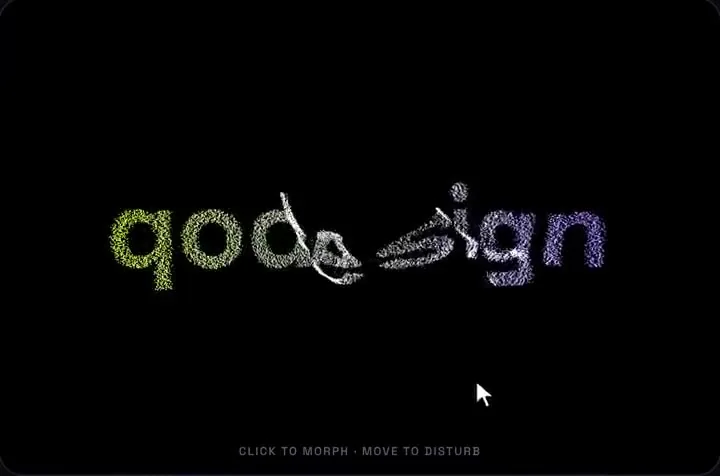
- Particle Morph is not an R3F component. It creates its own THREE.WebGLRenderer, scene and camera inside a div, so it can't go inside <Canvas>. Put it in its own box next to your R3F canvas, as page.tsx below does. That gives you two WebGL renderers on one page, each with its own loop.
- What it does: 9,000 particles by default spring between a sphere, your word and a torus knot. A click cycles the shapes, the pointer pushes particles away, and the colour runs from colorA to colorB left to right. It pauses off-screen and in a hidden tab, and with Reduce Motion on it draws each shape still.
- It fits two readers. One wants this morph, with a word as one of the shapes, and doesn't want to add R3F at all. The other already has an R3F scene and wants the morph as a separate hero block. If you want particles that live inside your R3F scene, share its camera or react to its objects, the free routes above fit better.
- Its renderer is created without alpha, so it paints its own black background. In our test the box stayed black over the starfield behind it. Give it a dark section or its own card rather than layering it over the R3F canvas.
- There is no R3F version in the download. Its spring loop is the same idea as ParticleSwarm.tsx, so you could move it into useFrame, but that means rewriting the component.
"use client";
import dynamic from "next/dynamic";
import SpaceBackground from "@/components/SpaceBackground";

// Particle Morph runs its own three.js renderer, so it lives in its own box,
// not inside <Canvas>. ssr: false keeps WebGL off the server.
const ParticleMorph = dynamic(() => import("@/components/ParticleMorph"), {
  ssr: false,
  loading: () => <div className="h-full w-full bg-black" />,
});

export default function Page() {
  return (
    <main className="min-h-screen text-white">
      <SpaceBackground />
      <section className="mx-auto grid max-w-5xl gap-8 px-6 py-24 md:grid-cols-2 md:items-center">
        <div>
          <h1 className="text-4xl font-semibold">Acme</h1>
          <p className="mt-3 text-white/70">Click the particles to change the shape.</p>
        </div>
        <div className="h-[420px] overflow-hidden rounded-2xl">
          <ParticleMorph word="ACME" count={7000} colorA="#C6FF3D" colorB="#8B6CFF" />
        </div>
      </section>
    </main>
  );
}
No R3F? The plain three.js particle morph
- If you don't use R3F at all, the plain three.js route is on our particle text animation guide, in the section "Three.js particle morphing in React: shader or springs?" (it's under More for React below). It covers three's own morph targets on THREE.Points, MeshSurfaceSampler to give two shapes the same point count, and a shader route for large counts.
Tailwind v4
- Our Tailwind v4 check lists Particle Morph (piece 03) as "works as-is": "None in computed styles. The pixel diff is three.js particle noise, the same size as v3 rerun against v3." The piece needs no @config line and no CSS change.
- The same check was corrected on Oct 25 2026: in a shadcn, daisyUI or HeroUI app, don't add @config to load the piece's tailwind.config.js. Pieces that need a font fix get a scoped rule instead. Particle Morph doesn't need either.
- The word is drawn from a canvas font string, "Space Grotesk" by default, and the component waits for document.fonts.load before it samples the word. Load Space Grotesk with next/font or a link tag, or pass your own font prop. Otherwise the word is sampled in Arial.
- The download's package.json asks for three ^0.170.0. We ran it with three 0.186.1, the current version.
What we checked and what we didn't
- Facts checked on Oct 25 2026: @react-three/fiber 9.8.2 (MIT), @react-three/drei 10.7.9 (MIT), three 0.186.1 and @types/three 0.186.0 on npm. npm counts for Oct 16 to 22: fiber 4,253,341, drei 2,756,327, three 15,202,672. npm reports 0 for Oct 19 to 21 on all three, so those totals are low.
- @react-three/fiber 9.8.2 lists react ">=19 <19.4" as a peer dependency. React is at 19.3.1 today, so check fiber's release notes when React 19.4 comes out.
- Type-checked: ParticleSwarm.tsx, SpaceBackground.tsx, page.tsx and the shipped ParticleMorph.tsx with TypeScript 5.9.3 against those packages, React 19.3.1 and next/dynamic from next 15.5.28. Two broken copies (a string where a number belongs) failed as they should.
- Run: the three files were bundled with esbuild and opened in headless Chromium with software WebGL at 390 and 1440 px. Every canvas drew, the click moved the swarm from the sphere toward the knot, the console logged no errors and neither width scrolled sideways.
- Not run: a Next.js dev server or build of these exact files, a real GPU, phones, Safari, Firefox, or a frame-rate test.
Install
- Copy from the zipPut
react/src/componentsintosrc/, thennpm i three && npm i -D @types/three. - Or ask your AIPaste PROMPT.md into Cursor, Lovable or v0.
Props
- word
- the word it forms
- count
- number of particles (9,000 by default)
- colorA / colorB
- gradient, left to right
- font
- canvas font used to sample the word
How qodesign compares
- qodesign vs React BitsReact Bits is best for: text animations, animated backgrounds and creative effects.
- qodesign vs Aceternity UIAceternity UI is best for: teams building many marketing pages who want one big library.
All comparisons, with prices read on each library's own site.
Questions
Is Particle Morph a React Three Fiber component?
No. It is plain three.js with its own renderer inside a div. It runs next to an R3F canvas, not inside one.
Can I put Particle Morph inside <Canvas>?
No. It creates its own WebGLRenderer, so place it in its own box beside the canvas. To get the morph inside your R3F scene, port the spring loop into useFrame or use the free ParticleSwarm.tsx on this page.
Do I need drei for particles in React Three Fiber?
No. <points> with a <bufferGeometry> works in plain R3F. drei adds <Points>, <PointMaterial>, <Sparkles> and <Stars> so you write less code.
Which React version does React Three Fiber need?
@react-three/fiber 9.8.2 lists react ">=19 <19.4" as a peer dependency (npm, Oct 25 2026).
Can Cursor or v0 add it for me?
Yes. Each download has a PROMPT.md. Paste it into Cursor, Lovable, v0 or Claude Code and it fits the piece into your app.
Can I use it in client work?
Yes, in personal and client projects. You can't resell the code itself as a kit.