Image to particles with three.js
Turning an image into particles with three.js takes one canvas and one Points object, and the free React component below does it in your image's own colours. Particle Morph can form a logo too, but not through a prop: it needs a small edit to its component, where fillText becomes drawImage.
By buying you agree to the Terms.
- Download right after paying
- Use it in client projects
- Won't run on the listed stack? We fix it or refund you
Ready forCursorv0Lovableshadcn CLI
Image to particles in three.js: a free React component
"use client";
import { useEffect, useRef } from "react";
import * as THREE from "three";

type Props = { src: string; step?: number; size?: number; className?: string };

// Turns an image into coloured points that fly in and settle: one point for
// every `step`-th pixel whose alpha is above 128, coloured like that pixel.
// The image must be same-origin or served with CORS headers, or the browser
// blocks getImageData with a SecurityError.
export default function ImageParticles({ src, step = 2, size = 0.03, className = "" }: Props) {
  const host = useRef<HTMLDivElement>(null);

  useEffect(() => {
    const el = host.current!;
    let disposed = false;
    let raf = 0;
    let onScreen = true;
    const renderer = new THREE.WebGLRenderer({ antialias: true, alpha: true });
    renderer.setPixelRatio(Math.min(devicePixelRatio, 2));
    renderer.setSize(el.clientWidth, el.clientHeight);
    el.append(renderer.domElement);
    const scene = new THREE.Scene();
    const camera = new THREE.PerspectiveCamera(45, el.clientWidth / el.clientHeight, 0.1, 100);
    camera.position.z = 9;
    const geo = new THREE.BufferGeometry();
    const mat = new THREE.PointsMaterial({ size, vertexColors: true });
    let pos = new Float32Array(0);
    let target = new Float32Array(0);
    const reduced = matchMedia("(prefers-reduced-motion: reduce)");

    const frame = () => {
      raf = 0;
      let moving = false;
      for (let i = 0; i < pos.length; i++) {
        const d = target[i] - pos[i];
        if (Math.abs(d) > 0.001) moving = true;
        pos[i] += d * 0.06;
      }
      geo.attributes.position.needsUpdate = true;
      renderer.render(scene, camera);
      if (moving) loop(); // stops by itself once every point has landed
    };
    const loop = () => {
      if (disposed || raf || !onScreen || document.hidden) return;
      raf = requestAnimationFrame(frame);
    };

    const img = new Image();
    img.crossOrigin = "anonymous"; // harmless same-origin, needed for a CORS host
    img.onload = () => {
      if (disposed) return;
      // 1. draw the image into a small canvas, longest side 320 px
      const k = 320 / Math.max(img.naturalWidth, img.naturalHeight);
      const w = Math.round(img.naturalWidth * k), h = Math.round(img.naturalHeight * k);
      const c = document.createElement("canvas");
      c.width = w; c.height = h;
      const g = c.getContext("2d")!;
      g.drawImage(img, 0, 0, w, h);
      const px = g.getImageData(0, 0, w, h).data;

      // 2. one point per kept pixel, in that pixel's colour
      const p: number[] = [], col: number[] = [], tmp = new THREE.Color();
      const unit = 6 / Math.max(w, h); // the picture is about 6 world units wide
      for (let y = 0; y < h; y += step) {
        for (let x = 0; x < w; x += step) {
          const i = (y * w + x) * 4;
          if (px[i + 3] <= 128) continue;
          p.push((x - w / 2) * unit, -(y - h / 2) * unit, (Math.random() - 0.5) * 0.2);
          // canvas pixels are sRGB; three works in linear, so convert
          tmp.setRGB(px[i] / 255, px[i + 1] / 255, px[i + 2] / 255, THREE.SRGBColorSpace);
          col.push(tmp.r, tmp.g, tmp.b);
        }
      }
      target = new Float32Array(p);
      pos = reduced.matches ? target.slice() : target.map(() => (Math.random() - 0.5) * 14);
      geo.setAttribute("position", new THREE.BufferAttribute(pos, 3));
      geo.setAttribute("color", new THREE.Float32BufferAttribute(col, 3));
      scene.add(new THREE.Points(geo, mat));
      renderer.render(scene, camera);
      loop();
    };
    img.src = src;

    const io = new IntersectionObserver(([e]) => {
      onScreen = e.isIntersecting;
      if (onScreen) loop(); else { cancelAnimationFrame(raf); raf = 0; }
    });
    io.observe(el);
    const onVis = () => { if (!document.hidden) loop(); };
    document.addEventListener("visibilitychange", onVis);
    const onResize = () => {
      camera.aspect = el.clientWidth / el.clientHeight;
      camera.updateProjectionMatrix();
      renderer.setSize(el.clientWidth, el.clientHeight);
      renderer.render(scene, camera);
    };
    addEventListener("resize", onResize);

    return () => {
      disposed = true;
      cancelAnimationFrame(raf);
      io.disconnect();
      document.removeEventListener("visibilitychange", onVis);
      removeEventListener("resize", onResize);
      geo.dispose();
      mat.dispose();
      renderer.dispose();
      renderer.domElement.remove();
    };
  }, [src, step, size]);

  return <div ref={host} className={`h-full w-full ${className}`} />;
}import ImageParticles from "@/components/ImageParticles";
// logo.png sits in public/, so it is same-origin and the canvas can read it
export default function Page() {
return (
<section className="h-[70vh] bg-black">
<ImageParticles src="/logo.png" step={2} />
</section>
);
}Good to know
- It draws your image on a canvas scaled so the longest side is 320 px, then keeps every second pixel (step) whose alpha is above 128. A PNG or SVG with a transparent background gives you the shape. A JPG has no transparency, so every pixel passes and you get a filled rectangle.
- The image has to come from your own domain or from a host that sends CORS headers. Otherwise the canvas is tainted and getImageData throws a SecurityError. Files in a Next.js public/ folder are same-origin.
- Canvas pixels are sRGB and three.js works in linear colour, so each colour goes through Color.setRGB(r, g, b, SRGBColorSpace). Skip that and the points come out lighter than the image.
- The points fly in from random spots and settle, and the loop stops once all of them have landed. With Reduce Motion on they start in place. Nothing runs while it's scrolled away or the tab is hidden.
- PointsMaterial draws square points. The particle sphere guide shows a small circle texture that makes them round.
- All the three.js code runs inside useEffect, so the component renders in a normal server page without next/dynamic.
Free image to particles code you can start from
- The best-known image to particles three.js tutorial is Codrops' "Interactive Particles with Three.js" by Bruno Imbrizi, from January 2019. It turns a photo into one particle per pixel with a touch trail, and its code is on GitHub (brunoimbrizi/interactive-particles). The repo's licence lets you use it in personal and commercial projects but not sell it as-is. It targets three ^0.98 with webpack 4, so expect to update it for current three.js.
- Tolexia/threejs-image-particles-transition on GitHub is MIT and moves particles between images. On Stack Overflow, "Make Image to Particles with Three JS in Next JS" (question 70819892, January 2022) covers the Next.js side.
- For photos and images with many colours, those projects and ImageParticles.tsx above fit better than Particle Morph. Particle Morph samples a silhouette by alpha and paints it with its own two-colour gradient, so a photo comes out as a flat shape.
Particles to logo animation in React with Particle Morph
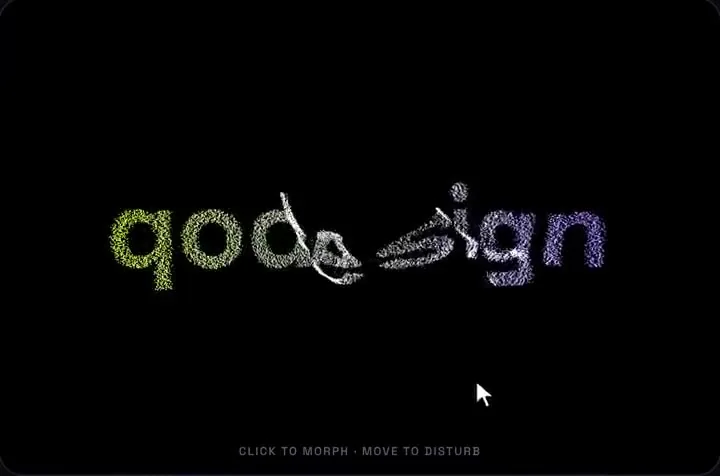
- Particle Morph moves 9,000 particles with springs between a sphere, a second shape and a torus knot. The pointer pushes them away and a click moves to the next shape. Out of the box the second shape is a word, and there is no logo or image prop.
- The shipped ParticleMorph.tsx draws your word with fillText on a 1000 x 260 canvas, keeps every second pixel with alpha above 128 and hands those spots to the particles. Swap fillText for drawImage and the same code samples a logo. The edit below adds a logo prop to your copy: one branch in text(), a promise that waits for the image next to the font, and logo in the effect's dependency list. It's about 20 lines.
- What stays the same: the particles are still coloured by x from colorA to colorB, not by the logo's pixels. It starts as a sphere and the logo appears on the first click, because the piece has no autoplay or timer. A logo that fails to load falls back to the word.
// ParticleMorph.tsx, your copy from the zip: three changes

// 1. Add a logo prop next to font, in the type and in the function's arguments
  /** same-origin PNG or SVG with a transparent background */
  logo?: string;
  // ...
  font = '700 190px "Space Grotesk", Arial, sans-serif',
  logo,

// 2. Inside text(), replace the line  g.fillText(w, 500, 135);  with:
      if (logoImg && logoImg.naturalWidth) {
        // fit the logo into the 1000 x 260 canvas, centred where the word would be
        const s = Math.min(960 / logoImg.naturalWidth, 240 / logoImg.naturalHeight);
        const lw = logoImg.naturalWidth * s, lh = logoImg.naturalHeight * s;
        g.drawImage(logoImg, 500 - lw / 2, 135 - lh / 2, lw, lh);
      } else {
        g.fillText(w, 500, 135);
      }

// 3. Near the end of the effect, replace the font-wait line
//    (document.fonts ? document.fonts.load(font)... .then(start);) with this,
//    and add logo to the effect's dependency list.
//    text() only runs after this promise resolves, so logoImg exists by then.
    const logoImg = logo ? new Image() : null;
    const logoReady = new Promise<void>((done) => {
      if (!logoImg) return done();
      logoImg.crossOrigin = 'anonymous';
      logoImg.onload = logoImg.onerror = () => done();
      logoImg.src = logo!;
    });
    Promise.all([document.fonts ? document.fonts.load(font).catch(() => undefined) : undefined, logoReady]).then(start);
  // ...
}, [word, count, colorA, colorB, font, logo]);"use client";
import ParticleMorph from "@/components/ParticleMorph";
// after the edit: the second shape (first click) is your logo; "ACME" is the fallback
export default function Hero() {
return (
<div className="h-[480px] bg-black">
<ParticleMorph logo="/logo.png" word="ACME" />
</div>
);
}What we ran on this image to particles code
- On October 25, 2026, ImageParticles.tsx, app/page.tsx, the edited ParticleMorph.tsx and app/Hero.tsx type-checked against three 0.186.1 (the current npm release), @types/three 0.186.0, @types/react 19.3.0 and TypeScript 5.9.3. A deliberate mistake (passing the logo string to drawImage) failed the check, as it should.
- We then ran the compiled components in headless Chromium with software WebGL at 900 x 500. The test PNG (a ring with a cut-out) and an SVG with and without width and height all formed their shape after one click. The same picture saved as a JPG formed a solid rectangle. A missing file fell back to the word, and the page logged no errors. ImageParticles.tsx drew the PNG in its own colours.
- Not tested: Safari and Firefox WebGL (our headless Firefox had no WebGL), real phones and GPUs, frame rates, and a full Next.js build with these files. We checked types and ran the components in a plain page.
- Tailwind v4: Particle Morph ships no CSS file. The component's only styling is four Tailwind classes on its wrapper div (relative h-full w-full cursor-crosshair), and our Tailwind 4.3.3 check of every paid piece found it works as-is, with no change in computed styles. It doesn't touch shadcn or daisyUI styles, so no scoping edit is needed. The two free components on this page use h-full w-full and nothing else.
Install
- Copy from the zipPut
react/src/componentsintosrc/, thennpm i three && npm i -D @types/three. - Or ask your AIPaste PROMPT.md into Cursor, Lovable or v0.
Props
- word
- the word it forms, and the fallback when the logo fails
- logo (after the edit)
- same-origin PNG or SVG with a transparent background
- count
- number of particles (9,000 by default)
- colorA / colorB
- the gradient across x
- font
- font used for the word
How qodesign compares
- qodesign vs React BitsReact Bits is best for: text animations, animated backgrounds and creative effects.
- qodesign vs Aceternity UIAceternity UI is best for: teams building many marketing pages who want one big library.
All comparisons, with prices read on each library's own site.
From the blog: Three.js Particles That Morph Between Shapes in React
Questions
Does Particle Morph have a logo or image prop?
No. The shipped component samples text. The edit on this page adds a logo prop to your copy in about 20 lines.
Why does my logo come out as a rectangle?
Both samplers keep pixels by alpha. A JPG, or a PNG with a white background, is opaque everywhere. Export the logo with a transparent background.
Why does getImageData throw a SecurityError?
The image came from another domain without CORS headers, so the canvas is tainted. Serve it from your own site, for example public/ in Next.js, or from a host that sends Access-Control-Allow-Origin.
Can the particles keep my logo's colours?
In ImageParticles.tsx, yes. In Particle Morph, no: it colours every particle by its x position between colorA and colorB.
Will it change my shadcn styles?
No. Particle Morph ships no CSS file, only four Tailwind classes on its own div, so your shadcn or daisyUI styles stay as they are.
Can Cursor or v0 add it for me?
Yes. Each download has a PROMPT.md. Paste it into Cursor, Lovable, v0 or Claude Code and it fits the piece into your app.
Can I use it in client work?
Yes, in personal and client projects. You can't resell the code itself as a kit.