Headless UI navbar in React and Next.js: Disclosure, Menu and an animated island
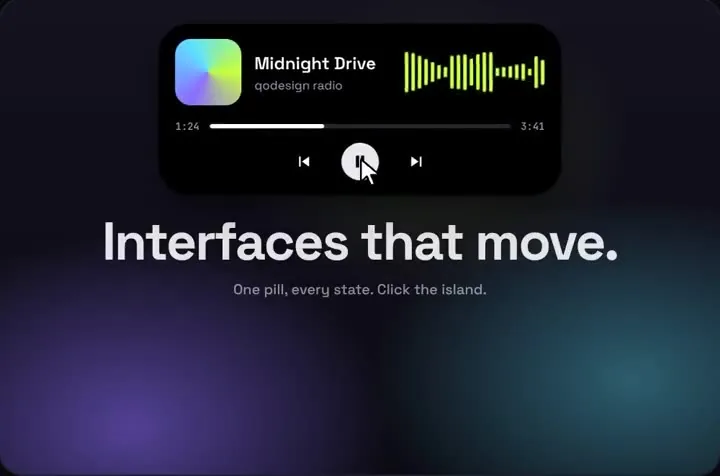
Headless UI has no Navbar component. You build one from two parts it does have: Disclosure for the phone menu and Menu for a dropdown, styled with Tailwind. site-nav.tsx below is a complete, free one for Next.js, and for most sites it's all you need. If your app also wants page search or a live notification up top, the Dynamic Island can float under that navbar as a black pill that opens into either.
components/app-island.tsx (optional: the animated island)
"use client";
import { useRouter } from "next/navigation";
import DynamicIsland from "@/components/DynamicIsland";
import { ACCOUNT, PAGES } from "@/lib/pages";

const ALL = [...PAGES, ...ACCOUNT];

// The Headless UI navbar keeps the links and the account menu.
// The island floats under it for the things a link can't do: search and a live notification.
export function AppIsland() {
  const router = useRouter();

  return (
    // The island is absolutely positioned, so a fixed, zero-height layer under the 64 px nav is enough.
    <div className="pointer-events-none fixed inset-x-0 top-16 z-30">
      <div className="pointer-events-auto">
        <DynamicIsland
          size="auto"
          top={12}
          tabs={["search", "notify"]}
          accent="#6366f1"
          items={ALL.map((page) => page.label)}
          resultTag="Page"
          searchPlaceholder="Search pages"
          avatar="A"
          notificationTitle="Invoice paid"
          notificationText="INV-2041 was paid a minute ago"
          notificationAction="Open"
          onHome={() => router.push("/")}
          onSelect={(label) => {
            const page = ALL.find((p) => p.label === label);
            if (page) router.push(page.href);
          }}
          onNotificationAction={() => router.push("/invoices")}
        />
      </div>
    </div>
  );
}
app/layout.tsx
import type { ReactNode } from "react";
import "./globals.css";
import { SiteNav } from "@/components/site-nav";
import { AppIsland } from "@/components/app-island";

export default function RootLayout({ children }: { children: ReactNode }) {
  return (
    <html lang="en">
      <body className="min-h-dvh bg-gray-50 text-gray-900">
        <SiteNav />
        <AppIsland />
        {/* room for the island: 76 px tall, 12 px under the nav (60 px on phones) */}
        <main className="mx-auto max-w-5xl px-4 pt-28">{children}</main>
      </body>
    </html>
  );
}
Good to know
What we ran on Oct 25, 2026: every file on this page type-checked with TypeScript 5.9.3 against @headlessui/react 2.2.10, the shipped DynamicIsland.tsx, framer-motion 14.6.0, React 19.3.1, @types/react 19.3.0 and Next.js 15.5.28's types. Three deliberate mistakes failed tsc, as they should: a tab called "home" on the island, anchor="sideways" on MenuItems, and a CloseButton rendered as Link with no href.
Then we bundled site-nav.tsx and app-island.tsx for the browser and drove them in headless Chromium with CSS from Tailwind 4.3.3. At 1440 px the links showed and the menu button was hidden; Account opened the dropdown, the arrow keys moved focus, and clicking Settings closed it. At 390 px the links were hidden; the button opened the panel (aria-expanded true, the icon swapped to a cross), and tapping Invoices closed it again. Nothing scrolled sideways at either width.
In that browser run next/link and usePathname were small stand-ins, not Next.js itself. The Link stand-in does what Next.js 15.5.28's Link does on a click (we read it in next/dist/client/app-dir/link.js): it calls your onClick first, then prevents the default and navigates.
What we didn't run: next dev or next build with these files, Next.js 16, Safari, Firefox, a real phone or a screen reader.
The island's search results are buttons that call onSelect, not links. That's fine here because the navbar above it keeps every page as a real link, which is what crawlers follow.
The island's CSS names Space Grotesk and JetBrains Mono but doesn't load them. Load them with next/font or change the names in dynamic-island.css. Otherwise it falls back to system-ui.
Headless UI navbar: there is no Navbar component, so you compose one
@headlessui/react 2.2.10 is the current release (MIT, published April 7, 2026, peers react ^18 || ^19). npm counted 4,577,119 downloads in the week of October 16 to 22. Its React docs list Menu, Disclosure, Dialog, Popover, Tabs, Transition and the form parts. There's no Navbar, and a search for "headless ui navbar" on October 25 turned up the Menu docs and forum threads, not a navbar page.
Disclosure is the part the docs point at for this. Its page shows a DisclosureButton labelled "Open mobile menu" and says CloseButton "is especially useful when using disclosures for things like mobile menus that contain links where you want the disclosure to close when navigating to the next page."
So the free navbar above is three ideas: plain links on wide screens, a Disclosure that holds the same links on phones, and a Menu for the account dropdown. It's about a hundred lines, and you own every class.
Headless UI mobile menu: Disclosure, Popover or Dialog
Disclosure, used above: the panel opens inside the nav and pushes it taller, which is the simplest phone menu. It doesn't close on its own when a link is tapped, because in the Next.js App Router the layout, and the navbar in it, stays mounted between pages. Render each link as CloseButton as={Link}, as site-nav.tsx does, or call the close render prop.
Popover: the docs say "Popovers are perfect for floating panels with arbitrary content like navigation menus, mobile menus and flyout menus." For a header with several flyouts, wrap them in PopoverGroup so a panel stays open while you tab between them. Like Disclosure, it won't close on a link click by itself: "we can't automatically close them when you click something inside of them like we can with Menu components." CloseButton works there too.
Dialog fits when the phone menu should cover the page, like a slide-over. We didn't build or test that route for this page.
Headless UI React navbar dropdown with Next.js Link
Menu closes when you click a MenuItem. The docs add a warning: "some third-party Link components use event.preventDefault() which prevents the menu from closing." Next.js Link does call preventDefault, but only after it has called the onClick it was given, and MenuItem hands its click handler to the Link as that onClick. So a Link inside MenuItem closes the menu. In our browser run, clicking Settings closed the dropdown and recorded the navigation.
anchor="bottom end" on MenuItems positions the dropdown under the button, right-aligned, and the [--anchor-gap:8px] class sets the space between them. MenuItems renders in a portal when it's anchored, so the sticky nav's overflow can't clip it. In our run at 1440 px it opened 176 px wide, lined up with the right edge of the Account button.
aria-current="page" on the active link does two jobs: screen readers announce it, and Tailwind's aria-[current=page]: variant styles it, so there's no separate active class to keep in sync.
Headless UI transitions with Tailwind v4
Since v2 you add the transition prop to DisclosurePanel or MenuItems and style the closed state with data attributes. The Transition docs describe it as "specifying the element's closed styles by targeting the data-closed attribute". Tailwind v4 has data-* variants built in, so data-closed:opacity-0 needs no plugin. Tailwind 4.3.3 compiled it to a [data-closed] selector.
We measured it on October 25, 2026 in headless Chromium. 20 ms after clicking Account the dropdown had data-enter set and opacity 0, with a 0.15 s transition; 400 ms later it was at opacity 1. The phone panel did the same: opacity 0 at 30 ms, 1 at 400 ms.
The island's own motion is framer-motion, not Headless UI, so it ignores these classes. Our Tailwind v4 check (Tailwind 4.3.3 against 3.4.19) rated the piece a one-line fix: "The island label, subtitle and controls (font-sans on main and children, 4 elements) render in the system sans instead of Space Grotesk." Those elements are in the zip's demo stage, which the navbar on this page doesn't use. If you keep the stage, skip @config: the check's October 25 correction found it either does nothing or switches the whole app's sans font in UI-kit apps. Add a class to the stage's main and give that class the Space Grotesk font-family in app/globals.css.
Where the Dynamic Island fits on a Headless UI navbar
The island is not a responsive nav menu. It has no links of its own and no phone menu, and it doesn't hide on scroll. Keep the Headless UI navbar for links and the account menu. The island sits 12 px under it for the two things a link can't do: search across your pages, and a notification that opens into a short message with an action button.
In our run the closed island measured 358 x 76 px with two tabs at 1440 px and 232 x 60 px at 390 px (size="auto" switches under 640 px). Search opened it to 600 px wide on desktop. When the phone menu is open, the nav (z-40) covers the island (z-30), so the two never fight over taps.
The piece's CSS is scoped: we re-read dynamic-island.css on October 25 and all 99 selectors start with a qdi- class, which matches the clean rating in our CSS leak audit. Nothing in it touches your navbar's Tailwind classes.
If you'd rather not write the navbar at all, Tailwind Labs has ready-made navbar blocks in Tailwind Plus. When we opened those pages on October 25, 2026 they asked for a Tailwind Plus login, so we haven't read them.
Install
Copy from the zipPut react/src/components into src/, then npm i @headlessui/react framer-motion.
Or ask your AIPaste PROMPT.md into Cursor, Lovable or v0.
Props
tabs
icons next to Home: "search", "music", "notify"
items / onSelect
what search finds, and the pick (push the route here)
onHome
the Home icon
size
"regular", "compact" or "auto" (compact under 640 px)
the bell state's text; onNotificationAction for its button
onStateChange
idle, notify, music or search
accent
any CSS colour, including a CSS variable
How qodesign compares
qodesign vs Hover.devHover.dev is best for: animated website sections you copy and paste.
qodesign vs Cult UICult UI is best for: free animated shadcn components and device mockups.
All comparisons, with prices read on each library's own site.
Questions
Does Headless UI have a navbar component?
No. Headless UI gives you the parts: Disclosure for a phone menu, Menu for dropdowns, Popover for flyouts. A navbar is your own nav element built from those, like site-nav.tsx on this page.
How do I make a mobile menu with Headless UI?
Wrap the nav in Disclosure, show a DisclosureButton only on small screens (sm:hidden), and put the links in a DisclosurePanel. Render each link as CloseButton as={Link} so the panel closes when someone taps it.
Why doesn't my Headless UI mobile menu close after I tap a link?
In the Next.js App Router the navbar stays mounted between pages, and Disclosure only closes when told to. Use CloseButton for the links, or call the close render prop in their onClick.
Does the Headless UI Menu work with Next.js Link?
Yes. Put the Link inside MenuItem. Next.js Link calls the onClick it receives before it prevents the default, so the menu still closes after navigation.
Do Headless UI transitions work with Tailwind v4?
Yes. Add the transition prop and style the closed state with data-closed: classes, which Tailwind v4 supports without a plugin. We measured the fade on Headless UI 2.2.10 with Tailwind 4.3.3.
Does Headless UI v2 support React 19?
Yes. @headlessui/react 2.2.10 lists react and react-dom ^18 || ^19 as peers.
Can Cursor or v0 add it for me?
Yes. Each download has a PROMPT.md. Paste it into Cursor, Lovable, v0 or Claude Code and it fits the piece into your app.
Can I use it in client work?
Yes, in personal and client projects. You can't resell the code itself as a kit.