daisyUI navbar for Next.js: the free one and an animated island
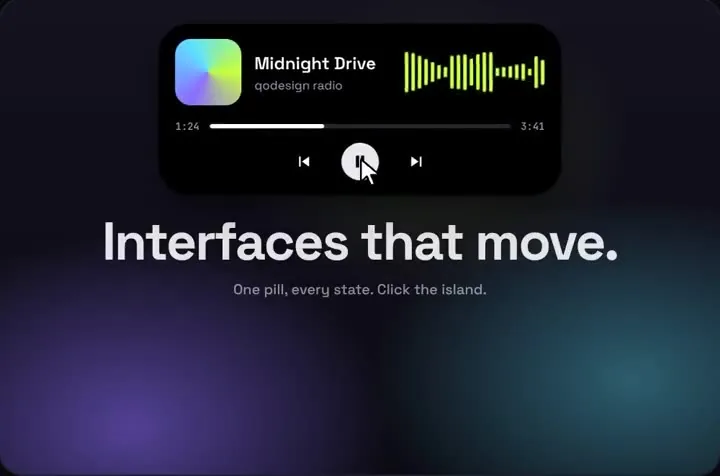
daisyUI ships a free navbar made of CSS classes, with a dropdown for phones. For a site header it's the right pick, and daisy-navbar.tsx further down sets it up in Next.js. For an app header there's a second option: the Dynamic Island, a black pill that opens into page search or a live notification and takes its accent colour from your daisyUI theme.
By buying you agree to the Terms.
- Download right after paying
- Use it in client projects
- Won't run on the listed stack? We fix it or refund you
Ready forCursorv0Lovableshadcn CLI
Use it in Next.js
import type { ReactNode } from "react";
import "./globals.css";
import { AppNav } from "@/components/app-nav";
import { SiteFooter } from "@/components/site-footer";

export default function RootLayout({ children }: { children: ReactNode }) {
  return (
    <html lang="en" data-theme="light">
      <body className="min-h-dvh bg-base-200 text-base-content">
        <AppNav />
        {/* room for the island: 76 px tall at top 16 (60 px on phones) */}
        <main className="mx-auto max-w-5xl px-4 pt-28">{children}</main>
        <SiteFooter />
      </body>
    </html>
  );
}@import "tailwindcss";
@plugin "daisyui";
/* The navbar needs no extra rule here. See the Tailwind v4 section if you keep the zip's demo stage. */"use client";
import { useRouter } from "next/navigation";
import DynamicIsland from "@/components/DynamicIsland";
import { PAGES } from "@/lib/pages";
export function AppNav() {
const router = useRouter();
return (
// The island is absolutely positioned, so a fixed, zero-height header is enough.
<header className="fixed inset-x-0 top-0 z-40">
<DynamicIsland
size="auto"
top={16}
tabs={["search", "notify"]}
// daisyUI theme colours are CSS variables, so the accent follows data-theme
accent="var(--color-accent)"
items={PAGES.map((page) => page.label)}
resultTag="Page"
searchPlaceholder="Search pages"
avatar="A"
notificationTitle="Order shipped"
notificationText="#1042 left the warehouse"
notificationAction="Track"
onHome={() => router.push("/")}
onSelect={(label) => {
const page = PAGES.find((p) => p.label === label);
if (page) router.push(page.href);
}}
onNotificationAction={() => router.push("/orders")}
/>
</header>
);
}export const PAGES = [
{ label: "Dashboard", href: "/dashboard" },
{ label: "Orders", href: "/orders" },
{ label: "Customers", href: "/customers" },
{ label: "Products", href: "/products" },
{ label: "Settings", href: "/settings" },
{ label: "Help", href: "/help" },
];import Link from "next/link";
import { PAGES } from "@/lib/pages";
// The island's search results are buttons, not links.
// Keep real links on every page for crawlers and for people who never open search.
export function SiteFooter() {
return (
<footer className="footer sm:footer-horizontal mt-24 bg-base-100 p-10 text-base-content">
<nav aria-label="Pages">
<h6 className="footer-title">Pages</h6>
{PAGES.map((page) => (
<Link key={page.href} href={page.href} className="link link-hover">
{page.label}
</Link>
))}
</nav>
</footer>
);
}Good to know
- What we ran on Oct 25 2026: every file on this page, with the shipped DynamicIsland.tsx and dynamic-island.css, in a scratch Next.js 15.5.28 app with React 19.1.1, Tailwind CSS 4.3.3, daisyUI 5.7.50, framer-motion 14.6.0 and TypeScript 5.9.3. tsc and next build passed. A wrong island tab name and a string tabIndex on the daisyUI dropdown both failed tsc, so the props really are checked.
- In headless Chromium at 1440 px and 390 px, typing "ord" in the island listed Orders, picking it went to /orders, the footer held six real links, and nothing scrolled sideways. The closed island measured 358 x 76 px at 1440 (with two tabs) and 232 x 60 px at 390.
- What we didn't run: Next.js 16, a real phone, Safari or Firefox, a screen reader, daisyUI themes other than light and dark, or your own routes. The pages in our run were placeholders.
- The island's search results are buttons that call onSelect, not links. That's why the footer keeps a plain list of links with daisyUI's link classes: crawlers follow those, and so do people who never open search.
- The island's CSS names Space Grotesk and JetBrains Mono but doesn't load them. Load the same two fonts or change the names in dynamic-island.css to your theme's font. Otherwise it falls back to system-ui, as it did in our run.
- On phones the open search box grows down over the top of your page. Keep the top padding on main (pt-28 above) so the closed island doesn't cover your heading.
daisyUI navbar: what the free component gives you
- daisyUI has one, and it's free. daisyUI's own llms.txt (read Oct 25 2026) sums it up in one line: "Use a navbar to show navigation at the top of the page." You get the navbar class plus navbar-start, navbar-center and navbar-end for the three positions, and the rules add "You can use base-200 for the background color." The navbar page on daisyui.com has ten examples, from "Navbar with title only" to "Navbar with search input and dropdown" and two responsive ones. It is CSS classes only: no JavaScript, no animation, nothing that morphs.
- npm on Oct 25 2026: daisyui 5.7.50, published Oct 13 2026, MIT, with no dependencies. npm's last-week count (Oct 16 to 22) was 695,738. Its daily numbers are patchy: 8 of the 13 days we read from Oct 12 to 24 show zero, and the Oct 18 to 24 week adds up to only 371,975. Treat any single week as rough.
- daisyUI 5 needs Tailwind 4. The same file says "You must use Tailwind CSS 4 with daisyUI 5." If you were looking for a React wrapper, react-daisyui's latest release, 5.0.5 from Sep 18 2024, lists daisyui ^4.12.10 as a peer dependency. With daisyUI 5 you write the classes in JSX yourself, as both files on this page do.
Responsive daisyUI navbar in Next.js (the free route)
- This is the better choice for most sites. A logo, four or five links, a dropdown on phones and a sign-up button: daisyUI's navbar does that for free, it follows your theme, and it matches the rest of your daisyUI parts. The file below is daisyUI's "Responsive (dropdown menu on small screen, center menu on large screen)" example turned into JSX with Next.js Link.
- One thing to fix in Next.js. daisyUI's dropdown opens while its button or a link inside it has focus. When the navbar sits in a shared layout, a client-side route change keeps it mounted and keeps focus on the link you tapped. In our run at 390 px, with the navbar in a layout, tapping Docs went to /docs and the menu stayed open (opacity 1, focus still on Docs). With the closeMenu blur below, the same tap went to /docs and the menu closed. daisyUI's docs also show the details and summary method and the Popover API for dropdowns if you'd rather not depend on focus.
- At 1440 px the links sat in navbar-center and the menu button was hidden; at 390 px it was the other way round.
"use client";
import Link from "next/link";

const LINKS = [
  { label: "Features", href: "/features" },
  { label: "Pricing", href: "/pricing" },
  { label: "Docs", href: "/docs" },
  { label: "Blog", href: "/blog" },
];

// daisyUI's dropdown opens on focus. A client-side route change keeps focus
// on the link, so the menu would stay open: blur it when a link is picked.
function closeMenu() {
  (document.activeElement as HTMLElement | null)?.blur();
}

// Free route: daisyUI's responsive navbar (dropdown below lg, menu-horizontal from lg up).
export function DaisyNavbar() {
  return (
    <header className="navbar sticky top-0 z-30 bg-base-100 shadow-sm">
      <div className="navbar-start">
        <div className="dropdown">
          <div tabIndex={0} role="button" aria-label="Open menu" className="btn btn-ghost lg:hidden">
            <svg xmlns="http://www.w3.org/2000/svg" className="h-5 w-5" fill="none" viewBox="0 0 24 24" stroke="currentColor" aria-hidden="true">
              <path strokeLinecap="round" strokeLinejoin="round" strokeWidth={2} d="M4 6h16M4 12h8m-8 6h16" />
            </svg>
          </div>
          <ul tabIndex={-1} className="menu menu-sm dropdown-content z-1 mt-3 w-52 rounded-box bg-base-100 p-2 shadow">
            {LINKS.map((link) => (
              <li key={link.href}>
                <Link href={link.href} onClick={closeMenu}>
                  {link.label}
                </Link>
              </li>
            ))}
          </ul>
        </div>
        <Link href="/" className="btn btn-ghost text-xl">
          Acme
        </Link>
      </div>

      <nav aria-label="Main" className="navbar-center hidden lg:flex">
        <ul className="menu menu-horizontal px-1">
          {LINKS.map((link) => (
            <li key={link.href}>
              <Link href={link.href}>{link.label}</Link>
            </li>
          ))}
        </ul>
      </nav>

      <div className="navbar-end">
        <Link href="/sign-up" className="btn btn-primary btn-sm">
          Sign up
        </Link>
      </div>
    </header>
  );
}
daisyUI navbar fixed or sticky
- None of the ten examples on daisyUI's navbar page is fixed or sticky. You add that with Tailwind. sticky top-0 z-30 on the navbar, as in the file above, keeps it in the page flow and pins it once you scroll; we read position: sticky on it in our run. fixed inset-x-0 top-0 takes it out of the flow, so give the content below it top padding the height of the bar.
- The island is fixed by design. The header in app-nav.tsx is fixed and zero height, and the island inside it is absolutely positioned at top={16}. That's why the layout puts pt-28 on main.
When an animated island beats a daisyUI navbar
- The island fits a different job: an app header where search is the main way around, plus one live status such as an order, a deploy or a message. It isn't a logo-and-links bar, it has no hamburger menu and no dropdowns, and on phones search takes the place of a menu. daisyUI's navbar doesn't morph like this, and that's the only reason to reach for the island.
- It's the same piece as our shadcn navbar guide and our HeroUI v3 navbar guide. Pick the guide for the kit you use; the island's code doesn't change between them, only the free route and the theme wiring.
Dynamic Island as a daisyUI navbar: themes and Tailwind v4
- Themes: the island keeps its own palette, a black pill with white text and its own purple and cyan in the music state. Only the accent follows your theme. The accent prop is set as a CSS variable (--qdi-accent), so accent="var(--color-accent)" works. In daisyUI's default light and dark themes --color-accent is the same teal, oklch(77% .152 181.912), so the island looks the same in both. --color-primary does change: oklch(45% .24 277.023) in light and oklch(58% .233 277.117) in dark, and when we pointed the accent at it the active icon followed data-theme. The light primary is a dark violet on a black pill, though, which is why the snippet uses --color-accent. Any token from a custom theme works the same way.
- Get the token name right. daisyUI 5's colour variables are --color-primary, --color-accent and so on. When we built the same page without daisyUI, var(--color-accent) pointed at nothing: the active icon went white and the notification badge lost its fill, with no error anywhere.
- daisyUI's base styles leave the island alone. We compared the island's computed styles with and without @plugin "daisyui" (75 elements, 16 properties each, at 1440 and 390 px). The only difference was the accent colour.
- Tailwind v4: the Dynamic Island download is a Vite project set up with Tailwind CSS 3.4, React 18 and framer-motion ^11.11.0. Our Tailwind v4 check of every piece (Oct 25 2026, Tailwind 4.3.3 against 3.4.19) rated it a one-line fix: "The island label, subtitle and controls (font-sans on main and children, 4 elements) render in the system sans instead of Space Grotesk." Those elements are the demo stage in the zip's App.tsx. The navbar on this page doesn't use the stage, so it needs no rule.
- If you keep the stage, don't add @config for the zip's tailwind.config.js in a daisyUI app. The check's Oct 25 correction says not to use it in UI-kit apps, and on our daisyUI login page @config switched the body, btn and input to Space Grotesk. daisyUI's own llms.txt agrees: "The tailwind.config.js file is deprecated in Tailwind CSS v4. Do not use tailwind.config.js." Scope one rule to the stage instead. Its main element has no class of its own, so add one next to font-sans (we used qdi-stage) and put this in app/globals.css: .qdi-stage { font-family: "Space Grotesk", system-ui, sans-serif; }. Load Space Grotesk with next/font or a link tag, because the rule only names it. In our daisyUI run the stage and its heading picked up that font stack and the body kept its own.
- React 19: the snippet type-checked against React 19.1.1 and @types/react 19.3.0, while the piece's package.json lists React 18. framer-motion is the island's one runtime dependency; we used 14.6.0, whose peer range is react ^18.0.0 || ^19.0.0.
Install
- Copy from the zipPut
react/src/componentsintosrc/, thennpm i framer-motion (daisyUI 5 already set up). - Or ask your AIPaste PROMPT.md into Cursor, Lovable or v0.
Props
- tabs
- icons next to Home: "search", "music", "notify"
- items / onSelect
- what search finds, and the pick (push the route here)
- onHome
- the Home icon
- size
- "regular", "compact" or "auto" (compact under 640 px)
- top
- px from the top of the positioned parent
- avatar
- any short node at the right end
- notificationTitle / notificationText / notificationAction
- the bell state's text; onNotificationAction for its button
- onStateChange
- idle, notify, music or search
- accent
- any CSS colour, including a daisyUI theme variable
How qodesign compares
- qodesign vs Hover.devHover.dev is best for: animated website sections you copy and paste.
- qodesign vs Cult UICult UI is best for: free animated shadcn components and device mockups.
All comparisons, with prices read on each library's own site.
Questions
Does daisyUI have a navbar component?
Yes, and it's free. It's a set of CSS classes: navbar, plus navbar-start, navbar-center and navbar-end. There's no JavaScript and no animation in it.
How do I make a daisyUI navbar responsive?
Put the links in a dropdown with a menu button below lg and in menu-horizontal from lg up, as daisyUI's responsive example and daisy-navbar.tsx above do. In Next.js, blur the focused link on click so the dropdown closes after the route change.
Why does my daisyUI dropdown stay open after I click a link in Next.js?
The dropdown opens on focus, and a client-side route change keeps the navbar mounted with focus on the link. Call blur on document.activeElement when a link is picked, or use the details or Popover API dropdown.
How do I make a daisyUI navbar fixed?
daisyUI has no fixed variant. Add sticky top-0 z-30 to keep it in the flow, or fixed inset-x-0 top-0 and give the page top padding the height of the bar.
Can the Dynamic Island use my daisyUI theme colours?
The accent can. Pass accent="var(--color-accent)" or another daisyUI 5 token. The pill itself stays black with white text in every theme.
Can Cursor or v0 add it for me?
Yes. Each download has a PROMPT.md. Paste it into Cursor, Lovable, v0 or Claude Code and it fits the piece into your app.
Can I use it in client work?
Yes, in personal and client projects. You can't resell the code itself as a kit.