Dodo Payments checkout in Next.js
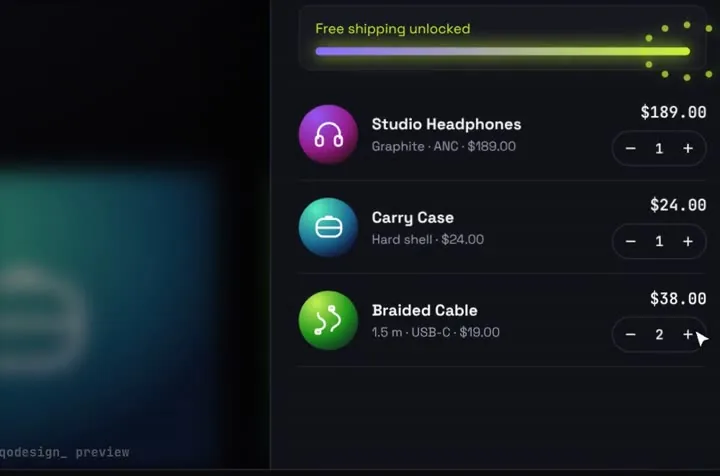
An animated cart drawer that pays through Dodo Payments: a server action turns the cart into a checkout session with the Dodo SDK and sends the buyer to Dodo's hosted page.
By buying you agree to the Terms.
- Download right after paying
- Use it in client projects
- Won't run on the listed stack? We fix it or refund you
Ready forCursorv0Lovableshadcn CLI
Use it in Next.js
"use client";
import StackCartDrawer from "@/components/StackCartDrawer";
import { createDodoCheckout } from "./actions";

export default function Shop() {
  return (
    <div className="h-dvh">
      <StackCartDrawer
        autoplayDemo={false}
        onCheckout={async (items) => {
          try {
            const url = await createDodoCheckout(items);
            window.location.assign(url);
            return { ok: true };
          } catch {
            return { ok: false }; // the drawer says the payment failed and keeps the cart
          }
        }}
      />
    </div>
  );
}"use server";
import DodoPayments from "dodopayments";
const dodo = new DodoPayments({
bearerToken: process.env.DODO_PAYMENTS_API_KEY,
environment: process.env.DODO_PAYMENTS_ENVIRONMENT === "live_mode" ? "live_mode" : "test_mode",
});
// product id in the cart data -> Dodo Payments product id
const PRODUCTS: Record<string, string> = {
orbit: "pdt_orbit",
case: "pdt_case",
cable: "pdt_cable",
};
export async function createDodoCheckout(items: { id: string; qty: number }[]) {
const session = await dodo.checkoutSessions.create({
product_cart: items.map((i) => ({ product_id: PRODUCTS[i.id], quantity: i.qty })),
return_url: `${process.env.NEXT_PUBLIC_SITE_URL}/thanks`,
});
if (!session.checkout_url) throw new Error("Dodo Payments sent no checkout URL");
return session.checkout_url;
}Good to know
- We type-checked this against dodopayments 2.57 and next 15.5. We haven't run a live Dodo checkout with it.
- The API key stays on the server. Use a test mode key while you build. Dodo gives test mode its own keys, and the checkout opens on its test domain.
- product_cart takes several products with quantities, so the whole drawer becomes one checkout. The ids come from the products you made in the Dodo dashboard.
- Give access from the payment.succeeded webhook, not from the /thanks page. Anyone can open /thanks without paying.
- Dodo is the merchant of record and adds tax at checkout, so the total in the drawer is only a preview.
- Dodo's @dodopayments/nextjs adapter also has a ready Checkout route handler. The plain SDK in a server action is enough when the drawer is the only place people pay.
Install
- Copy from the zipPut
react/src/components + react/src/dataintosrc/, thennpm i framer-motion dodopayments. - Or ask your AIPaste PROMPT.md into Cursor, Lovable or v0.
Props
- onCheckout
- (items, total) → { ok }
- data
- store name, products, free-shipping line
- autoplayDemo
- false for a real shop
How qodesign compares
- qodesign vs 21st.dev21st.dev is best for: browsing a huge marketplace and copying many components a month.
- qodesign vs Skiper UISkiper UI is best for: unusual interaction details for landing pages: image reveals, cursor trails, tooltips, drag-and-scroll galleries.
All comparisons, with prices read on each library's own site.
Questions
Can I prefill the buyer's email?
Yes. Pass customer with the email and name in checkoutSessions.create when you know who is signed in.
Does it work for subscriptions?
A checkout session takes subscription products too. For a plan picker with monthly and yearly prices, a pricing switch fits better than a cart.
What if Dodo answers with an error?
The action throws, onCheckout returns { ok: false } and the drawer says the payment failed. The cart stays as it was.
Can Cursor or v0 add it for me?
Yes. Each download has a PROMPT.md. Paste it into Cursor, Lovable, v0 or Claude Code and it fits the piece into your app.
Can I use it in client work?
Yes, in personal and client projects. You can't resell the code itself as a kit.