Appwrite email OTP login in Next.js
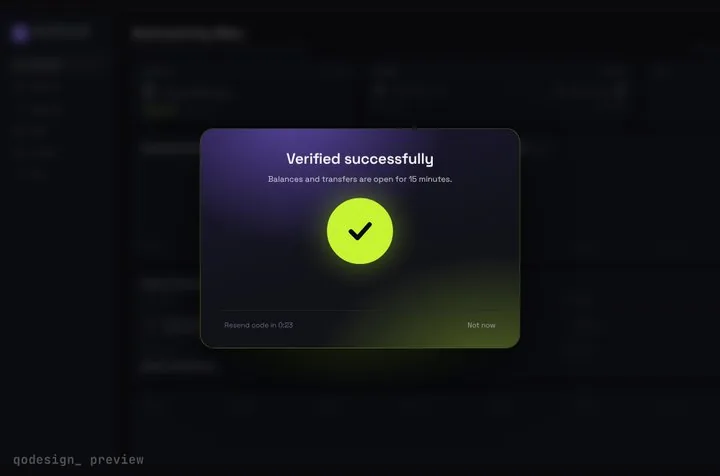
Appwrite emails a 6-digit code with account.createEmailToken and signs the user in with account.createSession. Here those two calls drive an animated code card, with Appwrite's security phrase on the card and a server version that keeps the session in an httpOnly cookie.
By buying you agree to the Terms.
- Download right after paying
- Use it in client projects
- Won't run on the listed stack? We fix it or refund you
Ready forCursorv0Lovableshadcn CLI
Use it in Next.js
"use client";
import { useState } from "react";
import { useRouter } from "next/navigation";
import { AppwriteException, ID } from "appwrite";
import { StepUpGate } from "@/components/StepUpGate";
import { account } from "@/lib/appwrite";

type Sent = { userId: string; email: string; phrase: string };

export default function EmailOtpLogin() {
  const router = useRouter();
  const [email, setEmail] = useState("");
  const [sent, setSent] = useState<Sent | null>(null);
  const [hint, setHint] = useState("");
  const [error, setError] = useState("");

  async function sendCode(address: string) {
    setError("");
    try {
      // phrase: true makes Appwrite put the same short phrase in the email and in this response
      const token = await account.createEmailToken({ userId: ID.unique(), email: address, phrase: true });
      setSent({ userId: token.userId, email: address, phrase: token.phrase });
      setHint(`Look for "${token.phrase}" in the email we just sent to ${address}.`);
    } catch (err) {
      setError(err instanceof AppwriteException ? err.message : "We couldn't send a code. Try again.");
    }
  }

  if (!sent) {
    return (
      <main className="grid min-h-dvh place-items-center bg-[#0b0c10] text-white">
        <form
          onSubmit={(e) => {
            e.preventDefault();
            void sendCode(email);
          }}
          className="grid w-80 gap-3"
        >
          <label htmlFor="email" className="text-sm text-white/70">Email</label>
          <input id="email" type="email" autoComplete="email" required value={email} onChange={(e) => setEmail(e.target.value)}
            className="rounded-lg bg-white/10 px-3 py-2 outline-none focus:ring-2 focus:ring-[#C6F432]" />
          <button className="rounded-lg bg-[#C6F432] px-3 py-2 font-medium text-black">Email me a code</button>
          {error ? <p role="alert" className="text-sm text-red-400">{error}</p> : null}
        </form>
      </main>
    );
  }

  return (
    <StepUpGate
      title="Check your email"
      description={hint}
      successTitle="You're in"
      successDescription="Opening your dashboard."
      onVerify={async (code) => {
        try {
          // the 6-digit code from the email is the token secret
          await account.createSession({ userId: sent.userId, secret: code });
          return true;
        } catch (err) {
          if (err instanceof AppwriteException && err.type === "general_rate_limit_exceeded") {
            setHint("Too many tries. Wait a minute, then try again.");
          }
          return false; // user_invalid_token: wrong or expired code, the cells shake
        }
      }}
      onResend={() => void sendCode(sent.email)}
      onCancel={() => setSent(null)}
      onVerified={() => router.push("/dashboard")}
    >
      {/* what sits frosted behind the card */}
      <div className="grid min-h-dvh place-items-center bg-[#0b0c10] text-white/40">Your dashboard</div>
    </StepUpGate>
  );
}import { Account, Client } from "appwrite";
export const client = new Client()
.setEndpoint(process.env.NEXT_PUBLIC_APPWRITE_ENDPOINT!)
.setProject(process.env.NEXT_PUBLIC_APPWRITE_PROJECT!);
export const account = new Account(client);Good to know
- Free first: Appwrite has no prebuilt React screen for email codes. Its docs flow with a plain 6-digit input is enough for most apps, and that's what we'd ship if the code step doesn't need to stand out. The card earns its place when the code unlocks something the user can see behind it.
- The method names were read from the appwrite 29.1.0 types on October 25, 2026: account.createEmailToken({ userId, email, phrase }) sends the code and account.createSession({ userId, secret }) turns it into a session. The older positional forms are still there but marked deprecated.
- The code the user types goes into secret. Appwrite's docs: "The user will use their 6-digit one-time password to log in to your app." The token's own secret field stays empty in the browser; the type comment says it "will return an empty string unless the response is returned using an API key or as part of a webhook payload."
- From the 29.1.0 SDK comments: "The secret sent to the user's email is valid for 15 minutes." There's no option to change that yet; issue #13636, "Add `expiry` parameter to Magic URL and Email OTP", is still open.
- A new email gets an account on its first code. The docs: "If the email address has never been used, a new account is created using the provided userId." For an existing account the userId you pass is ignored, so the snippet keeps the userId from the response.
- A wrong or expired code comes back as 401 user_invalid_token, and the snippet returns false so the cells shake. Too many tries come back as 429 general_rate_limit_exceeded, and the line under the title says to wait.
- In this browser version the web SDK keeps the session in Appwrite's cookie. When the browser blocks that cookie, the 29.1.0 SDK falls back to localStorage (cookieFallback). Either way your server components can't see it. If they need to, use the server version below.
- Copy StepUpGate.tsx, step-up-gate.css and timeline.ts from react/src/components. The card frosts whatever you pass as children.
- Tailwind v4: the piece ships set up for Tailwind 3.4 with preflight turned off. Our October 25 check compiled it under Tailwind 4.3.3, where @import "tailwindcss" turns preflight back on. Line height goes to 1.5 on every element, which pushes text and the cards down, and the code cells' grid tracks widen from 26px to 38px. The fix is to swap that one import for three lines: @layer theme, base, components, utilities; then @import "tailwindcss/theme.css" layer(theme); then @import "tailwindcss/utilities.css" layer(utilities);. That also drops the reset from your own pages.
- React 19 is fine: the piece asks for framer-motion ^11.11, which installs 11.18.2, and that version lists react ^18.0.0 || ^19.0.0 as its peer.
- What we ran: every file on this page was type-checked on October 25, 2026 against appwrite 29.1.0, node-appwrite 31.0.0, next 16.4.3, react 19.3.1, @types/react 19.3.0, framer-motion 11.18.2 and TypeScript 5.9.3, with the shipped StepUpGate. We also checked that a wrong field name ({ otp } instead of { secret }) fails the type-check. We didn't run it against an Appwrite project, so no real email was sent and no real session was created.
When Appwrite's own flow with a plain input fits better
- Appwrite's docs show the whole flow in two calls and leave the screen to you. Any 6-digit input works with it, including the InputOTP field you may already have from shadcn/ui. If the code step is a quick check inside a form, or you don't want framer-motion in your bundle for one screen, use that. It costs nothing and there's less to maintain.
- Also look at Magic URL before you pick codes. Appwrite's docs list the trade-off: a code "Doesn't require user to be signed into email inbox on the device" and "Doesn't disturb application flow with a redirect", but it "Expires quicker" and "Requires more inputs from user".
- The card fits when the code unlocks something visible, like a dashboard frosted behind it or a step-up check before a sensitive action. A wrong code shakes the cells, and the page clears once createSession succeeds.
Appwrite email OTP with the security phrase
- Appwrite can put a short phrase in the email and return the same phrase to your app. The docs: "Users must match the phrase on the login page with the phrase provided inside the email." It's off by default and you turn it on per request with phrase: true, as the snippet does. The phrase comes back on the token as token.phrase.
- The card has no separate slot for it, so the snippet puts the phrase in the description line. The header block in step-up-gate.css is a fixed 92px. In our headless Chromium check two lines of description fit, and a third line touched the code cells at 1440px wide. That check used a fallback font, not Space Grotesk, so treat it as close, not exact.
- Keep the line short, as the snippet does. If you need more text, change .mhead { height: 92px } to 116px in your copy of step-up-gate.css. In the same check, three lines then cleared the cells at both widths.
Keep the session on the server instead
- Our Appwrite login page does the password version of this with server actions and an httpOnly cookie. The same works for email codes. It reuses lib/server/appwrite.ts from that page, and the API key needs the sessions.write scope.
- Two things change once an API key is involved. First, createEmailToken now returns the real token secret, so the action sends back only userId and phrase. Second, Appwrite's SSR docs say the key will "allow your server requests to bypass rate limits". Nothing on Appwrite's side stops someone from guessing codes through your action, so the action counts tries itself. The Map in the snippet only works on a single server process. Use Redis or your database if you run more than one.
"use server";
import { cookies } from "next/headers";
import { AppwriteException, ID } from "node-appwrite";
import { createAdminClient } from "@/lib/server/appwrite";

// The API key skips Appwrite's rate limits, so count tries yourself.
// This Map only works on one server; use Redis or your database when you run more.
const tries = new Map<string, number>();
const MAX_TRIES = 5;

export async function sendEmailCode(email: string) {
  try {
    const { account } = await createAdminClient();
    const token = await account.createEmailToken({ userId: ID.unique(), email, phrase: true });
    tries.delete(token.userId);
    // token.secret is filled in because we used an API key. Never send it to the browser.
    return { ok: true as const, userId: token.userId, phrase: token.phrase };
  } catch {
    return { ok: false as const, error: "We couldn't send a code. Try again." };
  }
}

export async function verifyEmailCode(userId: string, code: string) {
  const n = (tries.get(userId) ?? 0) + 1;
  tries.set(userId, n);
  if (n > MAX_TRIES) return { ok: false as const, error: "Too many tries. Ask for a new code." };
  try {
    const { account } = await createAdminClient();
    const session = await account.createSession({ userId, secret: code });
    tries.delete(userId);
    (await cookies()).set("my-custom-session", session.secret, {
      path: "/",
      httpOnly: true,
      sameSite: "strict",
      secure: true,
      expires: new Date(session.expire),
    });
    return { ok: true as const };
  } catch (err) {
    if (err instanceof AppwriteException && err.type === "user_invalid_token") {
      return { ok: false as const, error: "" }; // wrong or expired code
    }
    return { ok: false as const, error: "Sign-in failed. Try again." };
  }
}"use client";
import { useState } from "react";
import { useRouter } from "next/navigation";
import { StepUpGate } from "@/components/StepUpGate";
import { sendEmailCode, verifyEmailCode } from "./actions";
export default function EmailOtpLogin() {
const router = useRouter();
const [email, setEmail] = useState("");
const [sent, setSent] = useState<{ userId: string; email: string } | null>(null);
const [hint, setHint] = useState("");
async function sendCode(address: string) {
const res = await sendEmailCode(address);
if (!res.ok) return setHint(res.error);
setSent({ userId: res.userId, email: address });
setHint(`Look for "${res.phrase}" in the email we just sent to ${address}.`);
}
if (!sent) {
return (
<form onSubmit={(e) => { e.preventDefault(); void sendCode(email); }} className="mx-auto grid w-80 gap-3 py-24">
<input type="email" autoComplete="email" required value={email} onChange={(e) => setEmail(e.target.value)} aria-label="Email" />
<button>Email me a code</button>
{hint ? <p role="alert">{hint}</p> : null}
</form>
);
}
return (
<StepUpGate
title="Check your email"
description={hint}
onVerify={async (code) => {
const res = await verifyEmailCode(sent.userId, code);
if (res.error) setHint(res.error);
return res.ok;
}}
onResend={() => void sendCode(sent.email)}
onCancel={() => setSent(null)}
onVerified={() => {
router.push("/account");
router.refresh();
}}
>
<div className="min-h-dvh" />
</StepUpGate>
);
}Appwrite phone OTP with the same card
- Phone login is the same two steps. createPhoneToken({ userId, phone }) sends an SMS, and createSession({ userId, secret }) takes the code. The 29.1.0 comments say the SMS code is also valid for 15 minutes. Swap the first call in sendCode and keep onVerify as it is. Your Appwrite project needs SMS delivery set up for this to send anything.
import { ID } from "appwrite";
import { account } from "@/lib/appwrite";

export async function sendPhoneCode(phone: string) {
  const token = await account.createPhoneToken({ userId: ID.unique(), phone });
  return token.userId; // then createSession({ userId, secret: code }) in onVerify
}
Install
- Copy from the zipPut
react/src/componentsintosrc/, thennpm i framer-motion appwrite. - Or ask your AIPaste PROMPT.md into Cursor, Lovable or v0.
Props
- onVerify
- (code) → true when createSession succeeds
- onResend
- createEmailToken again
- onCancel
- back to the email step
- onVerified
- runs after the unlock animation
- title / description
- card text; the snippet puts the security phrase in description
- resendSeconds
- Resend countdown, 30 by default
How qodesign compares
- qodesign vs Magic UIMagic UI is best for: landing pages built with shadcn/ui.
- qodesign vs Aceternity UIAceternity UI is best for: teams building many marketing pages who want one big library.
All comparisons, with prices read on each library's own site.
Questions
Does Appwrite email OTP create new users?
Yes. createEmailToken makes an account the first time it sees an email, using the userId you pass. For an email that already has an account, Appwrite ignores that userId and returns the existing one.
How long is an Appwrite email OTP code valid?
15 minutes, per the comments in appwrite 29.1.0. You can't change it per request yet; GitHub issue #13636 asks for an expiry parameter and is still open.
What's the difference between createEmailToken and createSession?
createEmailToken emails the 6-digit code and returns a token with the userId. createSession takes that userId plus the code the user typed as secret, and signs them in. The card calls the first from onResend and the second from onVerify.
Do I have to use the security phrase?
No. The docs say "By default, security phrases are disabled." Drop phrase: true from createEmailToken and change the description line to something like "Enter the 6-digit code we emailed you."
Can I use email codes as a second factor in Appwrite?
Yes, through MFA instead of createEmailToken. In appwrite 29.1.0 that's account.createMfaChallenge({ factor: AuthenticationFactor.Email }) and then account.updateMfaChallenge({ challengeId, otp }). Put the second call in onVerify the same way.
Can Cursor or v0 add it for me?
Yes. Each download has a PROMPT.md. Paste it into Cursor, Lovable, v0 or Claude Code and it fits the piece into your app.
Can I use it in client work?
Yes, in personal and client projects. You can't resell the code itself as a kit.