AI orb animation in React
For a voice agent, use ElevenLabs UI's free Orb (MIT): it reacts to audio and shows listening, thinking and talking states. Our Liquid Metal Blob does not react to audio and has no agent states. It's an idle chrome orb that follows the pointer, with no three.js.
By buying you agree to the Terms.
- Download right after paying
- Use it in client projects
- Won't run on the listed stack? We fix it or refund you
Ready forCursorv0Lovableshadcn CLI
A free AI orb animation in React that reacts to your voice
"use client";
import { useEffect, useRef, useState } from "react";
import { Orb } from "@/components/ui/orb";

// ElevenLabs UI's free Orb (MIT), driven by your microphone.
// volumeMode="manual" makes the Orb call getInputVolume on every frame.
export default function MicOrb() {
  const level = useRef(0);
  const stop = useRef<(() => void) | null>(null);
  const [on, setOn] = useState(false);

  useEffect(() => () => stop.current?.(), []);

  async function start() {
    const stream = await navigator.mediaDevices.getUserMedia({ audio: true });
    const ctx = new AudioContext();
    const analyser = ctx.createAnalyser();
    analyser.fftSize = 512;
    ctx.createMediaStreamSource(stream).connect(analyser);
    const data = new Uint8Array(analyser.fftSize);
    let raf = 0;
    const tick = () => {
      analyser.getByteTimeDomainData(data);
      let sum = 0;
      for (const v of data) sum += ((v - 128) / 128) ** 2;
      level.current = Math.min(1, Math.sqrt(sum / data.length) * 4); // rough 0..1
      raf = requestAnimationFrame(tick);
    };
    tick();
    stop.current = () => {
      cancelAnimationFrame(raf);
      stream.getTracks().forEach((t) => t.stop());
      void ctx.close();
      level.current = 0;
      stop.current = null;
      setOn(false);
    };
    setOn(true);
  }

  return (
    <div className="flex flex-col items-center gap-4">
      <div className="h-48 w-48">
        <Orb
          volumeMode="manual"
          getInputVolume={() => level.current}
          getOutputVolume={() => 0.3}
          colors={["#CADCFC", "#A0B9D1"]}
        />
      </div>
      <button
        type="button"
        onClick={() => (on ? stop.current?.() : void start())}
        className="rounded-full border px-4 py-2 text-sm"
      >
        {on ? "Stop" : "Talk to the orb"}
      </button>
    </div>
  );
}Good to know
- Get the Orb itself with ElevenLabs' CLI, npx @elevenlabs/cli@latest components add orb, or copy orb.tsx into components/ui/orb.tsx and run npm install @react-three/drei @react-three/fiber three @types/three. Both routes are from the Orb docs page in the elevenlabs/ui repo, read on October 25, 2026. The repo is MIT licensed.
- The Orb has two modes. In "auto" (the default), the agentState prop (null, "thinking", "listening" or "talking") drives a built-in animation for each state. In "manual", it reads manualInput and manualOutput, two refs, or getInputVolume and getOutputVolume, each a number from 0 to 1. MicOrb.tsx uses manual mode with a Web Audio AnalyserNode on the microphone.
- The browser only allows the microphone on HTTPS or localhost, and it asks for permission on the first click. The level in MicOrb.tsx is a rough loudness value multiplied by 4 so normal speech moves the orb. Tune that number to your mic.
- With a voice SDK, keep the Orb in auto mode and pass your agent's status as agentState, or hand the SDK's volume readings to getInputVolume and getOutputVolume. We didn't write or test that wiring for any SDK on this page.
- orb.tsx loads a noise texture from storage.googleapis.com when it mounts (useTexture). If your Content Security Policy blocks that host, or you'd rather make no third-party requests, put the PNG in public/ and change the URL in orb.tsx.
- The Orb needs three, @react-three/fiber and @react-three/drei. On October 25, 2026 those were three 0.186.1, @react-three/fiber 9.8.2 and @react-three/drei 10.7.9, all MIT. fiber 9.8.2 lists react ">=19 <19.4" as a peer dependency, so it needs React 19.
More free AI orb animations: SmoothUI Siri Orb and React Bits Orb
- SmoothUI's Siri Orb is the free pick for a voice-reactive orb without three.js. Its docs call it an "Animated Siri-style orb built from layered conic gradients" that "reacts to real microphone loudness". It takes an amplitude prop (a number, or the motion value from its useAudioAmplitude hook) and a state prop: idle, listening, thinking, streaming, done or error. It's built on motion, and the smoothui repo is MIT licensed (GitHub, read October 25, 2026). If you searched for a Siri orb animation in CSS, start there.
- React Bits has a free Orb background drawn with raw WebGL 2, also without three.js. Its props include followCursor, clickPulse, hoverIntensity, colors and paused, and none of them takes audio (read from its Orb.tsx today). The license isn't plain MIT. LICENSE.md says "MIT + Commons Clause": you can use it in an app or product, commercial ones too, "so long as you do not sell, sublicense, or redistribute the components themselves".
- So if your orb has to listen or talk, ElevenLabs UI's Orb or SmoothUI's Siri Orb fits better than anything we sell. If you want a glowing orb that reacts to the cursor, React Bits Orb is free.
A chrome AI orb animation in React that doesn't listen: Liquid Metal Blob
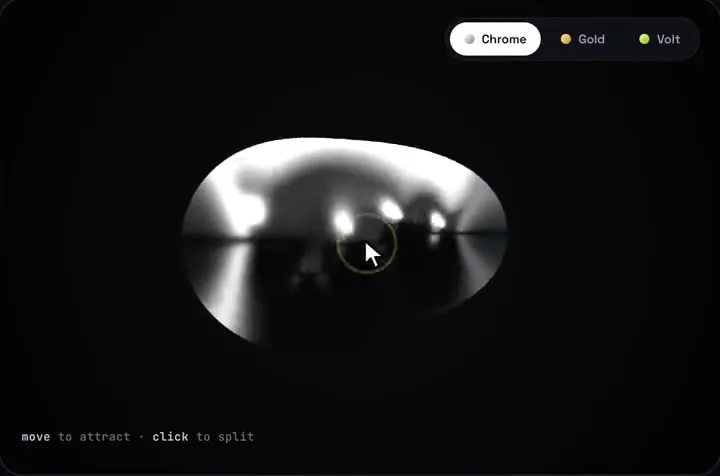
- Liquid Metal Blob is our paid piece. It's one drop of liquid chrome drawn by a raw WebGL 1 shader, with no three.js and no packages. Two small droplets drift inside it, a third drop reaches toward the pointer, and a click splits the blob in two, then merges it again. Chips switch the metal between Chrome, Gold and Volt, or you pass your own tints.
- It suits an orb that only has to look alive: the empty state of a chat, a hero, a waiting screen. It does not react to audio and has no agent states.
- The component draws a fixed 1000 x 660 stage with the blob in the middle. ChromeOrb.tsx below crops the middle of that stage into a circle and scales it to the size you pass. The pointer still lines up, because the component measures its own size on screen.
- In a crop this tight, a click sends the split droplet past the edge of the circle. Pass a bigger crop (660 shows the full stage height), or add pointer-events-none to the wrapper, which turns off both the click and the pointer pull.
- Could the pull follow a voice instead of the pointer? Only if you edit LiquidMetal.tsx. The pull is the uPull uniform, and its target is set in the pointer handlers, so you'd write an audio level into it on every frame. That's a code change, not a prop, and we haven't tested it.
- It doesn't pause when scrolled out of view, and the shader doesn't read Reduce Motion. ChromeOrb shows a plain black circle to people with Reduce Motion on.
"use client";
import { useEffect, useState } from "react";
import LiquidMetal from "@/components/LiquidMetal";

// LiquidMetal draws a fixed 1000 x 660 stage with the blob in the middle.
// This crops the middle of it into a circle and scales it down to `size`.
export function ChromeOrb({ size = 160, crop = 440 }: { size?: number; crop?: number }) {
  const [still, setStill] = useState(false);
  useEffect(() => {
    setStill(matchMedia("(prefers-reduced-motion: reduce)").matches);
  }, []);

  const scale = size / crop;
  return (
    <div
      className="relative shrink-0 overflow-hidden rounded-full bg-black"
      style={{ width: size, height: size }}
      aria-hidden
    >
      {still ? null : (
        <div
          className="absolute left-1/2 top-1/2"
          style={{ transform: "translate(-50%, -50%) scale(" + scale + ")" }}
        >
          {/* The canvas renders at 1000 x 660 times maxDpr; shrink it with the orb. */}
          <LiquidMetal showChips={false} label={null} maxDpr={Math.min(2, Math.max(0.5, scale * 2))} />
        </div>
      )}
    </div>
  );
}"use client";
import { ChromeOrb } from "@/components/ChromeOrb";
// An empty chat state with an idle chrome orb. It does not listen to audio.
export default function NewChat() {
return (
<main className="flex min-h-[70vh] flex-col items-center justify-center gap-6 px-6 text-center">
<ChromeOrb size={168} />
<h1 className="text-2xl font-semibold">How can I help today?</h1>
<p className="max-w-md text-sm text-neutral-500">Ask anything. Move your pointer over the orb.</p>
</main>
);
}Tailwind v4 and shadcn
- Our Tailwind v4 check lists Liquid Metal (piece 09) as "works as-is": "None in computed styles. The pixel diff is liquid-metal WebGL noise." It needs no @config line and no CSS change.
- That check was corrected on October 25, 2026: in a shadcn, daisyUI or HeroUI app, don't add @config to load a piece's tailwind.config.js. Pieces that need a font fix get a scoped rule instead. Liquid Metal needs neither.
- Our CSS leak audit rates the piece clean, and we read liquid-metal.css again today. Every selector starts with .qlm-, and there's no :root, html, body or bare element rule. The one button reset styles the piece's own chips. Nothing in the file targets your shadcn Buttons, Cards or theme variables. That's from reading the file; we didn't measure it in a browser for this page.
- The chips and the hint use Space Grotesk and JetBrains Mono when your app loads them, and system fonts otherwise. ChromeOrb hides both.
What we checked and what we didn't
- Read on October 25, 2026: the elevenlabs/ui repo on GitHub (MIT, last push October 16, 2026), its orb.tsx and Orb docs page; three 0.186.1, @types/three 0.186.0, @react-three/fiber 9.8.2 and @react-three/drei 10.7.9 on npm, all MIT; React Bits' LICENSE.md and Orb.tsx; SmoothUI's Siri Orb docs and source, and the smoothui repo's license.
- Type-checked with TypeScript 5.9.3, React 19.3.1 and @types/react 19.3.0: MicOrb.tsx against ElevenLabs' orb.tsx as published and those three.js packages, and ChromeOrb.tsx plus the chat page against the shipped LiquidMetal.tsx. Two broken copies (a string where a number belongs) failed as they should.
- Run: the shipped HTML version of the same shader in headless Chromium with software WebGL, cropped and scaled the way ChromeOrb does it at 168 px, at 1x and 3x pixel density. The blob stayed inside the circle at rest and while it reached toward the pointer, and the console logged no errors.
- Not run: MicOrb.tsx or the ElevenLabs Orb in a browser, a real microphone, a Next.js build of these exact files, a real GPU, phones, Safari or Firefox.
Install
- Copy from the zipPut
react/src/componentsintosrc/, thenno extra packages. - Or ask your AIPaste PROMPT.md into Cursor, Lovable or v0.
Props
- tints
- metal colours, each { name, rgb, swatch }
- defaultTint
- which tint starts
- showChips
- material picker, off for an orb
- label
- hint text, null to hide
- maxDpr
- canvas resolution cap
- onTintChange / onSplitChange
- callbacks
How qodesign compares
- qodesign vs React BitsReact Bits is best for: text animations, animated backgrounds and creative effects.
- qodesign vs Aceternity UIAceternity UI is best for: teams building many marketing pages who want one big library.
All comparisons, with prices read on each library's own site.
Questions
Does Liquid Metal Blob react to audio?
No. It has no audio input and no agent states. For a voice agent, use ElevenLabs UI's free Orb or SmoothUI's Siri Orb.
Which free AI orb reacts to a voice?
ElevenLabs UI's Orb (MIT) reacts to input and output volume and has listening, thinking and talking states. SmoothUI's Siri Orb (MIT) reacts to microphone loudness and doesn't need three.js.
Does the ElevenLabs Orb need three.js?
Yes. It uses three, @react-three/fiber and @react-three/drei. @react-three/fiber 9.8.2 lists react ">=19 <19.4" as a peer dependency (npm, October 25, 2026).
Is React Bits Orb MIT licensed?
Its LICENSE.md says MIT + Commons Clause. You can use it in an app or product, commercial ones included, but you can't sell or redistribute the component itself.
Does Liquid Metal Blob need three.js?
No. It's one canvas and a hand-written WebGL shader, with nothing to install.
Is qodesign affiliated with ElevenLabs?
No. We point to their free Orb because it's the right tool for a voice agent.
Does the chrome orb work in Next.js?
Yes, as a client component. Keep "use client" at the top of the file that renders it, as in the snippet above. App Router and Pages Router both work.
Can Cursor or v0 add it for me?
Yes. Each download has a PROMPT.md. Paste it into Cursor, Lovable, v0 or Claude Code and it fits the piece into your app.
Can I use it in client work?
Yes, in personal and client projects. You can't resell the code itself as a kit.