TL;DR Keep the shadcn login block as it is and add four small motions: a staggered rise on load with a Tailwind v4 keyframe and a per-row delay, a shake keyed to each failed attempt from useActionState, a pending button driven by useFormStatus, and a check that draws in on success. Put every animation behind motion-safe so reduced motion gets a static form.
The shadcn login blocks are a good start: a card, two inputs, a button, sensible spacing. Install login-01 in a Cursor or v0 project and you have a working sign-in page in a minute. You also have the same sign-in page as thousands of other apps, and it gives no feedback beyond a red line of text when the password is wrong. I make animated React components at qodesign, and login screens are where small motion pays off fastest, because every user sees them.
This post keeps the block's markup and adds four motions with Tailwind v4 keyframes. Nothing new to install.
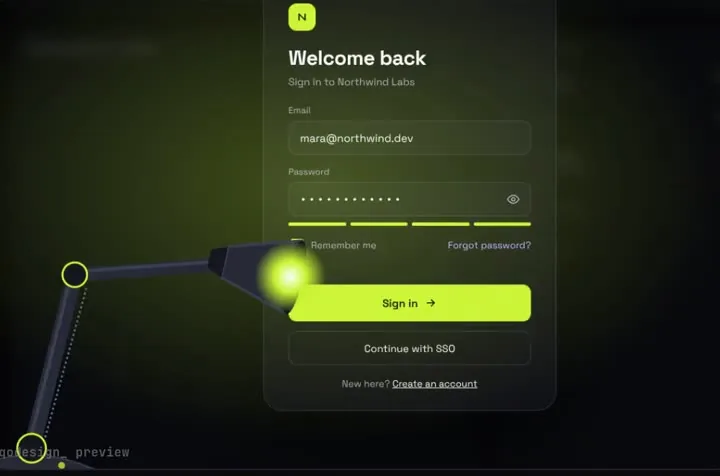
That is the Spotlight Lamp Login, one of the animated login pages on qodesign. The steps below get a plain shadcn form most of the way to that kind of feel.
Sixty milliseconds between rows reads as one motion. Past about 100ms the form starts to feel like it is loading. motion-safe: means the class only applies when the person has not asked for reduced motion.
On the client, key the shaking wrapper on the attempt number. A new key remounts the element, so the animation plays again on every failure, including the second and third:
Two details here. The error line has a fixed min-h-5, so the button doesn't jump down when the message appears. And aria-live="polite" reads the message to screen reader users, who can't see the shake. The shake is a hint for sighted users; the text carries the meaning.
Remounting also resets the inputs, which is what React does after a form action anyway. If you want the email kept, return it in the state and pass it as defaultValue.
The label fades out but stays in the layout, and the spinner and check sit on top of it with absolute. The button keeps its exact width through all three states, which is the difference between a polished button and one that twitches.
The check uses strokeDasharray="24" with the draw keyframe from step 1, so it draws itself in. For more on that trick, see the animated SVG checkmark post.
A shake and a check make the form feel responsive. If the login page is part of your brand, it can do more. The Shy Eyes Login has a character that follows the email field and covers his eyes for the password, and the Spotlight Lamp Login lights each field with a desk lamp. Both come with a PROMPT.md so Cursor or v0 can connect them to your auth. For accessibility details on animated forms, read the accessible animated login form guide. And if you want to try a qodesign piece first, the free kit has the free component and the open-source ones.
Keep the block's markup and add CSS animations with Tailwind. Define keyframes in globals.css under @theme so you get animate-* utilities, give each form row a rise animation with a growing animation-delay, and wrap every class in motion-safe so reduced motion users get a static form.
Return an attempt counter from your server action with useActionState and use it as the React key on the wrapper around the card. Each failure changes the key, the element remounts, and the shake animation plays again.
Put the button in its own client component inside the form and read pending from useFormStatus. Fade the label to opacity 0 instead of removing it, and place the spinner on top with absolute positioning so the button keeps its width.
Yes. Pass the server action to useActionState and use the returned action as the form's action prop. The inputs need name attributes so the action can read them from FormData.