# Framer Motion vs CSS Animation for Micro-Interactions
> Use CSS for micro-interactions between two fixed states, like hover, press and toggles; it costs no JavaScript. Use Motion (formerly Framer Motion) for exit animations, layout changes, interruptible springs and gestures. In my Next.js test the Motion route shipped 69 kB more first-load JS than the CSS one.
- URL: https://qodesign.dev/blog/framer-motion-vs-css-micro-interactions
- Author: Teodor Avadani (https://qodesign.dev/blog/author/teodor-avadani)
- Published: 2026-10-08
- Updated: 2026-10-20
- Category: Animation
- Publisher: qodesign (https://qodesign.dev), a shop of animated React + Tailwind CSS components for Next.js, each sold with its full source code and an AI prompt.
Framer Motion vs CSS animation is mostly a question of what the animation has to do. Use CSS transitions for micro-interactions that move between two fixed states: hover, focus, a button press, a toggle knob, a color change. Reach for Motion (the library formerly called Framer Motion) when you need what CSS can't do cleanly: animating an element as it leaves the DOM, animating layout changes such as reordering or a highlight moving between items, physics springs that can be interrupted mid-flight, and drag or gesture input. In my test app, a route using Motion for a toggle and a dismissible list loaded 172 kB of first-load JS, against 103 kB for the same UI built with CSS.
Below I build the same toggle and the same press feedback both ways in a Next.js 15 app, with reduced motion handled in each. Most comparisons stop at opinions or quote somebody else's bundle numbers. These numbers come from my own build output, and there's a section on the newer CSS features that cover part of what used to need a library.
## Is Framer Motion the same as Motion?
Yes. Framer Motion was renamed to Motion and is published as the `motion` package. The React API is imported from `motion/react`, and the [upgrade guide](https://motion.dev/docs/react-upgrade-guide) covers the switch. The `framer-motion` package still exists, so you'll see both in the wild. Every example here uses:
```bash
npm i motion
```
## How do you build a micro-interaction with CSS only?
A switch is two states, so CSS handles it well. The state lives in React (we need it for `aria-checked`), and the CSS reacts to that attribute:
```tsx
"use client";
import { useState } from "react";
import styles from "./toggle.module.css";
export function CssToggle({ label }: { label: string }) {
const [on, setOn] = useState(false);
return (
);
}
```
The styles go in a CSS module. The knob moves with `transform`, which the browser can animate without recalculating layout, and the `cubic-bezier` with a value above 1 gives a small overshoot that feels a bit like a spring:
```css
.track {
position: relative;
width: 3rem;
height: 1.75rem;
border-radius: 999px;
background: #d4d4d4;
transition: background-color 200ms ease;
}
.track[aria-checked="true"] {
background: #171717;
}
.knob {
position: absolute;
top: 0.25rem;
left: 0.25rem;
width: 1.25rem;
height: 1.25rem;
border-radius: 999px;
background: white;
transition: transform 220ms cubic-bezier(0.3, 1.4, 0.5, 1);
}
.track[aria-checked="true"] .knob {
transform: translateX(1.25rem);
}
.press {
transition: transform 120ms ease-out;
}
.press:active {
transform: scale(0.96);
}
@media (prefers-reduced-motion: reduce) {
.track,
.knob,
.press {
transition: none;
}
}
```
The press feedback on the Save button is the `.press` class: scale down to 96% while `:active`. It needs no JavaScript at all, so it works inside a Server Component:
```tsx
import styles from "./toggle.module.css";
import { CssToggle } from "./CssToggle";
export default function Page() {
return (
);
}
```
Reduced motion is the `@media (prefers-reduced-motion: reduce)` block at the bottom of the stylesheet, which removes the transitions so the toggle switches instantly ([prefers-reduced-motion on MDN](https://developer.mozilla.org/en-US/docs/Web/CSS/Reference/At-rules/@media/prefers-reduced-motion)).
What CSS does well here:
- Zero extra JavaScript for the animation itself.
- Transitions on `transform` and `opacity` run on the compositor in modern browsers.
- Transitions are interruptible. If you click the toggle twice quickly, the knob reverses from where it is.
## What does the same toggle look like in Motion?
Same toggle, built with Motion. Instead of moving the knob with a transform, the track flips its `justify-content`, and `layout` tells Motion to animate the knob from its old position to its new one with a spring:
```tsx
"use client";
import { useState } from "react";
import { motion } from "motion/react";
export function MotionToggle({ label }: { label: string }) {
const [on, setOn] = useState(false);
return (
);
}
```
A spring has no fixed duration. It runs until it settles, and if you click mid-animation it carries its current velocity into the new direction. For a toggle, that's a nice detail but not a necessity. The CSS version looks almost the same.
Where Motion really earns its place is this second component. Each click on Save adds a "Saved" item, and each item can be dismissed:
```tsx
"use client";
import { useState } from "react";
import { AnimatePresence, motion } from "motion/react";
export function Toasts() {
const [items, setItems] = useState([]);
return (
);
}
```
Two things here are hard in plain CSS:
1. Exit animations. When an item is removed from state, React removes its DOM node right away. `AnimatePresence` keeps it mounted until its `exit` animation finishes ([AnimatePresence docs](https://motion.dev/docs/react-animate-presence)). With CSS you'd have to delay the state update yourself and keep the timings in sync.
2. Layout animations. When an item leaves, the ones below it slide up instead of jumping, because each `li` has `layout`. Doing that in CSS means measuring positions and animating transforms by hand.
The Save button uses `whileTap`, Motion's version of `:active`. It's here because the component already loads Motion, not because CSS couldn't do it.
Reduced motion is handled once, at the page level:
```tsx
import { MotionConfig } from "motion/react";
import { MotionToggle } from "./MotionToggle";
import { Toasts } from "./Toasts";
export default function Page() {
return (
);
}
```
`reducedMotion="user"` follows the OS setting. Per the [MotionConfig docs](https://motion.dev/docs/react-motion-config), transform and layout animations are disabled when reduced motion is on, while opacity and color animations still run. So the toast still fades in, and nothing slides.
## How much does Framer Motion add to the bundle?
I built both routes in the same app with `next build` (Next.js 15.5, motion 14.4.0). The "First Load JS" column reported:
```txt
├ ○ /framer-motion-vs-css-micro-interactions/css 435 B 103 kB
├ ○ /framer-motion-vs-css-micro-interactions/motion 17.1 kB 172 kB
+ First Load JS shared by all 102 kB
```
So in this app, the Motion route loaded 69 kB more JavaScript before it could become interactive. That's the full `motion` component with `layout`, `AnimatePresence` and `MotionConfig`. Motion documents ways to load less, such as `LazyMotion` with the smaller `m` component, but I didn't measure them for this post, so I won't put a number on it.
Is 69 kB a lot? On a dashboard that already ships a charting library, probably not. On a marketing page whose only animation is a button hover, it's a lot of code for something CSS does for free.
## Can CSS do enter and exit animations now?
Partly, and this is where the comparison has moved since most posts on it were written. Two CSS features close some of the gap:
- `@starting-style` gives an element a "before" state, so it can transition in the moment it appears. MDN lists it as [Baseline 2024](https://developer.mozilla.org/en-US/docs/Web/CSS/@starting-style), working in current Chrome, Safari and Firefox.
- `transition-behavior: allow-discrete` (the `allow-discrete` keyword in the `transition` shorthand) lets `display` wait for the other transitions, so an element can fade out before it's hidden.
Together they cover the classic case of a popover or dialog that fades and slides in and out, with no JavaScript. This one uses the native `popover` attribute, so the page stays a Server Component:
```tsx
import styles from "./popover.module.css";
export default function Page() {
return (
Press Esc or click outside to close.
);
}
```
```css
.panel {
margin: auto;
padding: 1rem 1.25rem;
border-radius: 0.75rem;
border: 1px solid #e5e5e5;
opacity: 1;
transform: translateY(0);
transition:
opacity 180ms ease-out,
transform 180ms ease-out,
display 180ms allow-discrete;
}
.panel:not(:popover-open) {
opacity: 0;
transform: translateY(8px);
}
@starting-style {
.panel:popover-open {
opacity: 0;
transform: translateY(8px);
}
}
@media (prefers-reduced-motion: reduce) {
.panel {
transition: none;
}
}
```
This passed `tsc` and `next build` in the same test app. Older browsers simply skip the animation and show or hide the panel instantly, which is a fine fallback for a micro-interaction.
What CSS still can't do here is the toast list above. Those items aren't toggled with `display`; React removes them from the tree, and no stylesheet can animate a node that's already gone. The neighbors sliding up to fill the gap is a layout animation, which CSS also doesn't do on its own. That's the line.
### Side by side
| Need | CSS | Motion |
| --- | --- | --- |
| Hover, focus, press | Yes, no JS | Yes (`whileHover`, `whileTap`) |
| Toggle between two states | Yes | Yes, with a spring |
| Element appearing | Yes, `@starting-style` | Yes, `initial` / `animate` |
| Popover or dialog closing | Yes, `allow-discrete` | Yes, `AnimatePresence` |
| React item removed from a list | No | Yes, `AnimatePresence` |
| Neighbors sliding into place | No | Yes, `layout` |
| Shared element between components | No (view transitions are the closest) | Yes, `layoutId` |
| Velocity-aware springs, drag | No | Yes |
| Extra JavaScript | 0 kB | 69 kB in my build |
## When should you use Framer Motion instead of CSS?
Use CSS when:
- The element moves between two known states (hover, focus, pressed, on/off, open/closed with a fixed height).
- The element exists both before and after the animation.
- You want the component to stay a Server Component, or close to it.
Use Motion when:
- Something needs to animate out as it's removed (toasts, modals, list items, route content).
- Layout changes should animate: reordering, items appearing in a list, a highlight moving between tabs.
- You want springs that respond to velocity, or drag, pan and other gestures.
- Several elements need to coordinate (stagger, shared `layoutId` between components).
Mixing them is fine, and it's what I usually do. The toggles and buttons get CSS transitions, and Motion is loaded only on the routes that have a list, a drawer or a gesture. Since every Motion component needs `"use client"`, keeping it in small leaf components also keeps the rest of the page on the server.
## A checklist for either approach
1. Animate `transform` and `opacity` where you can, not `width`, `top` or `margin`.
2. Keep micro-interactions short. The CSS ones here run 120 to 220 ms.
3. Handle reduced motion: a media query in CSS, `MotionConfig reducedMotion="user"` or `useReducedMotion()` in Motion.
4. Check the build output after adding Motion to a route, so you know what it costs you.
5. Test interruption: click fast, hover in and out, dismiss while something is still entering.
## Seeing both in real components
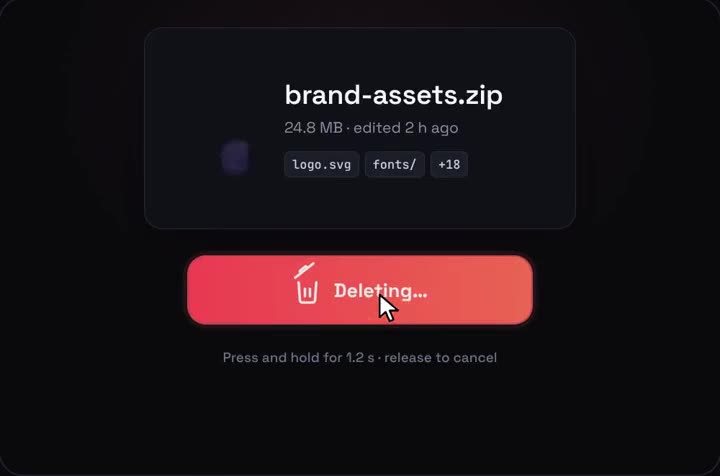
Most of what I build mixes the two: CSS for hover and press states, Motion for the parts that enter, leave or change layout. The [micro-interactions](/ui/micro-interactions) collection shows that split in practice, the [hold-to-delete button](/components/hold-to-delete) is a good example of a press interaction that needs more than `:active`, and a drawer like the [cart drawer](/components/cart-drawer) is the kind of component where enter and exit animation matters most. If you'd rather read the code first, [/free](/free) gives you one component with its full source.
I make animated React components at qodesign, and choosing between CSS and Motion is the first decision on every one of them.
## FAQ
### Does Framer Motion still exist?
Yes, it was renamed. The library is now Motion, published as the `motion` package with the React API in `motion/react`. The `framer-motion` package still installs, so older tutorials keep working.
### Is motion.dev the same as Framer Motion?
Yes. motion.dev is the home of Motion, the same library by the same author, renamed when it became independent from Framer. The React components and props carried over.
### Is Framer Motion bad for performance?
Not by itself. The animations run on transforms and opacity like good CSS does; the real cost is the JavaScript it adds. In my build that was 69 kB of first-load JS for one route, which matters most on light marketing pages.
### Which is better, Framer Motion or GSAP?
They aim at different jobs. Motion fits React components with declarative props, layout and exit animations, while GSAP is a general timeline engine that shines on long, scripted sequences and scroll scenes. For micro-interactions in a React app I'd pick CSS first and Motion second.