# How to Animate a v0 Dashboard: Cards, KPI Count-Up and Charts
> Animate a v0 dashboard in four steps: stagger the cards in with one CSS keyframe and a --i index, count KPI numbers up with a small requestAnimationFrame hook and tabular-nums, let the Recharts charts draw in with animationBegin and animationDuration, and flash a cell briefly when live data changes. Run it once per page load and switch it off under prefers-reduced-motion.
- URL: https://qodesign.dev/blog/animate-v0-dashboard-react-tailwind
- Author: Teodor Avadani (https://qodesign.dev/blog/author/teodor-avadani)
- Published: 2026-10-22
- Updated: 2026-10-22
- Category: AI-built UI
- Publisher: qodesign (https://qodesign.dev), a shop of animated React + Tailwind CSS components for Next.js, each sold with its full source code and an AI prompt.
v0 is very good at dashboards. Ask for "a SaaS analytics dashboard with revenue, users and a chart" and you get a sidebar, four KPI cards, an area chart and a table in under a minute. It looks finished in the screenshot, and on screen it sits completely still. Every number is just there, the chart is just there, and nothing tells you the data is live. I make animated React components at qodesign, and dashboards are where a little motion does the most work, because motion is how people notice that a number changed.
Here are four changes I make to every generated dashboard. They work on the shadcn-based code v0 produces, with no new dependency.
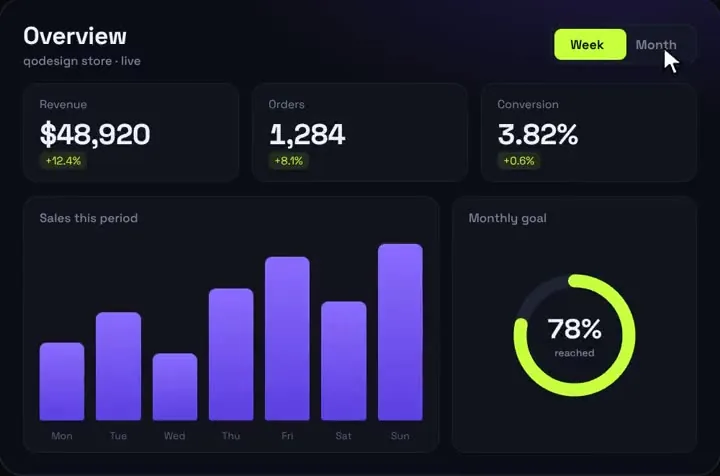
That is the [Analytics Dashboard V1](/components/analytics-dashboard-v1) on qodesign. The steps below cover the same ideas in a form you can apply to your own v0 output.
## 1. Stagger the cards in
Add one keyframe to `globals.css`:
```css
@theme {
--animate-card-in: card-in 480ms cubic-bezier(0.2, 0.8, 0.2, 1) both;
@keyframes card-in {
from { opacity: 0; transform: translateY(10px) scale(0.98); }
to { opacity: 1; transform: none; }
}
}
.stagger > * {
animation-delay: calc(var(--i, 0) * 50ms);
}
```
Then give the grid the class and each card its index:
```tsx
{kpis.map((kpi, i) => (
{/* card content */}
))}
```
Do the same for the chart row and the table with higher indexes, so the page fills in from top to bottom. Keep the gap between items around 50ms. With twelve elements, that is 600ms for the whole page, which feels quick. A 150ms gap makes people wait two seconds to read a number.
## 2. Count the KPI numbers up
A hook that eases from 0 to the target with `requestAnimationFrame`:
```tsx
"use client";
import { useEffect, useState } from "react";
export function useCountUp(target: number, duration = 900) {
const [value, setValue] = useState(target);
useEffect(() => {
const reduce = window.matchMedia("(prefers-reduced-motion: reduce)").matches;
if (reduce) {
setValue(target);
return;
}
let frame = 0;
const start = performance.now();
const tick = (now: number) => {
const t = Math.min((now - start) / duration, 1);
const eased = 1 - Math.pow(1 - t, 3); // ease-out cubic
setValue(target * eased);
if (t < 1) frame = requestAnimationFrame(tick);
};
frame = requestAnimationFrame(tick);
return () => cancelAnimationFrame(frame);
}, [target, duration]);
return value;
}
const fmt = new Intl.NumberFormat("en-US", { maximumFractionDigits: 0 });
export function KpiValue({ value }: { value: number }) {
const shown = useCountUp(value);
return {fmt.format(shown)};
}
```
Three things make this hold up:
- `useState(target)` means the server renders the real number. The HTML is correct for search engines, for people with JavaScript off and for the first paint. After hydration the number drops to zero and climbs back, so for cards below the fold, start the count when the card scrolls into view.
- `tabular-nums` gives every digit the same width. Without it, the card's text shakes sideways while the number climbs.
- The animation reruns when `target` changes, so a refetch counts from zero again. If you'd rather count from the old value to the new one, keep the previous value in a ref and ease between them.
Pass a currency formatter for revenue cards. The [animated number counter post](/blog/animated-number-counter-react-no-library) has an odometer version too.
## 3. Let the charts draw in
v0 dashboards use shadcn charts, which are Recharts underneath. Recharts already animates; the default just fires the moment the chart mounts, at the same time as everything else. Delay it so the line draws after its card has landed:
```tsx
```
Read `reducedMotion` once with `matchMedia` in a client component and pass it down. Set `isAnimationActive={false}` on charts that refetch every few seconds, otherwise the whole line redraws on every update and the chart never settles. If you've replaced Recharts with your own SVG, the [animated SVG line chart post](/blog/animated-svg-line-chart-react-no-library) covers the draw-on effect by hand.
## 4. Flash a value when live data changes
For dashboards that poll or stream, the useful animation is a short highlight on the number that just changed. Key a span on the value so React remounts it, and the keyframe plays once per change:
```css
@theme {
--animate-flash: flash 900ms ease-out;
@keyframes flash {
from { background-color: rgb(52 211 153 / 0.25); }
to { background-color: transparent; }
}
}
```
```tsx
{fmt.format(row.value)}
```
Use green for up and red for down if direction matters, and keep the flash under a second. The goal is to catch the eye, then get out of the way.
## What not to animate
- Sidebar and header. They are chrome; they should be there on frame one.
- Every table row. Stagger the table as one block. Twenty rows sliding in one by one is slow and makes scrolling feel heavy.
- Anything on client-side navigation between dashboard pages. Play the entrance on the first load only. A small `sessionStorage` flag or a check in the layout is enough.
- Values while the person is reading them. Count up once; after that, update in place with the flash.
## Prompting v0 for this
If you'd rather have v0 write it, be specific. "Add animations" gets you random fades. This works better:
"Stagger the KPI cards in with a 50ms delay each using a CSS keyframe. Count KPI numbers up from 0 over 900ms with requestAnimationFrame and tabular-nums, rendering the real value on the server. Set animationBegin 300 on the Recharts areas. Respect prefers-reduced-motion."
## Starting from a dashboard that already moves
If you'd like to skip the wiring, the [Orbit Dashboard](/components/orbit-dashboard) is a free, MIT-licensed ops dashboard with count-up KPIs, a live service map and a latency chart. It is in the [free kit](/free). The [Analytics Dashboard V1](/components/analytics-dashboard-v1) goes further with live counting on every card. Both ship with a PROMPT.md so Cursor or v0 can drop them into your app. For more on making generated apps feel less generic, see [how to make a v0 app not look AI generated](/blog/make-v0-app-not-look-ai-generated).
## FAQ
### How do I add animations to a v0 dashboard?
Add a CSS keyframe for the card entrance and stagger it with an index-based animation-delay, count KPI numbers up with a requestAnimationFrame hook, and set animationBegin and animationDuration on the Recharts charts that v0 generates. None of this needs a new package.
### How do I make numbers count up in a React dashboard?
Use a small hook that eases from 0 to the target value with requestAnimationFrame, format the result with Intl.NumberFormat and render it with tabular-nums so the width stays fixed. Start the state at the real value so the server HTML is correct.
### How do I control chart animation in shadcn charts?
shadcn charts are built on Recharts, so you can set isAnimationActive, animationBegin, animationDuration and animationEasing on each Area, Line or Bar. Turn animation off for charts that refresh often so they don't redraw on every update.
### Should dashboard animations play on every page change?
No. Play the entrance on the first load only and update values in place after that. Repeating the entrance on every navigation makes the dashboard feel slow.